 By
By This is the story of an Oracle APEX Raspberry Pi integration that started as a simple request, turn a card tap into an attendance record, and ended up touching Linux networking, digest authentication, SQLite, systemd, and a production bug that only revealed itself after the hardware was already back in the office.
Scope note: this is the account of that device and deployment, not a downloadable relay or a universal Hikvision API guide. The package, complete request bodies, credentials and endpoint authorization configuration are not published here. The implementation cautions added below are review recommendations, not claims that the original production system was rerun or changed.
The Ask That Sounded Simple
We had a Hikvision biometric attendance terminal sitting in the office, and every attendance report was still coming from manually exported logs. Someone had to log into Hikvision’s software, pull a file, and reconcile it against Planora by hand. It worked. It also meant attendance data was always a day behind reality, and nobody actually trusted it.
The goal I set for myself was blunt: an employee taps a card on the terminal, hears the usual confirmation beep, and the event shows up inside Planora without a single person touching an export button. No middle step. No manual import. Just a card tap that becomes a database row.
That sentence hides three separate problems. Get the event out of Hikvision. Get it to Oracle and ORDS securely. Figure out which Planora employee the card actually belongs to. None of those three turned out to be as simple as they sounded, and that gap between “simple to describe” and “simple to build” is exactly what turned a weekend idea into a real Oracle APEX Raspberry Pi integration project worth writing up.
Cracking Open Hikvision’s API
The terminal supported Hikvision’s ISAPI interface, authenticated over HTTP Digest. A basic device information request confirmed ISAPI was live and queryable, which was the easy part. The attendance-relevant endpoint turned out to be:
/ISAPI/AccessControl/AcsEventHere’s the first surprise: there wasn’t a clean, dedicated “attendance” endpoint that behaved the way the documentation implied. The dedicated attendance API either wasn’t supported on this device and firmware combination, or didn’t return what I expected. So the architecture pivoted. Instead of asking Hikvision “give me attendance,” I asked it “give me access-control events” and built the attendance logic myself on top of that raw stream.
Each event carried fields like major, minor, serialNo, employeeNoString, cardNo, and time. Card authentication showed up as major = 5, minor = 1. Fingerprint authentication produced a different minor code. Not every access-control event was an attendance event, some were system noise, so the relay needed an explicit allow-list of the event types we actually trusted as real attendance. For our production card workflow, that meant filtering specifically for major = 5, minor = 1 and nothing else. Treat that as the observed device/firmware mapping: validate event codes, request bodies and pagination against your own device documentation and test events before adopting the same filter.
Hikvision returns event history in pages, and it would have been very tempting to just read the last page and assume events arrive in a clean, globally sorted order. Testing proved that assumption wrong. Pages weren’t reliably ordered by serial number or timestamp in a way that let me safely skip to “just the newest stuff.” Missing an attendance event wasn’t an acceptable failure mode, so the first production implementation scanned the full relevant result set on every polling cycle and locally filtered out anything already processed. Correctness first, optimization later.
Why Hikvision Couldn’t Just Talk to ORDS Directly
Before building anything, I checked whether the terminal could just push HTTP notifications straight to our Oracle ORDS endpoint. That would have eliminated the need for a middleman entirely, and I genuinely wanted that to work.
It didn’t. The device’s notification configuration supported HTTP-style targets, but our production ORDS endpoint was exposed over HTTPS with a proper hostname, and the terminal’s notification capabilities didn’t give me the HTTPS-plus-hostname combination needed to reach it. If you’ve ever had to reason about calling an HTTPS endpoint securely from constrained hardware, the concerns are the same ones I cover in Call External HTTPS APIs with Oracle Wallet, just from the opposite direction this time: a device that couldn’t speak HTTPS at all, rather than an Oracle session that needed to.
So a direct path like Hikvision → ORDS was off the table. Something had to sit in the middle, speak the device’s language on one side, and speak proper HTTPS to Oracle on the other, which is the exact moment this stopped being a simple API project and became a real Oracle APEX Raspberry Pi integration.
Enter a Raspberry Pi That Was Older Than Some of My Junior Colleagues
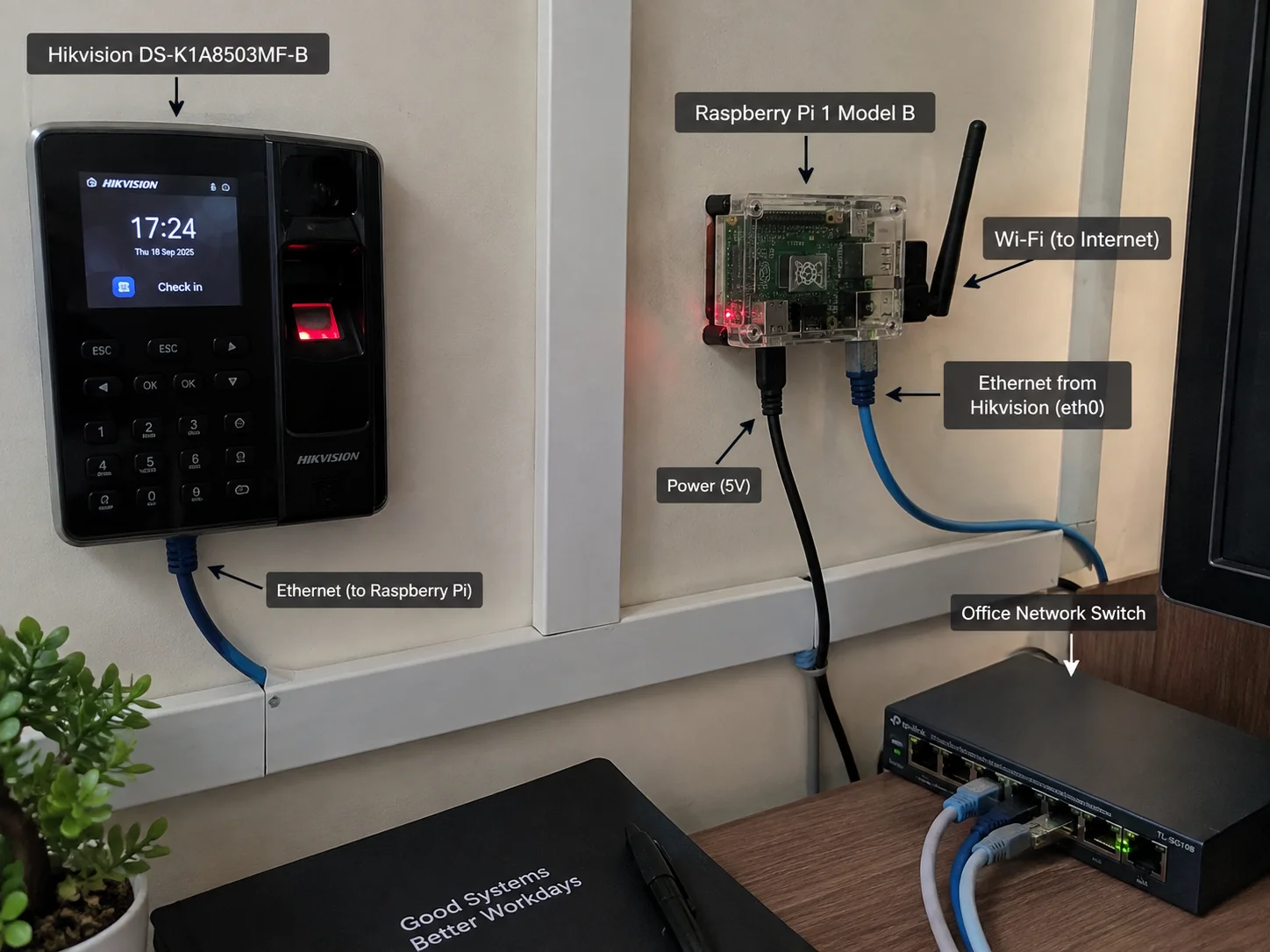
For the relay, I reached for an old Raspberry Pi 1 Model B that had been sitting unused. There’s a specific kind of satisfaction in taking hardware that would otherwise be landfill and turning it into a production appliance that a real business now depends on every single day.
The Pi got two jobs, one per network interface:
- Ethernet: a private, direct connection to the Hikvision terminal
- Wi-Fi: the normal office network, providing the path out to the internet and ORDS
This also solved a problem I hadn’t fully anticipated: the office Wi-Fi/LAN and the Hikvision terminal weren’t reliably able to talk to each other because of existing network isolation. Rather than fighting that configuration, I built a dedicated private Ethernet segment between the Pi and the device and left the rest of the network alone.
|
Private Ethernet
|
Raspberry Pi
|
Wi-Fi / Internet
|
ORDS
|
Oracle Database
|
Oracle APEX / Planora
Raspberry Pi OS Lite ran the show. The Ethernet interface got a persistent static IP and, critically, was explicitly marked so it would never become the default gateway. If Ethernet had won that race, the Pi would have lost its route to the internet the moment it rebooted.
eth0  → Hikvision only, static IP, not the default route
wlan0 → internet / ORDS, default route
I rebooted the Pi repeatedly during testing specifically to break this. It held.
Getting the Clock Right
Attendance systems fall apart fast when the clock is wrong, so I configured the Raspberry Pi as an NTP source using Chrony, then pointed the Hikvision terminal at the Pi for its own time sync. Inside Oracle, every attendance calculation explicitly uses Asia/Karachi rather than trusting whatever timezone the database session happens to be running in, because the session timezone and the physical office timezone are not guaranteed to be the same thing, and that’s exactly the kind of quiet mismatch that produces attendance records that are technically correct and practically useless.
Building the Relay: A Python vs curl Lesson
The relay itself is Python. The first real lesson showed up almost immediately: Python’s normal Digest authentication handling was unreliable against this specific device in this specific environment, and it caused repeated authentication failures. Enough failed attempts actually locked Hikvision’s authentication temporarily, to the point where I had to restart the device to recover.
The reliable path turned out to be shelling out to
curl --digest for every Hikvision request, while keeping Python’s requests library for the ORDS side over HTTPS. It’s not an elegant architecture on paper, one language, two different HTTP clients for two different legs of the same relay, but it was the difference between a relay that worked and one that locked itself out of the device it was supposed to be talking to.
# Hikvision leg
curl --digest -u "user:password" \
  "http://192.168.x.x/ISAPI/AccessControl/AcsEvent?format=json" ...

# ORDS leg
import requests
response = requests.post(
    ords_url, json=payload, headers=headers,
    verify=True, timeout=(5, 30), allow_redirects=False
)
response.raise_for_status()
if response.status_code != 200:
    raise RuntimeError("Unexpected ingestion status; leave event pending")
# Validate the documented success body before marking delivered.
The snippets above only illustrate the two clients; the curl ellipsis omits the device-specific search body and options. Do not put real passwords in shell history, checked-in source or logs. In a deployed relay, use a restricted credential/configuration mechanism, bounded subprocess/network timeouts and an authenticated, least-privilege ORDS ingestion endpoint. HTTPS certificate verification authenticates the server and encrypts transport; it does not authorize the relay to insert attendance events. HTTP Digest does not encrypt the device event payload, so keep that leg on a protected segment.
Requests has no timeout by default. The revised illustration sets separate connect/read timeouts and does not follow redirects; the read timeout is an inactivity limit, not a total request deadline. Exceptions and unexpected success bodies must leave the outbox record pending for controlled retry. No endpoint or real credentials were exercised for this review.
Implementation references: Requests timeouts, Requests certificate verification, systemd network-online guidance.
The SQLite Outbox: Because “Read and POST” Isn’t a Strategy
A naive relay reads an event and immediately POSTs it. That design falls over the first time ORDS is briefly unreachable, the Pi reboots mid-cycle, or the same event gets seen twice. This relay needed to survive all of that, so a local SQLite database sits between the Hikvision poll and the ORDS delivery:
|
Local SQLite outbox
|
POST to ORDS
|
Mark delivered
SQLite tracks the last processed event serial and holds an outbox of anything still waiting on delivery. If ORDS is down for five minutes, the relay just keeps retrying instead of quietly losing attendance data. This same instinct, buffer and retry instead of fire-and-forget, is the same lesson I hit from the opposite side of an integration in the ORDS connection pool exhaustion incident: a system that assumes the network will always cooperate is a system that’s already broken, it just hasn’t found that out yet.
Not Replaying Three Years of Test Punches
The Hikvision terminal already had historical events sitting in it from testing, and the last thing I wanted was for production to suddenly ingest all of that as real attendance. Before flipping the relay into production mode, I scanned the device, recorded the current highest event serial as a baseline, and initialized the production relay from that point forward. Old events got ignored by design, not by luck. The production SQLite database was also kept completely separate from the development one, so no test-era state could leak into what was now a live business system.
The Oracle Side: Where the Real Intelligence Lives
The physical device only captures authentication events. Deciding what those events mean is Oracle’s job, on purpose.
The core table is ATTENDANCE_LOG:
ATT_USER_FK
ATT_EVENT_SERIAL   -- unique, this is our duplicate-protection layer
ATT_CARD_NO
ATT_PUNCH_TIME
ATT_MAJOR_CODE
ATT_MINOR_CODE
ATT_EVENT_TYPE      -- CHECK_IN / CHECK_OUT / UNKNOWN
ATT_RAW_PAYLOAD
ATT_REMARK
Making the Hikvision event serial unique at the database level gives duplicate protection a second line of defense, independent of whatever the Raspberry Pi thinks it already delivered. Belt and suspenders.
Design boundary: serial uniqueness here describes the original single-device deployment. Before adding devices, replacing a terminal or recovering after a reset, verify the serial’s reuse/reset behavior and include stable device identity and, if needed, an ingestion epoch in the idempotency key. A maximum-serial checkpoint alone cannot prove completeness when pages arrive unordered or late. A robust adaptation must define a complete bounded scan/overlap strategy, deduplicate every event durably, and advance its checkpoint atomically with inserting outbox rows only after the relevant scan completes. The full relay code needed to audit those invariants is not included in this case study.
Keeping the Pi Dumb on Purpose
I deliberately did not store any employee mapping on the Raspberry Pi. If I had, onboarding a new employee would have meant SSHing into a Pi and editing a config file, which is exactly the kind of fragile, tribal-knowledge process that breaks the first time the person who built it goes on vacation.
Instead, mapping lives in Oracle, in ATTENDANCE_DEVICE_MAP:
ATDM_USER_FK
ATDM_DEVICE_TYPE
ATDM_EMPLOYEE_NO
ATDM_CARD_NO
ATDM_ACTIVE_YN
ATDM_VALID_FROM
ATDM_VALID_TO
ATDM_DELETED_YN
The table supports both employee number and card number, with uniqueness rules that prevent the same active card or employee identity from being mapped twice. That one design choice, keep the Pi generic and push identity logic into the application, means the Raspberry Pi doesn’t need to know who Hassan, Sajjad, or anyone else is. It just relays events. Oracle decides what they mean.
For convenience, we adopted a simple convention: Planora USER_ID = Hikvision Employee No. So Planora user 4 is Hikvision employee number 4, with the physical card number stored separately. It’s not required by the data model, but it turns troubleshooting from a lookup exercise into something you can eyeball.
Deciding CHECK_IN vs CHECK_OUT Without Trusting the Device
I didn’t want to trust Hikvision’s own attendance-mode metadata, since it wasn’t always consistent across the event types we saw. Planora decides for itself, per employee, per Pakistan calendar day:
1st punch of the day → CHECK_IN
2nd punch of the day → CHECK_OUT
3rd punch of the day → CHECK_IN
4th punch of the day → CHECK_OUT
...
The processing package looks at the employee’s most recent valid event for that calendar day and flips state. Last event was CHECK_IN? This one’s CHECK_OUT. That was our simple day-based rule; it is not a universally correct attendance algorithm.
Alternation assumes the relevant punches are complete and ordered. Duplicate taps, missed punches, delayed delivery, simultaneous requests and overnight shifts can change the meaning. An adaptation should retain immutable raw events, use event-time ordering with a defined tie-breaker, serialize or reconcile each employee’s classification, and provide reviewed corrections. Recompute affected later classifications when late events arrive. Do not use the unreviewed alternating result by itself for payroll or disciplinary decisions.
The processing package, PLOR_ATTENDANCE_PKG, ties it together:
|
Read serial / card / employee / time
|
Check duplicate serial
|
Look up ATTENDANCE_DEVICE_MAP
|
Resolve Planora USER_ID
|
Determine CHECK_IN / CHECK_OUT
|
Insert ATTENDANCE_LOG
If no mapping exists for a card, the event still gets recorded, just flagged as unmapped, instead of silently vanishing. An unmatched card should be visible and fixable, not invisible.
The ORDS Endpoint: A Clean API Boundary
A dedicated ORDS REST endpoint accepts the Hikvision payload from the Raspberry Pi and hands the request body to PLOR_ATTENDANCE_PKG.PR_PROCESS_HIKVISION_EVENT. In this deployment, a successful response is HTTP 200, and only then does the relay mark that event as delivered.
For a reusable API contract, success must mean the event is durably committed or an identical event is already present, not merely that JSON parsed. A response lost after commit must be safe to retry using the same idempotency key. Validate payload fields and size, authorize the relay server-side, distinguish retryable failures from rejected records and alert on a growing outbox. This article does not publish enough endpoint/package source to verify those controls. The layer responsibilities remain:
| Layer | Responsibility |
|---|---|
| Raspberry Pi | Transport and retry |
| ORDS | API boundary |
| Oracle | Business rules, mapping, attendance logic |
The First Real Tap
Once the mapping, the ORDS endpoint, the package, and the relay were all in place, we did a real physical test. Someone tapped their card. The relay logged it:
Queued attendance serial=153
Delivered serial=153 to ORDS HTTP=200
Inside Oracle, it landed as CHECK_IN. A second tap a few hours later produced CHECK_OUT. That was the moment the whole pipeline proved itself end to end:
↓
Hikvision
↓
Raspberry Pi
↓
ORDS
↓
Oracle
↓
Planora
Turning a Script Into a Service
Running the relay by hand in a terminal window is fine for a demo and unacceptable for production. It became a proper systemd service, planora-attendance.service, running under a dedicated planora Linux user, configured to start on boot, restart automatically on crash, and wait for the network before trying to connect anywhere.
[Unit]
Description=Planora Attendance Relay
After=network-online.target
Wants=network-online.target

[Service]
User=planora
ExecStart=/usr/bin/python3 /opt/planora-attendance/relay.py
Restart=always
RestartSec=5

[Install]
WantedBy=multi-user.target
A full reboot test confirmed it: no SSH, no manual script launch, the relay came back on its own and picked up exactly where its SQLite checkpoint left off. network-online.target orders startup against the configured network-wait service; it does not guarantee that the device, internet or ORDS stays reachable. The relay still needs timeouts, retry backoff, durable local state and operational monitoring. That’s the point where a Raspberry Pi stops being a dev box on someone’s desk and starts being an appliance. If you want the full picture of how systemd handles restarts, dependency ordering, and boot-time waits, the official systemd.service documentation is worth keeping open while you write your own unit file.
The Bug That Only Showed Up in Production
This is my favorite part of the whole project, because it’s the part that actually teaches something.
After the Pi went back into the office and a newly enrolled employee tapped their card, the terminal said its usual “Thank you.” Planora showed nothing. The employee mapping looked right. The Oracle package looked right. The systemd service was clearly running.
The Raspberry Pi’s logs had the real answer:
attempt to write a readonly databaseThe production SQLite file had somehow been created with
root:root ownership, while the systemd service intentionally ran as the unprivileged planora user. The relay could read the database fine. It just couldn’t write its own checkpoint or outbox to it. Classic Unix permissions trap, the kind of bug that looks like “nothing is happening” from every angle except the one log file that actually explains it.
The fix was a one-line chown back to the planora user and a service restart. What happened next is the part worth remembering: the employee didn’t need to tap their card again. The original event was still sitting in Hikvision’s own event history. On its next poll, the relay found it, queued it, and delivered it to ORDS successfully, checkpoint intact. That’s the entire payoff of building a retry-safe relay with a durable outbox instead of a fire-and-forget script: a permissions bug that would have silently eaten an attendance record in a naive design instead just delayed it by a few minutes.
Building the APEX Side: Mapping, Dashboard, and Self-Service
With the backend proven stable, the Oracle APEX administration layer came next. Two pages handle employee-to-device mapping:
- Page 4010 — Employee Mapping Report
- Page 4011 — Employee Mapping Details, a drawer-style form for create/edit
Following Planora’s existing package architecture, page 4011 doesn’t scatter raw DML across the page. It routes through a page-specific package, PLOR_P4011_PKG, with GET and SET procedures that call into the underlying API package. The page supports NEW, EDIT, and a logical DELETE, since physically deleting a mapping would also erase the historical link that makes old attendance records make sense. A small Dynamic Action, similar in spirit to the ones covered in Oracle APEX Dynamic Actions Made Easy with 5 Best Examples, automatically copies the selected employee’s Planora USER_ID into the Hikvision employee-number field, so an admin mainly just picks a person and types a card number.
Card assignments change, people get replacement cards, so the mapping table carries its own history. Old mappings get disabled and expired rather than deleted, new ones get created, and every historical attendance row keeps pointing at the right employee through ATT_USER_FK regardless of how many cards that person has cycled through.
The Attendance Dashboard
Page 4020 is the attendance dashboard, and it deliberately reuses Planora’s existing timeframe-filtering system (Day, Week, Month, Quarter, Year, custom ranges) instead of inventing a second one. Built with APEX Dynamic Content regions returning CLOBs for full UI control, it opens with KPI cards: Employees Present, Check-ins, Check-outs, Total Punches, all computed against the selected range and normalized to Asia/Karachi.
Below that sits an employee-level summary, joined against Planora’s USERS table so it shows real names and initials instead of raw IDs, each row showing First In, Last Out, Punch Count, and a clean IN/OUT status badge. A third region shows recent activity in plain language:
Hassan Raza      Checked in    10:41 AM
Sajjad Hanifa    Checked out   05:32 PM
That single region does more for admin trust in the system than any KPI card does, it makes the dashboard feel alive rather than statistical.
My Attendance, for Everyone Else
Not everyone needs the full admin dashboard, but every employee reasonably wants to see their own attendance. A small “My Attendance” section on the Planora home page opens an APEX Inline Dialog showing the logged-in employee’s own summary and recent punches, resolved through APP_USER against USERS.USER_ID. Admins keep the full view. Everyone else gets exactly the slice that’s theirs. In an adaptation, enforce that ownership and administrator authorization in the server-side query/package and endpoint, not only by hiding an APEX dialog or button; do not accept a browser-supplied employee ID as proof of ownership.
The Final Architecture
↓
Hikvision DS-K1A8503MF-B
↓
ISAPI Access-Control Events
↓
Private Ethernet
↓
Raspberry Pi Attendance Relay
↓
SQLite checkpoint / outbox
↓
HTTPS
↓
Oracle ORDS
↓
PLOR_ATTENDANCE_PKG
↓
ATTENDANCE_DEVICE_MAP
↓
ATTENDANCE_LOG
↓
Oracle APEX / Planora
↓
Mapping UI + Dashboard + My Attendance
What This Oracle APEX Raspberry Pi Integration Actually Taught Me
None of this was really about connecting to an API. It was about a long chain of small, real-world integration problems that only reveal themselves once you’re past the happy path:
- The documented API didn’t match reality, so the architecture had to bend around what the device actually supported
- Pagination that looks sorted isn’t guaranteed to be sorted, and “just read the last page” would have quietly dropped events
- A device’s HTTP capabilities can flatly block an integration that looks trivial on a whiteboard
- Office network isolation is sometimes easier to route around than to fight
- Old, “useless” hardware can become the most important box in the building
- Digest auth libraries aren’t all built equal, sometimes
curljust wins - A durable outbox turns a permissions bug from data loss into a five-minute delay
- Business logic like employee identity belongs in the application layer, never on the edge device
- Explicit business rules still need ordering, reconciliation and reviewed exceptions
- A one-line Unix ownership mistake can look exactly like a much scarier bug until you read the actual log
The strongest design decision in the whole project was keeping responsibilities strictly separate. Hikvision only captures a physical authentication event. The Raspberry Pi only transports and retries it. Oracle decides who the employee is and what the event means. Oracle APEX handles administration, reporting, and the experience on top of all of it. That separation is why onboarding a new employee today needs zero SSH access and zero Python changes, just a Planora user, a Hikvision enrollment, a mapping row, and a card tap.
By the end, a physical card tap reliably became a structured Oracle attendance record with no manual export, no manual entry, and a Raspberry Pi that boots, reconnects, and resumes from its last checkpoint without anyone touching it. For a project that started as “can we skip the manual export,” this Oracle APEX Raspberry Pi integration ended up threading together hardware, Linux, networking, Python, REST, ORDS, PL/SQL, and Oracle APEX into one production system, and that’s exactly the kind of full-stack, physical-to-database integration story I think the Oracle community doesn’t get to read often enough.
Have you connected physical hardware to an Oracle APEX app before, a scanner, a sensor, a badge reader, anything with a wire? I’d like to hear how you solved the transport problem. Drop it in the comments.