 By
By You draw a signature on a canvas, Base64 it into a page item, write it to a BLOB, and call it Oracle APEX signature verification. It works in the demo. Here’s what happens the first time a real user, a slow connection, and an impatient click all show up on the same page at once.
I built the original BioSig Pro build the way most of us would: canvas, Base64, page item, PL/SQL insert. It ran fine in every test I threw at it. Then I put it in front of real users on a public demo, and three separate bugs showed up that no unit test had caught, one of which meant a “verified” signature could quietly be incomplete. This is the part nobody’s tutorial covers: what real Oracle APEX signature verification takes, and why most implementations only look like they have it.
Why Base64 in a Page Item Breaks Under Real Load
The canvas-to-Base64 approach works because it’s simple, not because it’s correct. Base64 inflates the payload by roughly a third before it ever leaves the browser. That inflated string then has to pass through APEX’s page-item and session-state mechanism, a system built for form data, not binary blobs.
The session state size ceiling nobody checks until it’s hit
Text and rich-text items in Oracle APEX carry a hard limit around 32,767 bytes per item, and session state itself was never designed to be a transport layer for large binary payloads. A low-resolution signature squeaks by. A signature captured at a resolution worth keeping for a business record does not.
What changes with mobile and stylus input
Stylus and touch input generate far more points per stroke than a mouse. Add autosave firing in the background while a user might tap Submit at any second, and you’ve built a component that looks finished in a screenshot and falls over the moment someone signs their name quickly on a phone.
The fix: store a UUID, not the payload
The page item in BioSig Pro holds a UUID. Thirty-six characters, nothing else. No Base64, no PNG, no JSON payload sitting in session state waiting to overflow something. The actual signature moves through the plugin’s own AJAX channel and lands directly in Oracle, independent of the page submission entirely. The page item goes back to doing what APEX page items are actually good at: holding a small, well-behaved reference.
What Are the Most Common Oracle APEX Signature Capture Mistakes?
Three mistakes show up in almost every signature implementation I’ve reviewed, including my own early version, and each one quietly breaks Oracle APEX signature verification even when the screen says everything worked.
Treating the raster image as the source of truth
A PNG is fine for display. It’s a poor record of what actually happened, because it throws away stroke order, pressure, and timing the moment you flatten it to pixels. BioSig Pro stores a versioned stroke and vector JSON structure as the canonical record in a CLOB, then derives the PNG separately for display. The structured version is what everything downstream actually relies on.
Trusting the browser’s own hash
If the browser computes a checksum and your server just stores it, you haven’t done signature verification, you’ve recorded a claim. Real Oracle APEX signature verification means the server independently recomputes the hash and compares it against what the client reported, and only proceeds when both match.
Ignoring the page’s submit lifecycle entirely
This is the one that will bite you last, and hardest. A component that doesn’t coordinate with APEX’s own submit sequence can let a page submit before the signature verification behind it has actually finished. More on that below, because it’s the bug that changed how I built the rest of the plugin.
How Does Oracle APEX Signature Verification Actually Work Without DBMS_CRYPTO?
Oracle APEX signature verification without DBMS_CRYPTO means implementing the hash algorithm in pure PL/SQL. That sounds excessive until you hit an environment where DBMS_CRYPTO isn’t usable, which happens more often in real client environments than tutorials ever admit.
Why DBMS_CRYPTO isn’t always available
Locked-down production schemas, restricted grants, managed database services with limited package access, there are plenty of real reasons a target environment won’t give you working DBMS_CRYPTO. Other developers have hit this same wall often enough that independent PL/SQL reimplementations of DBMS_CRYPTO functions already exist on GitHub. It’s a known gap, not an edge case.
Writing SHA-256 in pure PL/SQL
I wrote a pure PL/SQL SHA-256 implementation based on FIPS 180-4, with no DBMS_CRYPTO dependency at all. Two details mattered more than the algorithm itself. First, LOB streaming, instead of assuming everything fits inside a VARCHAR2(32767) buffer. Second, install-time self-tests against the standard published test vectors, so a broken install fails loudly instead of silently producing wrong hashes that look plausible.
-- Simplified confirmation flow
l_client_hash := p_reported_hash;
l_server_hash := biosig_sha256.hash_blob( l_signature_blob );

IF l_client_hash = l_server_hash THEN
    UPDATE biosig_signatures
    SET status = 'CONFIRMED', hash_status = 'MATCH', verified_at = SYSTIMESTAMP
    WHERE signature_id = p_signature_id;
ELSE
    UPDATE biosig_signatures
    SET status = 'REJECTED', hash_status = 'MISMATCH'
    WHERE signature_id = p_signature_id;
END IF;
What the benchmarks actually showed
Performance scaled roughly linearly with payload size.
| Payload size | Hash time |
|---|---|
| 1 KB | ~10 milliseconds |
| 2 MB | ~22.5 seconds |
Real signatures sit nowhere near that upper range. The design deliberately keeps that cost out of continuous autosave and reserves it for the one moment that actually needs it: final confirmation.
A matched hash proves the stored data wasn’t altered after capture. It doesn’t, on its own, make something a legally compliant electronic signature the way a regulated e-signature and e-records framework would define one. Cryptographic integrity and legal sufficiency are two different problems. Don’t let a passing hash check imply more than it does.
The Race Condition a 400ms Debounce Created
This is the bug that only showed up after I put a build I thought had working signature verification in front of real users on a public demo.
Finish a stroke, click Confirm, submit wins the race
Autosave runs on a roughly 400 millisecond debounce. Draw a complex signature, finish the last stroke, and click Confirm immediately, before that debounce fires and completes its round trip, and the page can submit while the most recently persisted version is still one step behind what’s actually on screen.
Why CONFIRMED and MATCH can both be true on an incomplete signature
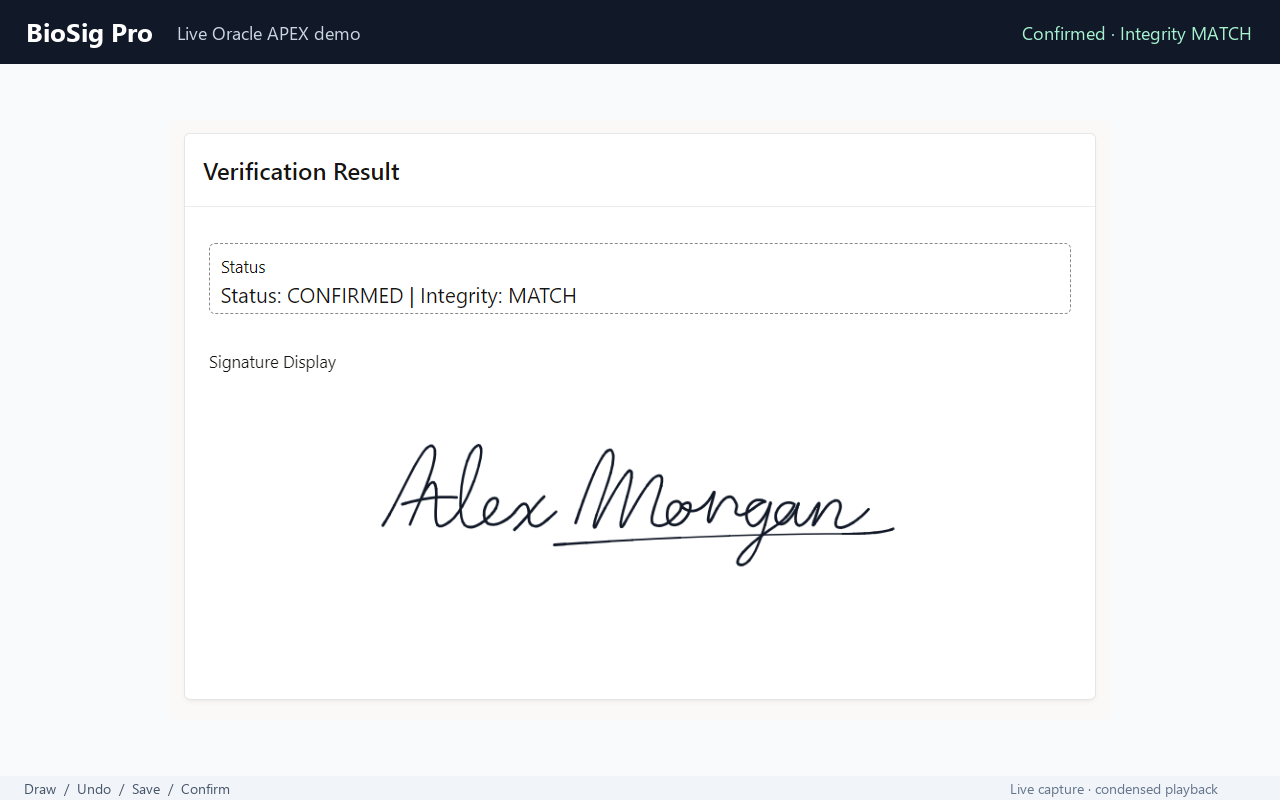
The confirmed record still reported CONFIRMED with a HASH_STATUS of MATCH, because the older, already-uploaded version really was internally valid. Nothing lied. Signature verification checked a real state, just not the most current one. That distinction matters enormously once you’re deciding how to fix it, because it means the hash logic was never broken. The timing was.
Reproducing it on purpose
I forced it deliberately: loops, direction changes, a fast final stroke, an immediate click on Confirm. The stored signature was visibly incomplete every time. Wait three seconds before confirming the identical drawing, and it saved correctly every single time. That’s not a data corruption bug. That’s a timing bug wearing a data corruption bug’s clothes, and mistaking one for the other leads you toward the wrong fix.
Why I Rejected My First Fix
My first instinct was to hook the page submit event and finish the pending save work right there. It worked, in the sense that it visibly closed the race in testing.
apexbeforepagesubmit looked like the right hook, until I read Oracle’s own warning against it
The Oracle APEX JavaScript API documentation explicitly warns against long-running or asynchronous AJAX work inside apexbeforepagesubmit. It’s not an obscure footnote either, other developers have documented the same trap independently in write-ups on APEX and asynchronous Ajax. I threw the fix away and started over, not because it failed, but because it broke a documented contract I had no business ignoring just because the symptom went quiet.
Wrapping apex.page.submit() instead of fighting the event lifecycle
The redesign wraps apex.page.submit() itself, ahead of APEX’s own submit sequence. Before the real submit call fires, BioSig checks every signature item on the page: if an upload is in flight, wait for it. If the state is dirty, flush it. Only once every signature is confirmed current does the wrapper call the real apex.page.submit() and hand control back to APEX’s normal lifecycle.
// Simplified pattern
var origSubmit = apex.page.submit;

apex.page.submit = function( pOptions ) {
    biosig.flushAllPending().then( function() {
        origSubmit.call( apex.page, pOptions );
    });
};
The corrected build went back into the live demo, and the previously reproducible race stopped reproducing under the same manual test conditions that had exposed it. That fix is implemented, tested, and manually validated on its own branch, a strong candidate for a future patch release. I’d rather say that plainly than claim a release date I haven’t shipped yet.
Building for APEX 23.2, Verifying on APEX 26.1
Supporting Oracle APEX 23.2 and up turned into real engineering work of its own, separate from getting signature verification right in the first place.
Positional vs. named custom plugin attributes
Newer APEX releases expose custom plugin attributes with descriptive internal IDs. APEX 23.2 treats them as effectively positional instead. I generated the canonical plugin export, thirteen custom attributes covering everything from canvas dimensions to autosave behavior, tested it on 23.2 as the compatibility baseline, then imported the identical export into 26.1 and tested it again.
Why “supported” should mean “tested,” not “probably fine”
Both passed. The stated support range, APEX 23.2 and later, reflects what was actually verified on both ends, not what should probably work based on how the framework is supposed to behave. That’s a small thing to say in a changelog and an easy thing to fake. I’d rather test it twice than write a support claim I can’t back up.
BioSig Pro and the Submit-Lifecycle Patch Candidate
BioSig Pro provides UUID-based page items, independent server-side SHA-256 verification, and Oracle-native signature storage. The apex.page.submit() lifecycle change described above is a patch candidate; check the release notes for the package you receive before assuming it is included. BioSig Pro is available as a native Oracle APEX item type plugin.
- Server-side hash verification on every signature, not just a browser-reported checksum you have to trust
- For the submit-lifecycle patch candidate described above, verify inclusion in your package release notes and repeat the immediate-confirm test
- Canonical stroke and vector data stored separately from the display image, not just a flattened PNG
- Tested and supported on Oracle APEX 23.2 through 26.1
- A one-time license with no online activation, so it works inside locked-down private networks with no outbound internet
If you’ve read this far, you already understand why a canvas-to-Base64 signature pad isn’t enough for anything you’d call production. That’s the exact gap BioSig Pro closes. During the 14 October 2026 check, the linked interactive demo returned a technical-error page. You can view the animated walkthrough and read the installation documentation on the BioSig Pro product page. The walkthrough is a recording, not an interactive test.
What This Means for Your Own Oracle APEX Signature Component
None of this started as architecture astronautics. It started because a signature pad with no real signature verification behind it looks finished in a demo and quietly fails in production. If you’re building or reviewing signature capture in your own APEX app, three things are worth checking today: get any large binary payload out of session state and off the page item entirely, verify integrity server-side instead of trusting whatever the browser reports, and coordinate explicitly with APEX’s submit lifecycle instead of assuming autosave will always win the race.
I’ve made mistakes like these before in other parts of APEX development too, most of them for the same reason: something worked in testing, so I assumed it was done. I wrote about a few of those in 5 PL/SQL Mistakes I Made as a Junior Oracle Developer, and the pattern repeats more than I’d like to admit. If you’re debugging autosave failures that get misreported as network errors, a centralized error logging framework will save you the hours I spent chasing the wrong log line.
The interactive demo could not be verified during the 14 October 2026 check. The animated BioSig Pro walkthrough shows the capture interface; it does not let you reproduce the race-condition test described above. If you reproduce a related issue in your own application, share the steps in the comments.