
 By
By Correction and scope, 14 October 2026: This article now describes a bounded, single-administrator lab using one WAAPI instance, text messages, and approved test recipients. It preserves the APEX → API and webhook → ORDS architecture, but replaces plaintext credential storage, anonymous REST access, incomplete JSON handling, and misleading delivery claims. The revised examples are documentation-reviewed, not a newly executed end-to-end deployment. Do not deploy them against customer data before completing the checks below.
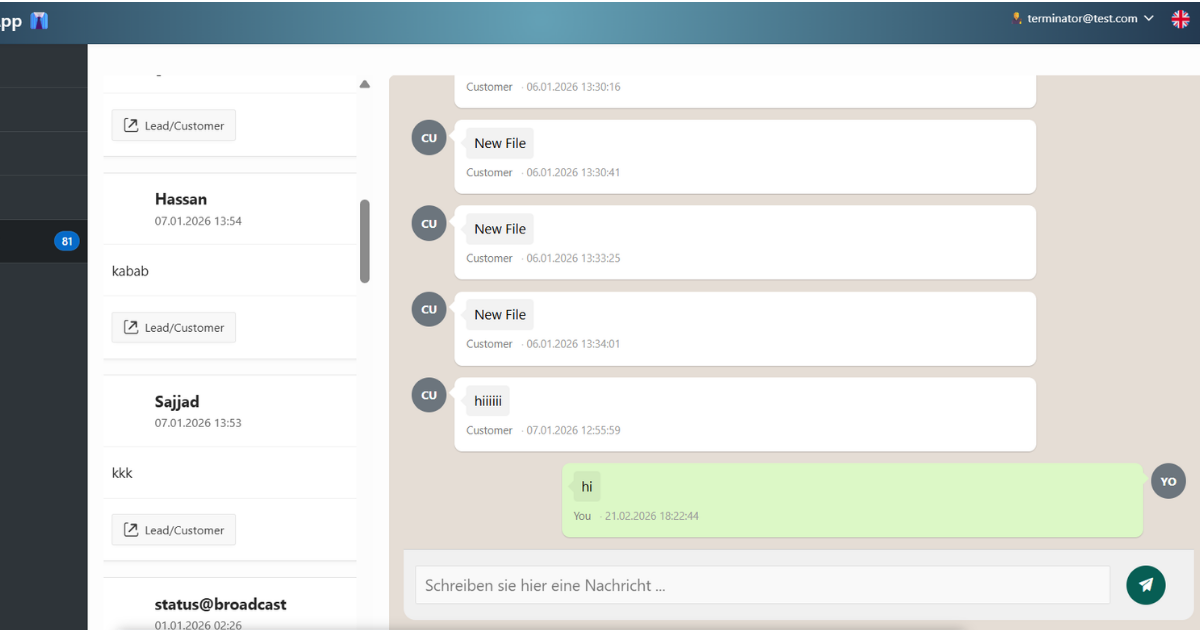
I wanted WhatsApp conversations to be available alongside the records in an Oracle APEX application. The useful idea is still the same: keep an auditable message history in Oracle and give the operator one place to work. Access to that history must be intentional. A conversation should not become visible to a whole team merely because somebody knows its ID.
Architecture and the lab boundary
- Outbound: an authenticated, authorized APEX administrator selects an approved test conversation; a server-side process calls WAAPI using an APEX Web Credential.
- Inbound: WAAPI sends an authenticated webhook through a configured gateway to n8n; n8n validates and normalizes the event, then calls a protected ORDS POST handler.
- APEX reads the conversation and message tables directly. This version deliberately has no public conversations GET endpoint.
- One WAAPI instance and one authorized administrator are assumed. Multiple teams, tenants, providers, groups, attachments and delivery receipts require additional design, not just another column.
Reference context: Oracle Database 19c SQL/PLSQL, APEX 26.1 Web Credentials and REST APIs, and ORDS 26.1 documentation. n8n and WAAPI payload behavior must be checked against the versions and instance actually used. The provider here is waapi.app; similarly named services are not interchangeable. Confirm account terms, recipient permission and applicable messaging rules before sending anything.
Step 1: Put credentials and transport trust in the right place
Create an APEX Web Credential in the workspace with static ID WAAPI_AUTH, authentication type HTTP Header, header name Authorization, and a secret value consisting of the complete bearer authorization value. Enter the real token only in the credential interface. Restrict Valid for URLs to the exact approved HTTPS instance send endpoint where practical, or the required https://waapi.app/api/v1/ prefix. Do not put it in JavaScript, a page item, an application configuration table, screenshots, export files or logs.
Web Credentials are workspace-level facilities; they do not authorize an APEX user to send to a particular recipient. Use an authenticated application plus a server-side CHAT_ADMIN authorization scheme that allows only the designated test administrator. Apply it to the page, reports, send button and server process. The process also checks it explicitly. Do not use a scheme that simply permits every authenticated user.
Have the DBA configure HTTPS trust and the minimum network access for the actual APEX engine context used by the Web Credential. Do not copy a broad parsing-schema ACL grant from a direct UTL_HTTP example. The wallet must trust an independently verified CA chain and have restricted filesystem access. This lab uses the instance-managed wallet; it supplies no wallet password or override. An auto-login wallet remains security-sensitive. A trust-only HTTPS call does not, by itself, need permission to use wallet client certificates or stored passwords.
See creating Web Credentials, credential execution context, and the separate Oracle wallet walkthrough. No server permission or credential changes are performed by publishing this article.
Step 2: Create a fresh, test-only conversation model
Run this only in an empty sandbox schema. It is a fresh lab model, not an ALTER script for the earlier article or a migration for existing chat history. If these names already exist, stop and design a backed-up migration. The allowed-recipient conversation table is populated deliberately by the administrator; an inbound webhook does not create arbitrary contacts.
CREATE TABLE chat_conversation (
  conv_id NUMBER GENERATED BY DEFAULT AS IDENTITY PRIMARY KEY,
  phone_number VARCHAR2(20 BYTE) NOT NULL,
  contact_name VARCHAR2(100 CHAR),
  is_active CHAR(1) DEFAULT 'Y' NOT NULL
    CHECK (is_active IN ('Y','N')),
  created_at TIMESTAMP WITH TIME ZONE DEFAULT SYSTIMESTAMP NOT NULL,
  CONSTRAINT chat_conv_phone_uq UNIQUE (phone_number),
  CONSTRAINT chat_conv_phone_ck
    CHECK (REGEXP_LIKE(phone_number, '^[1-9][0-9]{6,14}$'))
);

CREATE TABLE chat_message (
  msg_id NUMBER GENERATED BY DEFAULT AS IDENTITY PRIMARY KEY,
  conv_id NUMBER NOT NULL REFERENCES chat_conversation(conv_id),
  direction CHAR(1) NOT NULL CHECK (direction IN ('S','R')),
  msg_body VARCHAR2(4000 BYTE) NOT NULL,
  wa_msg_id VARCHAR2(500 BYTE),
  transport_state VARCHAR2(20 BYTE) NOT NULL,
  created_at TIMESTAMP WITH TIME ZONE DEFAULT SYSTIMESTAMP NOT NULL,
  CONSTRAINT chat_msg_provider_uq UNIQUE (wa_msg_id),
  CONSTRAINT chat_msg_state_ck CHECK
    (transport_state IN ('RECEIVED','HTTP_ACCEPTED','HTTP_REJECTED','UNKNOWN'))
);
CREATE INDEX chat_msg_conv_ix ON chat_message(conv_id, created_at, msg_id);
Use international digits without a leading plus sign for the approved test phone. The regular expression is a format gate, not proof of consent or ownership. Each row permits the single administrator to interact with that recipient. If a product later has multiple operators, add real membership/tenant predicates to every read and write. The unique provider message ID makes inbound replay detectable for this one-instance lab; a multi-instance design needs an instance-scoped key.
Step 3: Send from a protected APEX submit process
Create page items P1_CONV_ID and P1_MSG_TEXT. Use a normal Submit Page button with request SEND_MESSAGE, and run this server process only for that request after validations. Replace REPLACE_WITH_INSTANCE_ID with the non-secret instance identifier in the fixed endpoint. The browser must never choose the request URL or credential ID. This code runs during an authenticated APEX request; it is not a standalone scheduler/ORDS sender.
DECLARE
  l_phone chat_conversation.phone_number%TYPE;
  l_json JSON_OBJECT_T := JSON_OBJECT_T();
  l_reply CLOB;
  l_status PLS_INTEGER;
BEGIN
  IF NOT apex_authorization.is_authorized('CHAT_ADMIN') THEN
    raise_application_error(-20001, 'Not authorized.');
  END IF;
  IF :P1_MSG_TEXT IS NULL OR LENGTHB(:P1_MSG_TEXT) > 4000 THEN
    raise_application_error(-20002, 'Enter text up to 4000 bytes.');
  END IF;

  -- In this lab CHAT_ADMIN can use every deliberately approved active row.
  SELECT phone_number INTO l_phone
    FROM chat_conversation
   WHERE conv_id = :P1_CONV_ID AND is_active = 'Y';

  l_json.put('chatId', l_phone || '@c.us');
  l_json.put('message', :P1_MSG_TEXT);
  apex_web_service.set_request_headers(
    p_name_01 => 'Content-Type', p_value_01 => 'application/json',
    p_name_02 => 'Accept', p_value_02 => 'application/json',
    p_reset => TRUE
  );
  BEGIN
    l_reply := apex_web_service.make_rest_request(
      p_url => 'https://waapi.app/api/v1/instances/REPLACE_WITH_INSTANCE_ID/client/action/send-message',
      p_http_method => 'POST',
      p_body => l_json.to_clob(),
      p_credential_static_id => 'WAAPI_AUTH',
      p_transfer_timeout => 30
    );
    l_status := apex_web_service.g_status_code;
  EXCEPTION
    WHEN OTHERS THEN
      -- A timeout does not prove that the provider did not send the message.
      INSERT INTO chat_message(conv_id, direction, msg_body, transport_state)
      VALUES (:P1_CONV_ID, 'S', :P1_MSG_TEXT, 'UNKNOWN');
      COMMIT; -- deliberate boundary: this page must do no unrelated DML
      raise_application_error(-20003,
        'Send outcome unknown. Check the provider before retrying.');
  END;

  INSERT INTO chat_message(conv_id, direction, msg_body, transport_state)
  VALUES (:P1_CONV_ID, 'S', :P1_MSG_TEXT,
    CASE WHEN l_status BETWEEN 200 AND 299
         THEN 'HTTP_ACCEPTED' ELSE 'HTTP_REJECTED' END);
  COMMIT; -- deliberate lab boundary, not a reusable business transaction
  :P1_MSG_TEXT := NULL;
  IF l_status IS NULL OR l_status NOT BETWEEN 200 AND 299 THEN
    raise_application_error(-20004,
      'Provider HTTP request was not accepted. Check the transport record.');
  END IF;
END;
JSON_OBJECT_T serializes quotes, backslashes and control characters; the REST API receives a CLOB body and handles transport encoding. Do not manually concatenate JSON or guess a Content-Length from the database character set. Use a database character set that can represent the intended message text; this lab assumes AL32UTF8 for full Unicode, including emoji. The 4000-byte limit is a deliberate lab bound: oversize messages are rejected, not silently shortened. See Oracle’s PL/SQL JSON types and MAKE_REST_REQUEST API.
HTTP_ACCEPTED is not delivered or read. A 2xx response records only HTTP acceptance in this example. Check the provider JSON result before claiming even application-level send success; WAAPI distinguishes outer request status from its nested send result. Delivery/read indicators need the appropriate acknowledgement events and a verified state model. Set the APEX success message to “HTTP request recorded. Check provider status”, never “Delivered”. See WAAPI send-response guidance. Do not display or persist whole provider responses if they contain personal information.
An HTTP send and a database transaction are not atomic. A database error after the provider accepts a send can leave the local record missing. The lab therefore does not automatically retry outbound sends. A real service needs a durable outbox, worker state, reconciliation and provider-supported deduplication where available. Disabling a button helps usability but is not exactly-once delivery. Also configure the application’s error handler to show generic messages for unexpected database failures and keep restricted, redacted diagnostics server-side.
Step 4: Protect ORDS before creating an inbound route
Use HTTPS and a dedicated REST-enabled sandbox schema. Before publishing the module, create an ORDS role such as whatsapp.ingest, a privilege mapped to the entire /whatsapp/* route, and an OAuth client authorized only for that privilege/role. Configure n8n with that client’s server-side credential. Follow the security API/UI for your installed ORDS version; current releases use ORDS_SECURITY rather than deprecated OAUTH examples. p_auto_rest_auth is not a substitute for a custom module privilege.
In REST Workshop create a module named whatsapp.chat, base path /whatsapp/, initially Not Published; create template incoming and a POST PL/SQL handler accepting application/json. Do not expose an unprotected conversations GET query. Apply the module privilege, then publish only for a controlled authentication test: missing/invalid credentials must be rejected, an authenticated client without the role must be rejected, and the intended client must pass. If any unauthorized call executes the handler, unpublish and fix the mapping before continuing.
The endpoint URL is your actual ORDS deployment and schema mapping followed by /whatsapp/incoming; copy it from REST Workshop rather than assuming an APEX hosting URL. Oracle provides resource-protection guidance, the module and privilege API, and ORDS security best practices. The article does not create a role, token, account or network rule for you.
Step 5: Receive bounded, replay-safe text messages
The protected handler accepts this normalized contract from n8n: phone, message and messageId, all strings, with no extra keys. It checks JSON member types before calling get_string, which can otherwise coerce non-string values. It accepts only pre-approved active conversations. It reads the CLOB body once using :body_text; :body is a BLOB and is not the same bind. Set a small request-body size limit at the gateway as well; the code check happens after receipt.
DECLARE
  l_body CLOB := :body_text;
  l_json JSON_OBJECT_T;
  l_keys JSON_KEY_LIST;
  l_member JSON_ELEMENT_T;
  l_phone VARCHAR2(32767);
  l_text VARCHAR2(32767);
  l_provider_id VARCHAR2(32767);
  l_conv_id NUMBER;
  l_existing_conv NUMBER;
  l_existing_text VARCHAR2(4000);
  l_existing_direction CHAR(1);
  e_bad_input EXCEPTION;
  e_conflict EXCEPTION;
BEGIN
  IF l_body IS NULL OR DBMS_LOB.getlength(l_body) > 16000 THEN
    RAISE e_bad_input;
  END IF;
  BEGIN
    l_json := JSON_OBJECT_T.parse(l_body);
    l_keys := l_json.get_keys();
    IF l_keys.COUNT != 3 OR NOT l_json.has('phone')
       OR NOT l_json.has('message') OR NOT l_json.has('messageId') THEN
      RAISE e_bad_input;
    END IF;
    -- GET_STRING can convert non-strings, so inspect each JSON type first.
    l_member := l_json.get('phone');
    IF l_member IS NULL OR NOT l_member.is_string() THEN
      RAISE e_bad_input;
    END IF;
    l_phone := l_json.get_string('phone');
    l_member := l_json.get('message');
    IF l_member IS NULL OR NOT l_member.is_string() THEN
      RAISE e_bad_input;
    END IF;
    l_text := l_json.get_string('message');
    l_member := l_json.get('messageId');
    IF l_member IS NULL OR NOT l_member.is_string() THEN
      RAISE e_bad_input;
    END IF;
    l_provider_id := l_json.get_string('messageId');
  EXCEPTION WHEN OTHERS THEN RAISE e_bad_input;
  END;
  IF l_phone IS NULL OR NOT REGEXP_LIKE(l_phone, '^[1-9][0-9]{6,14}$')
     OR l_text IS NULL OR LENGTHB(l_text) > 4000
     OR l_provider_id IS NULL OR LENGTHB(l_provider_id) > 500 THEN
    RAISE e_bad_input;
  END IF;
  BEGIN
    SELECT conv_id INTO l_conv_id FROM chat_conversation
     WHERE phone_number = l_phone AND is_active = 'Y';
  EXCEPTION WHEN NO_DATA_FOUND THEN RAISE e_bad_input;
  END;

  BEGIN
    INSERT INTO chat_message
      (conv_id, direction, msg_body, wa_msg_id, transport_state)
    VALUES (l_conv_id, 'R', l_text, l_provider_id, 'RECEIVED');
  EXCEPTION WHEN DUP_VAL_ON_INDEX THEN
    SELECT conv_id, msg_body, direction
      INTO l_existing_conv, l_existing_text, l_existing_direction
      FROM chat_message WHERE wa_msg_id = l_provider_id;
    IF l_existing_conv <> l_conv_id OR l_existing_text <> l_text
       OR l_existing_direction <> 'R' THEN
      RAISE e_conflict;
    END IF;
    -- An identical replay is acknowledged without a second insert.
  END;
  COMMIT;
  :status_code := 200;
  owa_util.mime_header('application/json', FALSE);
  owa_util.http_header_close;
  htp.prn('{"status":"ok"}');
EXCEPTION
  WHEN e_bad_input THEN
    ROLLBACK;
    :status_code := 400;
    owa_util.mime_header('application/json', FALSE);
    owa_util.http_header_close;
    htp.prn('{"status":"invalid_request"}');
  WHEN e_conflict THEN
    ROLLBACK;
    :status_code := 409;
    owa_util.mime_header('application/json', FALSE);
    owa_util.http_header_close;
    htp.prn('{"status":"message_id_conflict"}');
  WHEN OTHERS THEN
    ROLLBACK;
    :status_code := 500;
    owa_util.mime_header('application/json', FALSE);
    owa_util.http_header_close;
    htp.prn('{"status":"internal_error"}');
END;
Do not return SQLERRM, tokens, stack traces or message bodies to callers or unrestricted logs. In a real service add restricted error reporting with a correlation ID and a retention policy. Consult the ORDS implicit-parameter reference for body and response-status handling, and Oracle’s JSON type reference for type inspection and getter conversion behavior.
Step 6: Authenticate and normalize the n8n webhook
Authenticate before processing. Neither fromMe = false, a User-Agent header, CORS nor knowledge of a phone number authenticates a webhook. n8n supports Basic, Header and JWT authentication, but the sender must support the selected method. Do not assume WAAPI can send arbitrary signed headers. Its documented example uses a per-instance secret path token; that is a bearer secret and can leak through URL logs.
For this lab, put a configured gateway in front of n8n: validate the provider’s documented per-instance secret mechanism, validate the expected instance ID, reject invalid calls, redact URL secrets from logs, and forward only verified events to n8n using Header Auth. Keep the underlying n8n webhook inaccessible except through this route or protected by that required header credential. An administrator must implement and test this boundary. If that infrastructure is unavailable, stop at synthetic manual fixtures in a private environment; do not publish an anonymous receiver. No gateway code or HMAC feature is invented here.
Configure the n8n Webhook node for POST with its Header Auth credential and “Using Respond to Webhook Node”. Validate the event and store it before returning success. Immediate acknowledgement only confirms that processing started; it does not prove database persistence. WAAPI’s published behavior distinguishes timeout retries from received HTTP error responses, so do not assume a 500 guarantees redelivery. A reliable service needs durable receipt, failure alerts and reconciliation. WAAPI’s published pages differ on signing and retry details, so verify the authentication and retry contract supported by your deployed instance before connecting it; do not infer a signature header, algorithm or retry guarantee. References: WAAPI webhook contract and n8n Webhook response modes.
After authentication, use a Code node in “Run Once for Each Item” mode. Replace the non-secret expected instance ID. This rejects unsupported groups, media, events and payload shapes instead of interpreting them as ordinary text. Connect validation failures to a controlled error response/alert branch, not a success response.
const event = $input.item.json.body;
const expectedInstanceId = "REPLACE_WITH_INSTANCE_ID";
if (!event || typeof event.instanceId !== "string" ||
    event.instanceId !== expectedInstanceId ||
    event.event !== "message") {
  throw new Error("Unexpected event or instance");
}
const m = event.data?.message;
if (!m || m.fromMe !== false || m.type !== "chat" ||
    m.isStatus === true || m.broadcast === true || m.hasMedia !== false ||
    typeof m.from !== "string" || typeof m.body !== "string") {
  throw new Error("Unsupported message shape");
}
const match = /^([1-9][0-9]{6,14})@c\.us$/.exec(m.from || "");
const messageId = typeof m.id === "string" ? m.id : m.id?._serialized;
if (!match || typeof messageId !== "string" || !messageId ||
    !m.body || messageId.length > 500 || m.body.length > 4000) {
  throw new Error("Invalid text message");
}
return { json: { phone: match[1], message: m.body, messageId } };
The documented WAAPI message event includes a structured ID with _serialized. Inspect a redacted fixture from your own version and update the mapping deliberately if it differs. The database performs the authoritative byte-length checks, which can reject multibyte text even when its JavaScript character count is below 4000.
Next add an HTTP Request node: POST the actual protected ORDS URL, use its configured OAuth2 client credential, send a JSON body object with phone, message and messageId from the current item, and request a JSON response. Do not construct JSON by string interpolation. Do not use “Authentication: None”. Keep OAuth secrets in n8n’s credential store. On a 2xx response with status = ok, route to a success Respond to Webhook node. On errors, preserve a restricted failure record and alert; never report “logged” merely because the node ran. Credential and response setup are described in n8n HTTP Request documentation.
Step 7: Build the APEX conversation and message reports
The original two-panel idea still works: conversation list on the left, thread on the right, compose area below. Both reports and all processes must use CHAT_ADMIN. In this one-administrator lab every active row is already an approved test recipient. That assumption must be replaced with server-side per-user predicates before offering the page to a wider team.
-- Conversation report, Static ID: conv_list
SELECT conv_id, NVL(contact_name, phone_number) AS display_name,
       phone_number, created_at
  FROM chat_conversation
 WHERE is_active = 'Y'
 ORDER BY created_at DESC, conv_id DESC;

-- Message report, Static ID: msg_thread
SELECT m.msg_id, m.direction, m.msg_body, m.transport_state,
       m.created_at
  FROM chat_message m
  JOIN chat_conversation c ON c.conv_id = m.conv_id
 WHERE m.conv_id = :P1_CONV_ID AND c.is_active = 'Y'
 ORDER BY m.created_at, m.msg_id;
Keep Escape Special Characters enabled for contact names, phone values and message text. Never insert a received message or arbitrary media URL directly into HTML. If you build chat bubbles using an HTML expression/template, contextually escape text and attribute values; only fixed direction-derived CSS class names may choose the style. The simple Classic Report above is the safe starting point.
Use APEX’s link builder on CONV_ID to set P1_CONV_ID on the same protected page. If you switch conversations with Ajax instead, submit P1_CONV_ID for the message region and refresh it only after setting the item. A hidden item is not an authorization boundary. A normal Send submit and branch back to the page avoids the original race between a click-triggered refresh and a server-side send process.
Optional chat layout CSS
This preserves the original visual styling for a custom, correctly escaped chat template. The SQL reports above do not automatically turn into bubbles merely because CSS exists. Apply the matching wrapper/classes in your report template, then check narrow-screen and keyboard behavior.
.chat-thread {
  display: flex;
  flex-direction: column;
  gap: 12px;
  padding: 20px;
  max-height: 520px;
  overflow-y: auto;
  background: #f5f5f5;
}

.msg-bubble {
  max-width: 68%;
  padding: 10px 14px;
  border-radius: 10px;
  font-size: 14px;
  line-height: 1.5;
  word-wrap: break-word;
}

.msg-sent { align-self: flex-end; }
.msg-sent .msg-bubble {
  background: #dcf8c6;
  border-bottom-right-radius: 2px;
}

.msg-received { align-self: flex-start; }
.msg-received .msg-bubble {
  background: #ffffff;
  border: 1px solid #e0e0e0;
  border-bottom-left-radius: 2px;
}

.msg-time {
  font-size: 11px;
  color: #aaa;
  margin-top: 4px;
  text-align: right;
}

@media (max-width: 600px) {
  .chat-thread { padding: 12px; }
  .msg-bubble { max-width: 95%; overflow-wrap: anywhere; }
}
If polling is appropriate for your test page, use one Page Load action, not an action that runs again on every region refresh:
if (window.waChatRefreshTimer) {
  window.clearInterval(window.waChatRefreshTimer);
}
window.waChatRefreshTimer = window.setInterval(function () {
  if (!document.hidden && apex.item("P1_CONV_ID").getValue()) {
    apex.region("msg_thread").refresh();
  }
}, 20000);
Set P1_CONV_ID in the message region’s Page Items to Submit. Polling reads the server-authorized report; it does not bypass authorization. Consider session expiry, overlapping refreshes, database load and accessibility before using polling in a production interface.
Step 8: Verification before using anything beyond synthetic data
Local check, 14 October 2026: The normalization JavaScript passed 21 checks with a mocked n8n input object, covering accepted fixtures, structured/string message IDs, malformed fields, unsupported senders/events/media, limits and Unicode preservation. These checks do not execute n8n, Oracle, APEX, ORDS or WAAPI. The SQL and integration wiring still require the controlled tests below.
- Authentication: anonymous/invalid-token/wrong-role ORDS calls fail without inserting rows; invalid gateway secrets and unexpected instance IDs never reach normalization.
- Input: missing/extra fields, non-string JSON fields, oversized bodies, unexpected event shapes, media/groups/status/broadcast messages, unapproved phones and malformed JSON are rejected with bounded messages.
- Replay: send the same provider ID and content twice; exactly one row remains. Reuse that ID with different content; expect 409, not silent overwrite.
- JSON/Unicode: test quotes, backslashes, newlines, accented text, Arabic and emoji, including byte-limit rejection. Verify the recipient receives the intended text without truncation.
- Outbound: test provider 2xx with application-level failure, 4xx/5xx, timeout and database failure after send. Confirm that no automatic retry or “delivered” claim is made.
- UI: try changing the hidden conversation ID and opening the page as another user. Verify server authorization, HTML escaping, report refresh, keyboard focus and mobile layout.
- Data handling: record consent/purpose, restrict operational logs and n8n execution data, set retention/deletion rules and prevent customer content from appearing in diagnostics.
Troubleshooting without weakening security
- ORA-29024: check the actual destination hostname and trusted CA chain with the DBA. Do not disable certificate validation or blindly trust a browser-exported leaf certificate.
- ORA-24247: confirm the principal and minimal host/port/protocol ACL used by the chosen APEX Web Credential execution context. A client-certificate wallet ACE is not a generic fix.
- ORA-29273: inspect the underlying restricted diagnostic. It is a wrapper for several HTTP failures, not proof that a wallet call was omitted.
- ORDS 401/403: inspect client credentials, privilege/role mapping and route coverage; do not remove protection to make a request work.
- ORDS 404: compare the deployment, schema mapping, published module and template. Do not guess the endpoint from the APEX page URL.
- n8n success but missing rows: distinguish webhook acknowledgement from database commit, examine a redacted failed execution, and reconcile with the provider.
What belongs in a production extension
The modular architecture makes responsibilities clear, but changing provider affects authentication, payloads, event schemas, acknowledgement behavior, limits and policy requirements. The layers are not automatically interchangeable. Before extending this lab, add a durable outbox/inbox, stable instance-scoped identifiers, tenant/recipient authorization, rate limits, secret rotation, restricted monitoring, reconciliation and a documented retention policy. Media handling needs its own validation, storage and access-control design.
The goal is an understandable integration with explicit boundaries. Start with approved test numbers, validate each hop, and keep the evidence of what your own environment actually passed. If you hit a specific issue, describe the version and a redacted error rather than posting credentials or a customer conversation.
Hassan Raza
Original author attribution: Oracle ACE Apprentice | Senior Oracle APEX Developer at S&H Software Solutions, Pakistan
2 Comments
Comments are closed.