 By
By
Your Oracle APEX app is live. The business is growing. Then someone in the meeting asks: “Can we have this in German?”
If you built your app before Oracle APEX 26.1, that question came with a weight. You knew what it meant. Shadow applications. One full copy of your app per language. Every page change you made in English needed repeating. Every new button, every label update, every region title had to go through a seeding cycle before it showed up in the translated version.
For small apps, manageable. For anything real, it compounds fast.
Building an Oracle APEX multilingual app got a lot simpler in APEX 26.1. The new Text Message-Based translation method lets a single application support every language you need, with no shadow apps and no parallel maintenance. I tested this on a real production app with 163 text messages and translated the entire XLIFF file to German using Claude Code CLI in under 10 minutes.
This guide walks through all 5 steps with real screenshots from my own setup.
What Is a Multilingual Oracle APEX App?
A multilingual Oracle APEX app displays UI text in the user’s preferred language without running separate applications for each one. The app detects the session language and loads the correct translations at runtime.
Until APEX 26.1, you needed shadow applications to make that work: one full copy of your app per target language. It worked, but it came with costs that added up every week.
The Old Way: Shadow Applications and Why They Were a Nightmare
Shadow applications are separate APEX apps built specifically to hold translations. You maintained them alongside your primary app, forever.
Every time you added a page, changed a label, or fixed a typo in English, you had to re-seed the translation. Then export. Then send for translation. Then import. Then publish the shadow app. One change in the primary language meant touching two apps minimum. A new module meant updating every language you supported.
The part that really gets me is this: a pure logic fix in your primary app, something with zero impact on UI text, still forced you through the full translation cycle just to keep shadow apps in sync. You were punished for doing unrelated work.
What Oracle APEX 26.1 Changes
APEX 26.1 introduces Text Message-Based translation, announced by Oracle’s APEX product team in May 2026. All translatable UI text gets stored in Shared Components as text messages. One app handles everything.
You add a language, export the text messages as XLIFF or CSV, get them translated, and import back. The app handles language switching at runtime. No shadow applications involved.
According to Weglot’s localization research, 75% of global consumers prefer to buy products in their native language. For enterprise APEX apps serving international users, multilingual support matters. APEX 26.1 finally makes it practical.
Step 1: Enable Translation in Your Multilingual Oracle APEX App
The first step takes under two minutes. Open your application in APEX App Builder and click Shared Components.
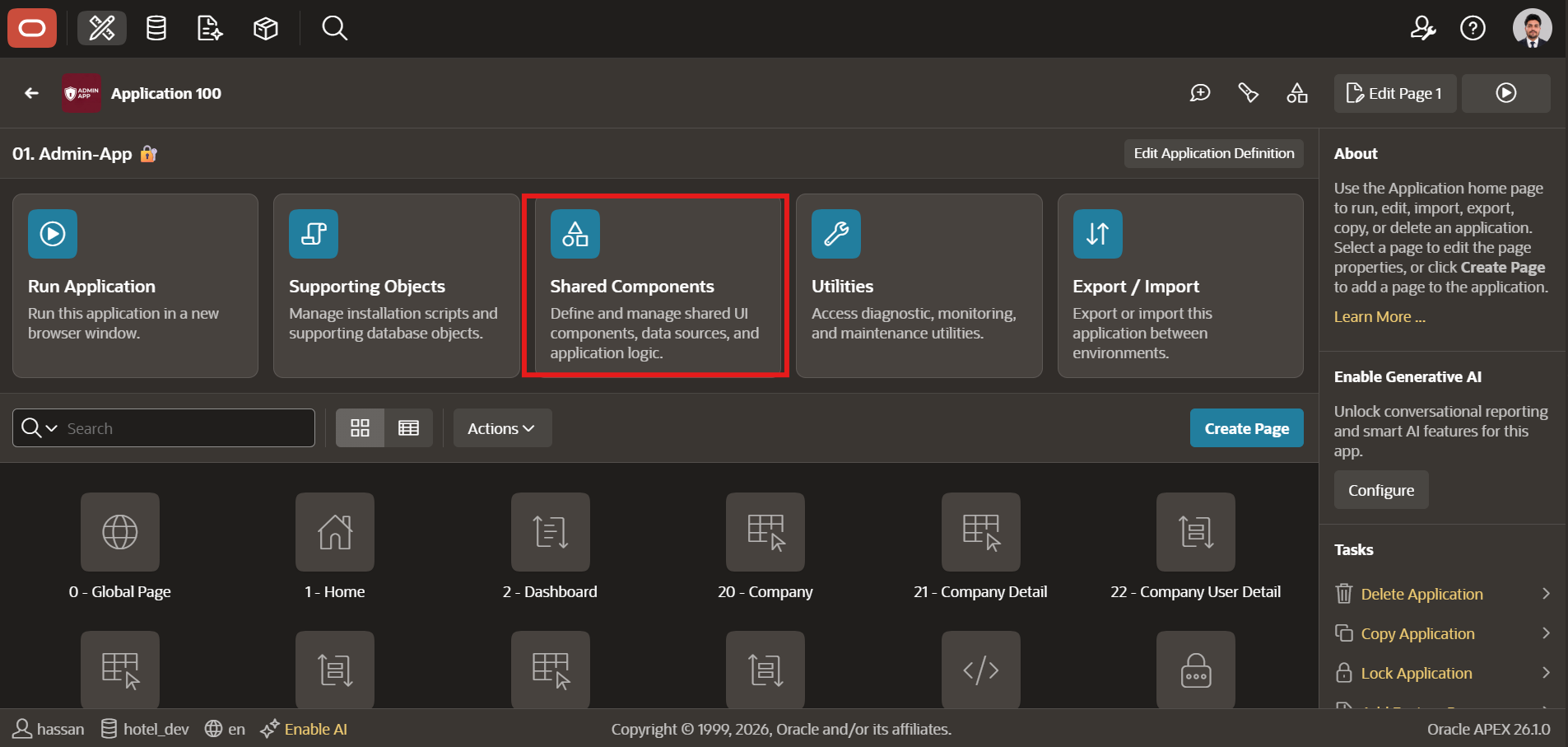
Where to Find Globalization Attributes
Inside Shared Components, scroll to the Globalization section and click Globalization Attributes.
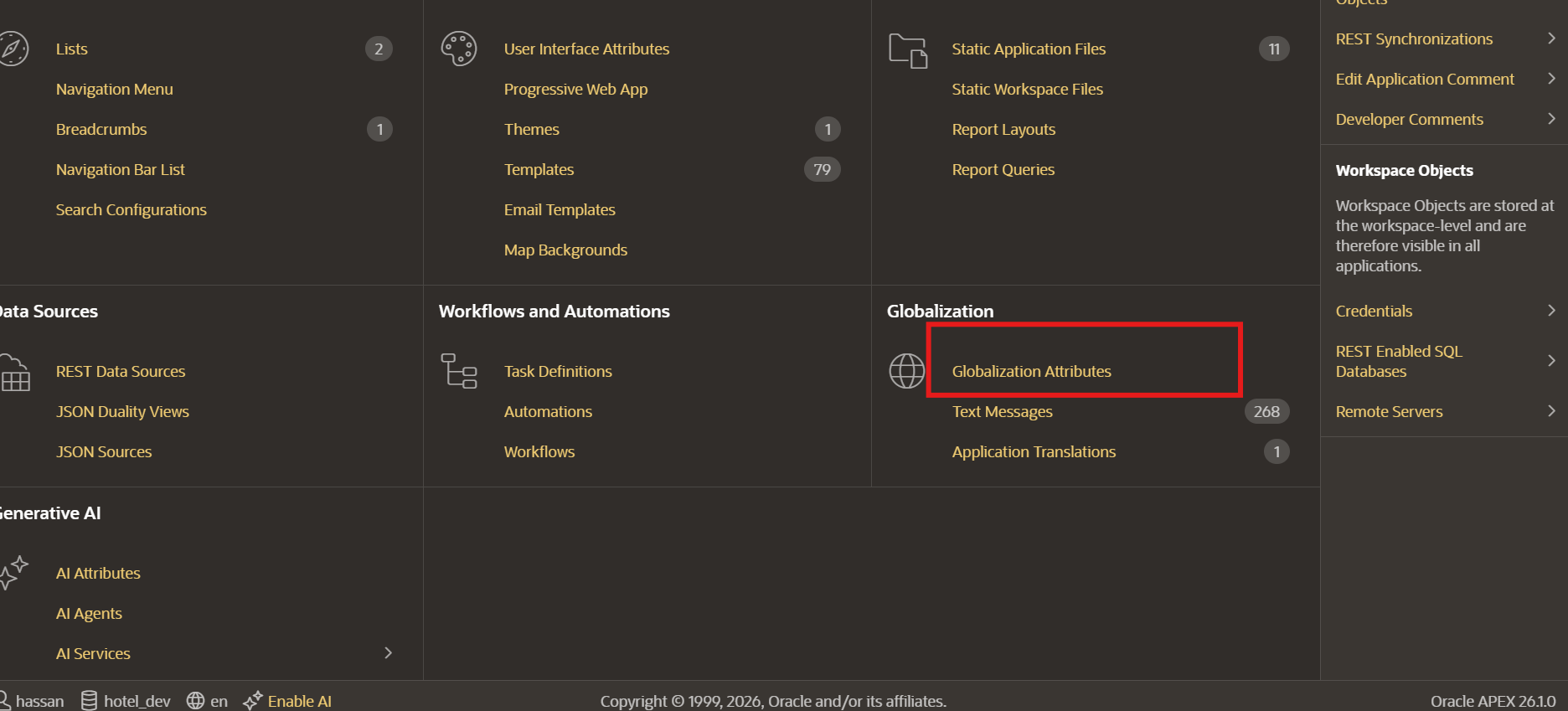
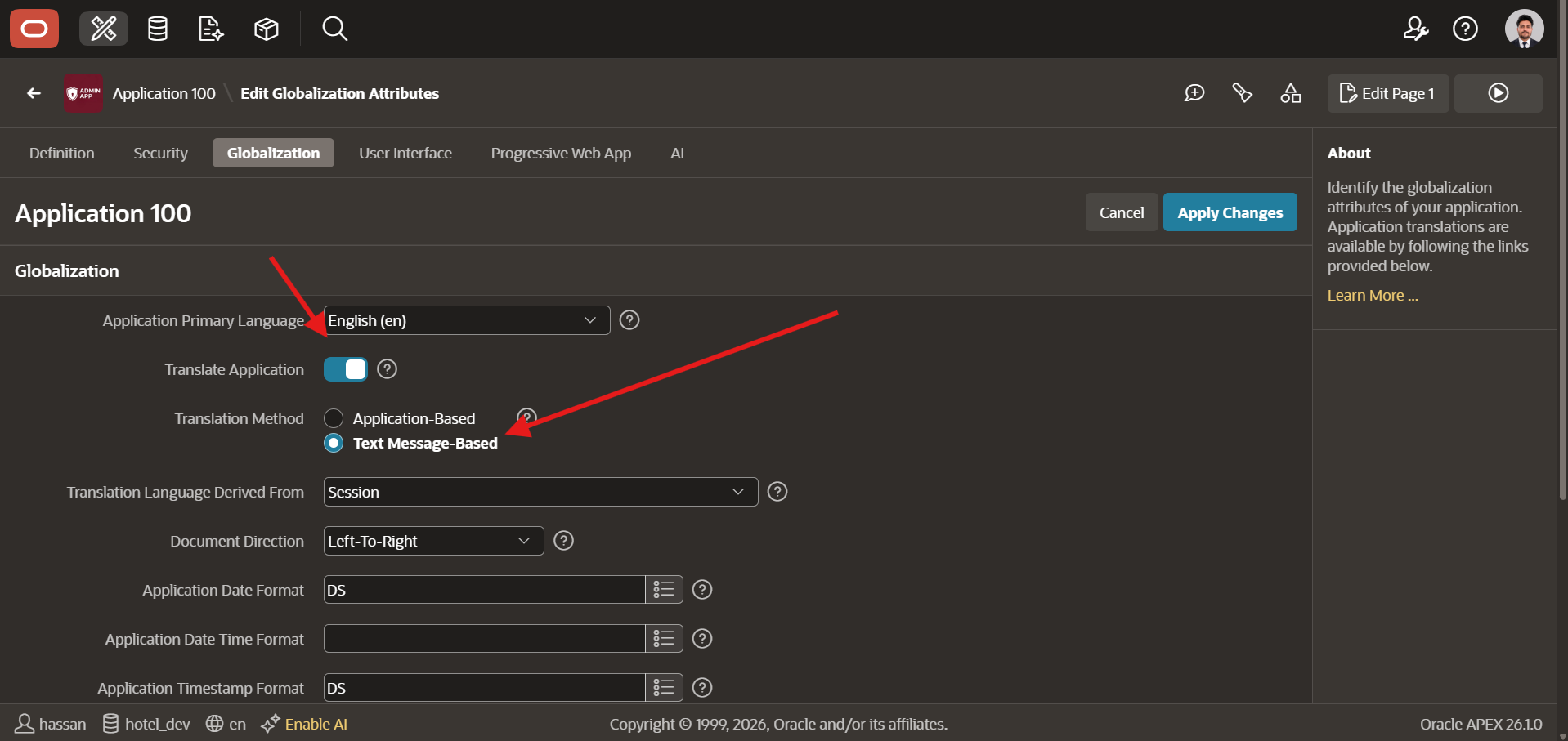
This opens the Edit Globalization Attributes screen. Click the Globalization tab. Your Application Primary Language is already set, and the Translate Application toggle is right below it.
Text Message-Based vs Application-Based: Which Should You Pick?
Enable the Translate Application toggle. APEX shows the Translation Method property with two options:
- Application-Based: The traditional shadow application approach. Each language gets its own cloned app. Still available in APEX 26.1 for teams that need it.
- Text Message-Based: The new approach. Translations live in Shared Components as text messages and one app handles every language.
Select Text Message-Based and click Apply Changes.
Step 2: Convert Your App Text Into Text Messages
APEX scans your application and converts every piece of translatable UI text into a named text message key.
A region titled “Customer Orders” becomes a text message with the key CUSTOMER_ORDERS. Every page that references “Customer Orders” now points to that key. Change the English value once and every instance across the app updates automatically.
What “Convert to Text Messages” Actually Does
Navigate to Shared Components → Application Translations. Click Convert to Text Messages.
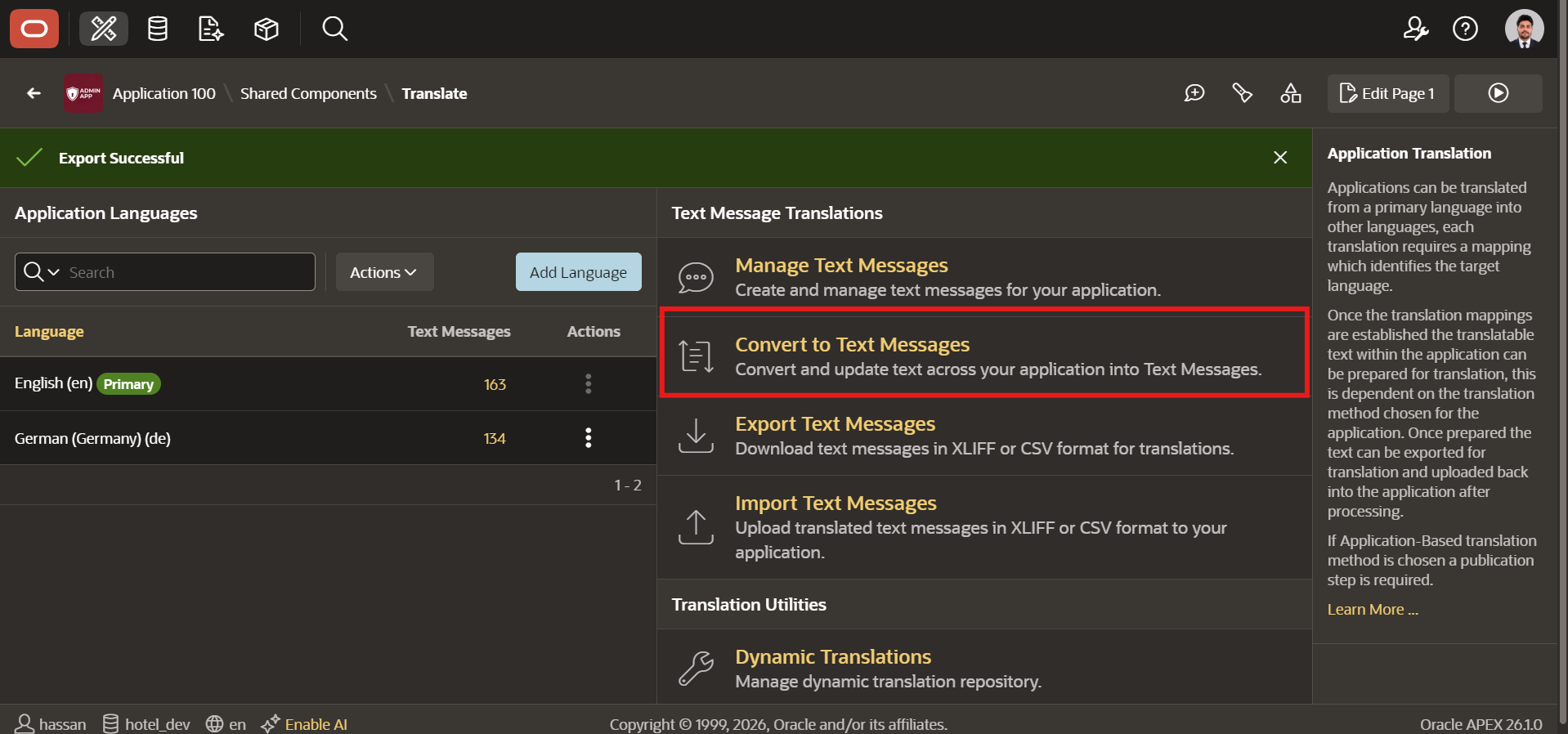
APEX scans the entire application, finds region titles, button labels, navigation items, and page headings, and creates a text message for each one in your primary language. It then replaces the static text in your components with substitution references pointing to those message keys.
When I ran this on my Admin-App (Application 100, hotel_dev schema), APEX produced 163 text messages covering the complete English UI. The whole scan took under 30 seconds.
What Gets Skipped (and Why It Matters)
Not everything gets converted. APEX skips template directives, numeric-only text, components marked as non-translatable, and subscribed text objects. Subscribed components have to be translated in their source application.
Worth knowing before you run the conversion: if your app pulls in subscribed shared components from a master application, those need separate handling. Skip this and you will have untranslated strings in your finished app that are hard to track down later.
Step 3: Add Your Target Languages
With your text messages created, tell APEX which languages your app supports. About one minute per language.
How APEX Syncs Primary Language Text Automatically
Go to Shared Components → Application Translations. In the Application Languages section, click Add Language.
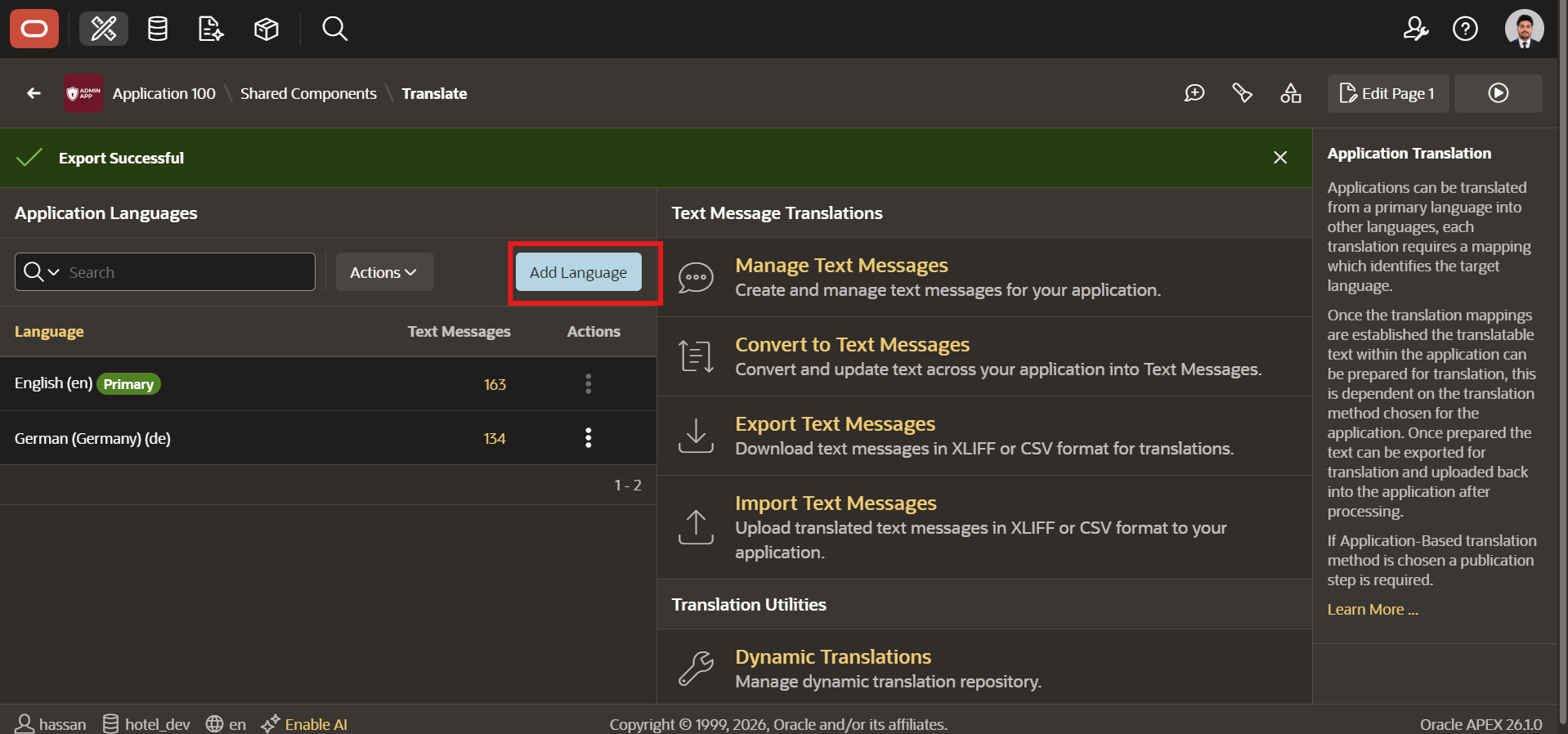
Pick your target language and click Add Language. APEX creates a matching set of text messages for that language immediately, populated with the English source text as placeholders. Translation-ready from the moment it appears.
What You See After Adding German
After adding German (de), the Application Languages table in my app showed:
- English (en), Primary, 163 text messages
- German (Germany) (de), 134 text messages
The count difference is normal. A few messages needed a sync pass to catch up. Step 5 covers that.
Step 4: Export, Translate With an LLM, and Import Back
This is the fast part. The old shadow application method had you seeding, exporting, applying, and publishing as separate steps with separate tools. Now export is three clicks. Import is three clicks.
Exporting as XLIFF or CSV
From Application Translations, click Export Text Messages.
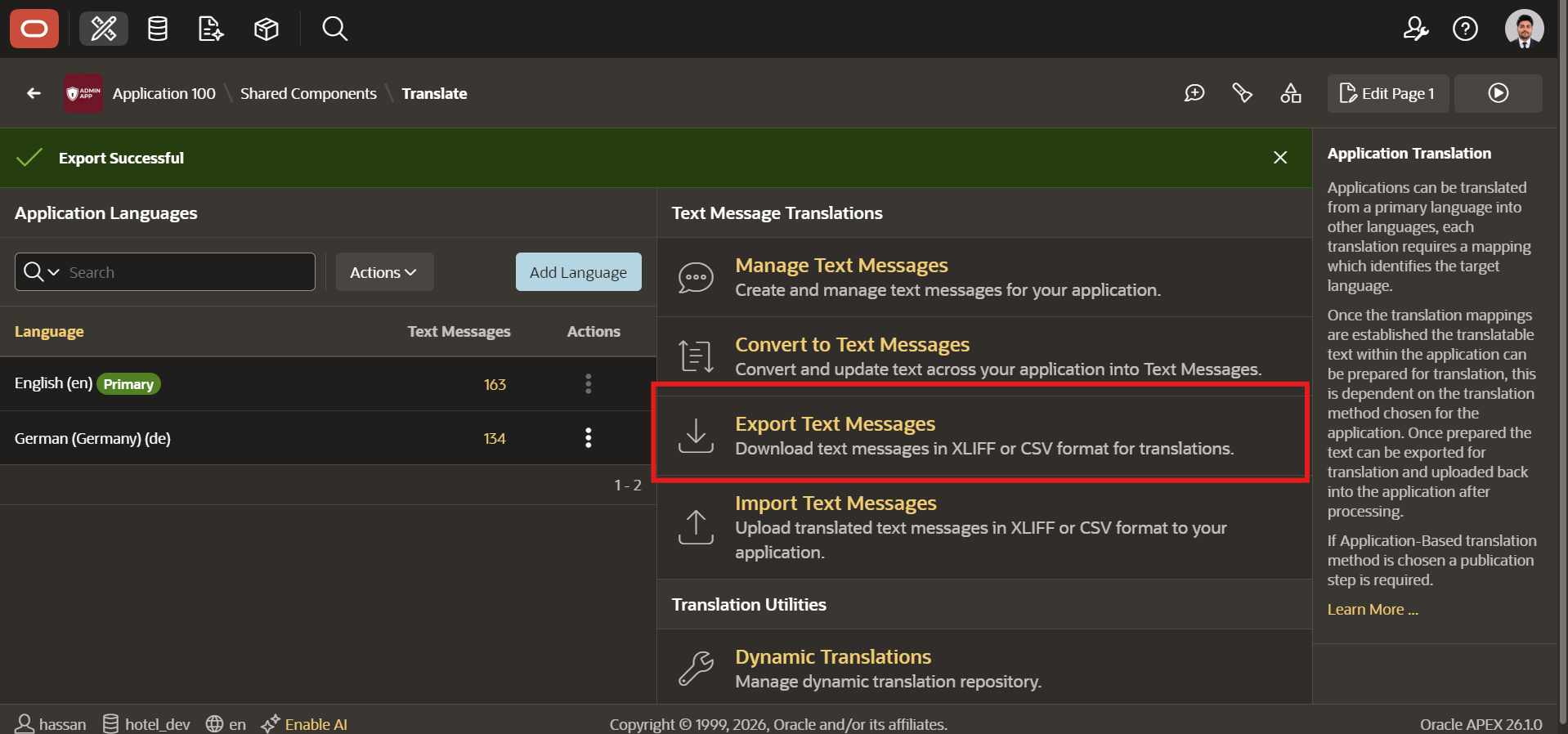
APEX gives you two format choices:
- XLIFF: The industry standard. Every professional localization tool accepts it. Use this when sending to a human translator or a translation management platform.
- CSV: Simpler structure. Good for quick edits in Excel or sending to non-technical stakeholders who need to review strings.
You can export a single language or all configured languages as a ZIP. I exported German as XLIFF, which produced f100_en_de.xlf. Inside: 163 translation units, each with an English <source> and an empty <target>.
How I Used Claude Code CLI to Translate 163 Text Messages in Minutes
I didn’t follow Oracle’s guide here.
I already had Claude Code configured in my terminal from building an entire Oracle APEX 26.1 HR app entirely from the CLI. So instead of a translation service, I opened the XLIFF file in VS Code and ran Claude Code CLI directly against it. I told it to translate every <target> value from English to German, preserve the XML structure, and leave substitution syntax untouched.
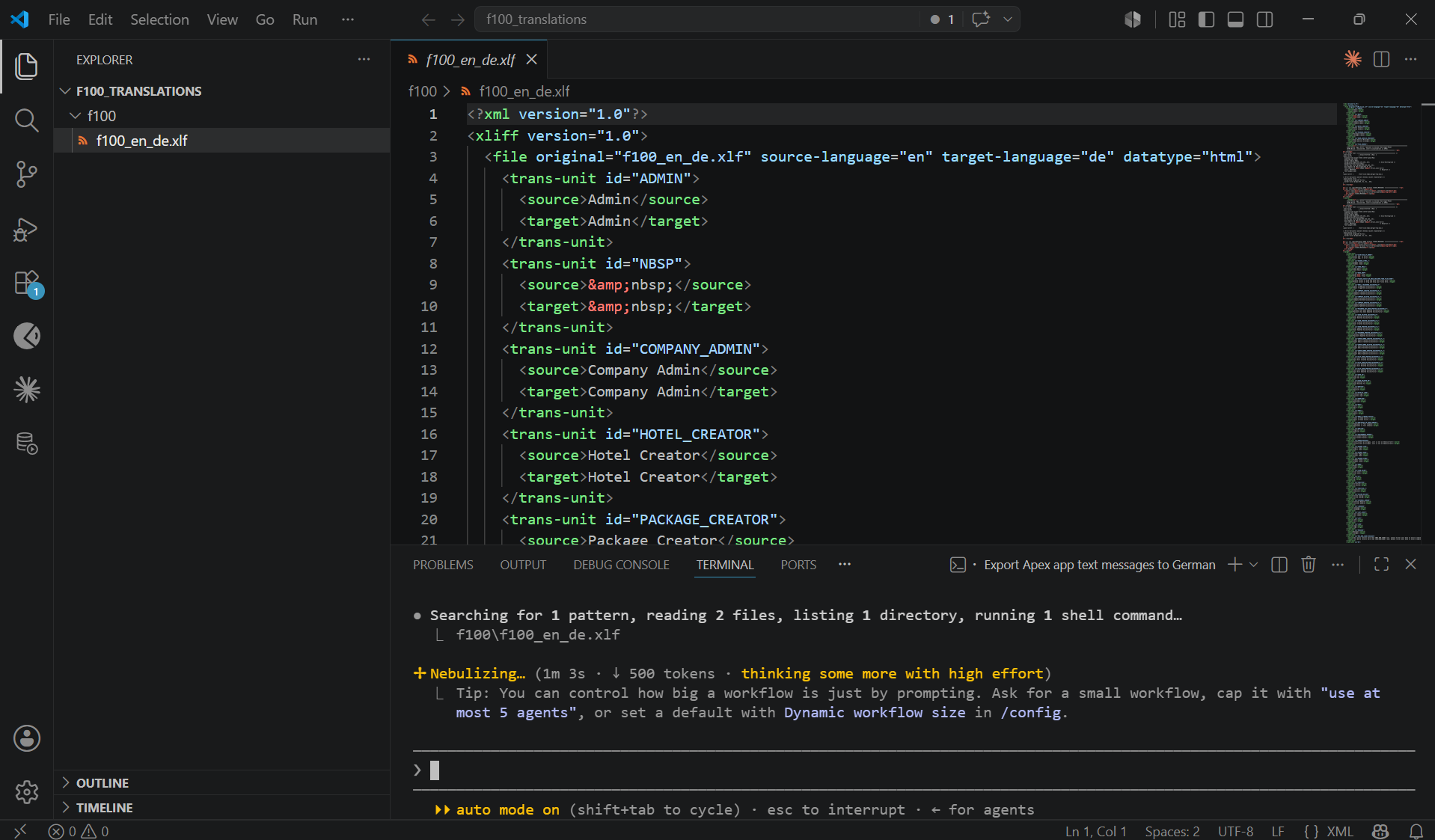
The output was a clean XLIFF file with proper German text in every <target> tag. Substitution syntax intact. No manual cleanup. No missed tags.
This works for any language the model knows well: French, Arabic, Urdu, Japanese, Spanish. If translation quality is business-critical, send the XLIFF to a professional translator instead. The format is universal and every localization tool accepts it.
Importing the Translated File Back Into APEX
Once your translated file is ready, go to Application Translations → Import Text Messages.
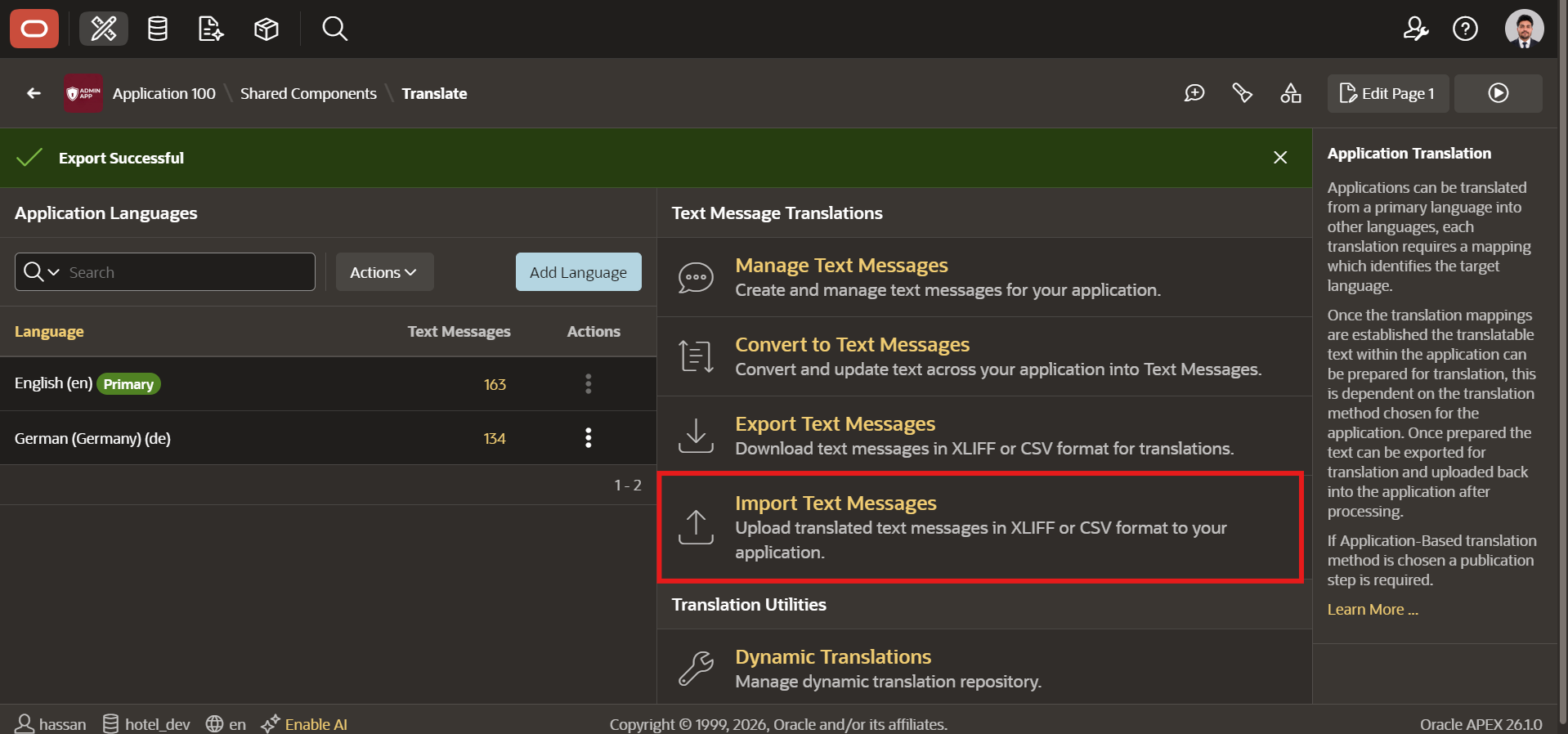
Upload your XLIFF, CSV, or ZIP file.
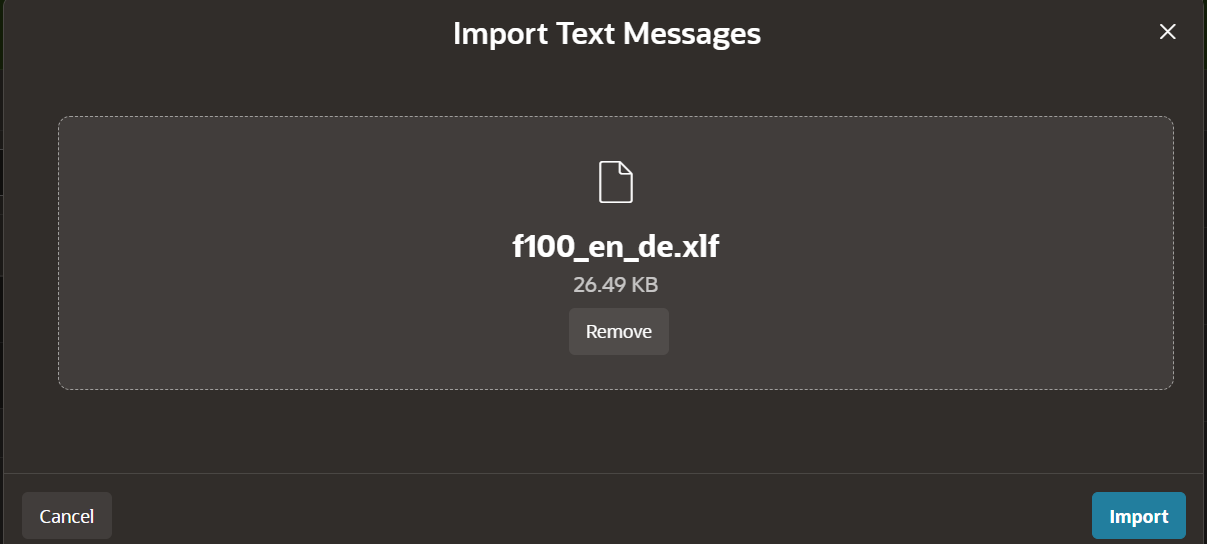
Click Import. APEX updates every text message for that language immediately. Switch your session to German and every label, button, region title, and navigation item reflects the translation.
Step 5: Keep Your Multilingual Oracle APEX App in Sync as It Grows
Apps grow. New pages, new buttons, new labels. The translation workflow has to keep up without turning into a second job.
Running Sync Text Messages When You Add New Pages
New components use inline text by default. That text does not automatically appear in your target language message sets.
To sync, open the three-dot actions menu next to your target language in the Application Languages table and select Sync Text Messages. APEX finds every new translatable string and adds it to the target language, ready for your next translation pass. Takes seconds.
The Text Messages Picker (That Globe Icon in Page Designer)
APEX 26.1 adds a globe icon next to every Page Designer property that supports translatable text. Click it to open the Text Messages Picker, search for an existing key, and insert it as a substitution reference. The resolved text appears immediately below so you can confirm the value before saving.
If you do not see the globe icon, enable it from the Page Designer toolbar under Show → Text Messages Picker.
It also means any text you assign this way automatically joins the translation pipeline the next time you run Sync Text Messages. No extra steps.
Text Message-Based vs Application-Based Translation: Side by Side
| Application-Based | Text Message-Based | |
|---|---|---|
| Number of apps | One per language | One for all languages |
| Maintenance | Update every shadow app separately | Update once, all languages benefit |
| Export formats | XLIFF only | XLIFF, CSV, or ZIP |
| Automation support | Manual seeding required | Full APEX_LANG PL/SQL API |
| Logic changes | Requires re-seeding and re-publishing shadow apps | No extra steps. Logic lives in one app |
| Best for | Legacy setups, complex subscriptions | New apps, modern localization pipelines |
If you are starting a new multilingual Oracle APEX app in 2026, use Text Message-Based. The old method stays available for existing shadow application setups that are not ready to migrate.
Can You Automate Oracle APEX Translation With PL/SQL?
Yes. The APEX_LANG PL/SQL package lets you export and import text messages programmatically. Useful if translation is part of a CI/CD pipeline or if you are pulling files from an external localization platform.
If you already automate workflows around your APEX app, translation slots right into the same pipeline.
Exporting Text Messages Programmatically With APEX_LANG
DECLARE
    l_file CLOB;
BEGIN
    apex_util.set_workspace('MY_WORKSPACE');
    l_file := apex_lang.export_text_messages(
        p_application_id => 100,
        p_lang_code      => 'de',
        p_format         => apex_lang.c_export_format_xliff
    );
END;
This exports German text messages for Application 100 as an XLIFF CLOB. Store it in a table, ship it to an external translation API, or write it to a file. The format constants are c_export_format_xliff, c_export_format_csv, and c_export_format_zip.
Importing Translations as Part of a Deployment Pipeline
BEGIN
    apex_util.set_workspace('MY_WORKSPACE');
    FOR c1 IN (
        SELECT application_id,
               translation_file,
               translation_format
        FROM   my_translation_table
        WHERE  translation_app_id = 100
    ) LOOP
        apex_lang.import_text_messages(
            p_application_id => c1.application_id,
            p_file           => c1.translation_file,
            p_format         => c1.translation_format
        );
    END LOOP;
    COMMIT;
END;
Store your translated files in a database table and loop through them on deployment. Every language gets imported in one run. One note if you are using SQLcl: apex_util.set_workspace is only needed outside App Builder context. Inside an APEX session, skip it.
The official APEX 26.1 translation documentation has the full parameter list if you need it.
Frequently Asked Questions About Oracle APEX Multilingual Apps
What happens if a translation is missing for a language in my Oracle APEX multilingual app?
APEX falls back to the primary language value. If the German translation for a specific text message is missing, users see the English text for that item and German for everything else. The app stays functional. No errors, no blank fields.
Can I still use the old Application-Based method in APEX 26.1?
Yes. Oracle kept it. If your existing app runs on shadow applications, nothing breaks. Text Message-Based is what Oracle recommends for new builds, but you are not forced to migrate anything that is already working.
What file formats does APEX 26.1 support for translation export and import?
XLIFF, CSV, and ZIP for both directions. ZIP files hold one translation file per configured language, so you can export everything in a single download, hand the archive to a localization provider, get it back, and import in one shot.
Do I need a shadow application for each language with Text Message-Based translation?
No. One application handles every language you configure. Shadow apps only come into play if you choose Application-Based translation. With Text Message-Based, they are not part of the picture at all.
How do I set up Oracle APEX if I am starting from scratch?
Oracle Cloud Free Tier is the fastest path. I wrote a step-by-step guide on how to get APEX running on a free cloud instance and build something real with it from day one.
Final Thoughts
Multilingual APEX used to mean managing shadow applications forever. That overhead is gone now.
Text Message-Based translation gives you one app, one codebase, and one place to manage every language. A logic fix does not drag you back into the translation cycle. The XLIFF format means any tool, service, or LLM you already use can handle the actual translation work. And if you build at scale, the APEX_LANG API lets you automate the whole thing.
I ran this on a real hotel management app. 163 text messages. German translation done in under 10 minutes with Claude Code CLI. Import was clean on the first try.
If you have been putting off multilingual support because of the old complexity, this is a good time to revisit it.
Drop your experience in the comments. Which language did you add first? And if something unexpected happened during the conversion step, let me know and I will add it to this guide.
Hassan Raza
An Oracle ACE Associate and Senior Oracle Application Developer at S&H Software Solution. I am specialized in Oracle APEX, SQL, and PL/SQL and writes about Oracle development at oraclewithhassan.com