
When a DBMS_SCHEDULER job is not running, the cause is almost always one of eight things: the job was never enabled, it went BROKEN after too many failures, it runs but fails every time, the repeat_interval does not mean what you think, there is no free job worker (JOB_QUEUE_PROCESSES), the owner lacks a privilege, the schedule is evaluated in a time zone you did not expect, or the job already finished and was dropped. You can tell them apart in a few minutes with three views: USER_SCHEDULER_JOBS (or DBA_SCHEDULER_JOBS), USER_SCHEDULER_JOB_RUN_DETAILS and USER_SCHEDULER_JOB_LOG.
This article reproduces each cause with real jobs in a lab, shows what the views report, and gives the fix. If you are new to the package, start with the DBMS_SCHEDULER tutorial first.
Tested on 31 October 2026: Oracle AI Database 26ai Free (23.26.3) in a Docker container, with Oracle APEX 26.2.0 installed in the same PDB, in a local lab with synthetic data. Jobs were created as a normal schema owner (CREATE JOB privilege only); JOB_QUEUE_PROCESSES was changed temporarily as SYS and restored afterwards. This test does not cover external jobs (executables), chains, windows and Resource Manager plans, RAC instance affinity, or Autonomous Database, where some settings are managed for you.
The triage query: run this first
Most of the eight checks show up in one query. ENABLED, STATE, RUN_COUNT, FAILURE_COUNT and the two limits tell you which section of this article to read.
select job_name, enabled, state, run_count, failure_count,
       max_failures, max_runs
from   user_scheduler_jobs
where  job_name like 'A03%'
order  by job_name;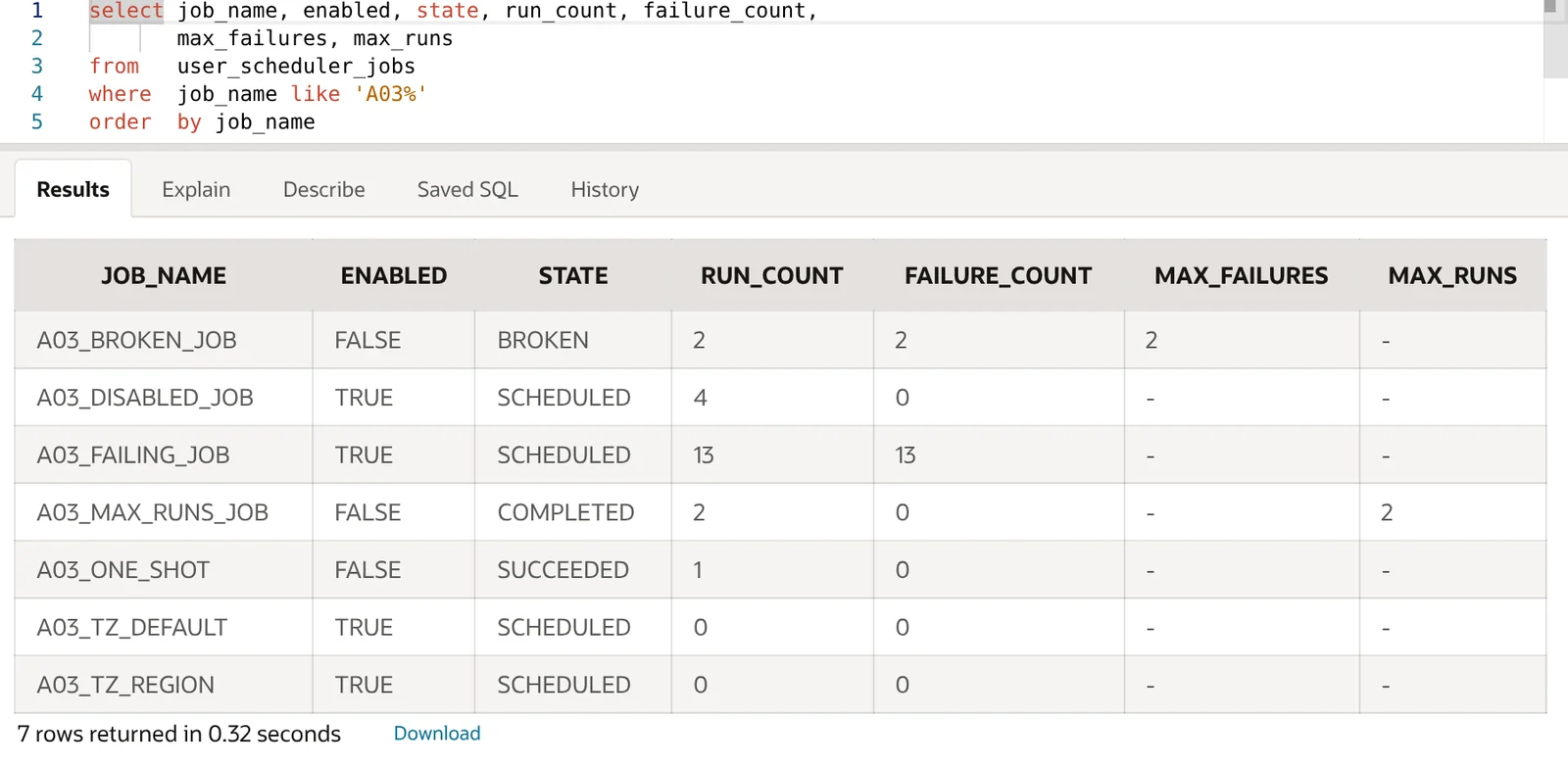
| What you see | Likely cause | Check |
|---|---|---|
ENABLED = FALSE, STATE = DISABLED, RUN_COUNT = 0 |
Never enabled | 1 |
STATE = BROKEN |
max_failures reached |
2 |
FAILURE_COUNT rising with RUN_COUNT |
The action fails | 3 |
NEXT_RUN_DATE in an odd month or minute |
Calendar string | 4 |
SCHEDULED, NEXT_RUN_DATE in the past |
No free job worker | 5 |
| Fails with ORA-27486 or PLS-00201 | Privileges | 6 |
| Runs, but hours off | Time zone | 7 |
COMPLETED, SUCCEEDED, or no row at all |
Already finished | 8 |
If you need to see jobs owned by other schemas, use DBA_SCHEDULER_JOBS (needs a DBA-type privilege) or ALL_SCHEDULER_JOBS; the columns are the same plus OWNER.
The lab setup
Every job in this article writes a row into a small log table through one procedure, so you can see whether a run really happened:
create table a03_job_log (
  id      number generated always as identity primary key,
  job     varchar2(30),
  logged  timestamp with time zone default systimestamp
);

create or replace procedure a03_log_run(p_job in varchar2) is
begin
  insert into a03_job_log (job) values (p_job);
  commit;
end;
/
Check 1: the job was never enabled
DBMS_SCHEDULER.CREATE_JOB creates jobs disabled unless you pass enabled => true. This is the single most common reason for a job that “does nothing”.
begin
  dbms_scheduler.create_job(
    job_name        => 'A03_DISABLED_JOB',
    job_type        => 'PLSQL_BLOCK',
    job_action      => 'begin a03_log_run(''A03_DISABLED_JOB''); end;',
    start_date      => systimestamp,
    repeat_interval => 'FREQ=MINUTELY;INTERVAL=1');
end;
/

JOB_NAME             ENABLED STATE       RUN_COUNT NEXT_RUN
-------------------- ------- ---------- ---------- --------
A03_DISABLED_JOB     FALSE   DISABLED            0
NEXT_RUN_DATE is empty because a disabled job has no next run. The fix is one call:
exec dbms_scheduler.enable('A03_DISABLED_JOB')

JOB_NAME           ENABLED STATE
------------------ ------- ----------
A03_DISABLED_JOB   TRUE    SCHEDULED
Jobs can also become disabled later: max_runs or end_date reached (check 8), max_failures reached (check 2), or a dependent object such as a program being dropped or changed. Whatever the reason, ENABLED is the first column to look at.
Check 2: the job is BROKEN
If you set max_failures, the Scheduler stops the job once that many consecutive runs have failed. The lab job below runs every 20 seconds and inserts into a table that does not exist, with max_failures set to 2:
begin
  dbms_scheduler.create_job(
    job_name        => 'A03_BROKEN_JOB',
    job_type        => 'PLSQL_BLOCK',
    job_action      => 'begin execute immediate ''insert into a03_no_such_table values (1)''; end;',
    start_date      => systimestamp,
    repeat_interval => 'FREQ=SECONDLY;INTERVAL=20',
    enabled         => false);
  dbms_scheduler.set_attribute('A03_BROKEN_JOB', 'max_failures', 2);
  dbms_scheduler.enable('A03_BROKEN_JOB');
end;
/
After two failed runs the job showed ENABLED = FALSE and STATE = BROKEN, and USER_SCHEDULER_JOB_LOG recorded the moment it happened:
select job_name, operation, status, to_char(log_date,'HH24:MI:SS') logged
from   user_scheduler_job_log
where  job_name = 'A03_BROKEN_JOB' order by log_id;

JOB_NAME         OPERATION  STATUS    LOGGED
---------------- ---------- --------- --------
A03_BROKEN_JOB   RUN        FAILED    14:29:43
A03_BROKEN_JOB   RUN        FAILED    14:33:49
A03_BROKEN_JOB   BROKEN               14:33:49
Fix the underlying error first (check 3 shows how to find it), then enable the job again. In the lab, enabling reset FAILURE_COUNT to 0 and the job ran on its next interval:
begin
  dbms_scheduler.set_attribute('A03_BROKEN_JOB', 'job_action',
    'begin a03_log_run(''A03_BROKEN_JOB''); end;');
  dbms_scheduler.enable('A03_BROKEN_JOB');
end;
/

JOB_NAME         ENABLED STATE      FAILURE_COUNT
---------------- ------- ---------- -------------
A03_BROKEN_JOB   TRUE    SCHEDULED              0
Check 3: the job runs, but fails every time
A job without max_failures keeps its SCHEDULED state while every run fails, so from the outside it looks as if “nothing happens”. The error is in USER_SCHEDULER_JOB_RUN_DETAILS:
select job_name, status, error#,
       to_char(actual_start_date, 'HH24:MI:SS') as started,
       errors
from   user_scheduler_job_run_details
where  job_name = 'A03_FAILING_JOB'
and    actual_start_date > systimestamp - interval '1' minute
order  by log_id;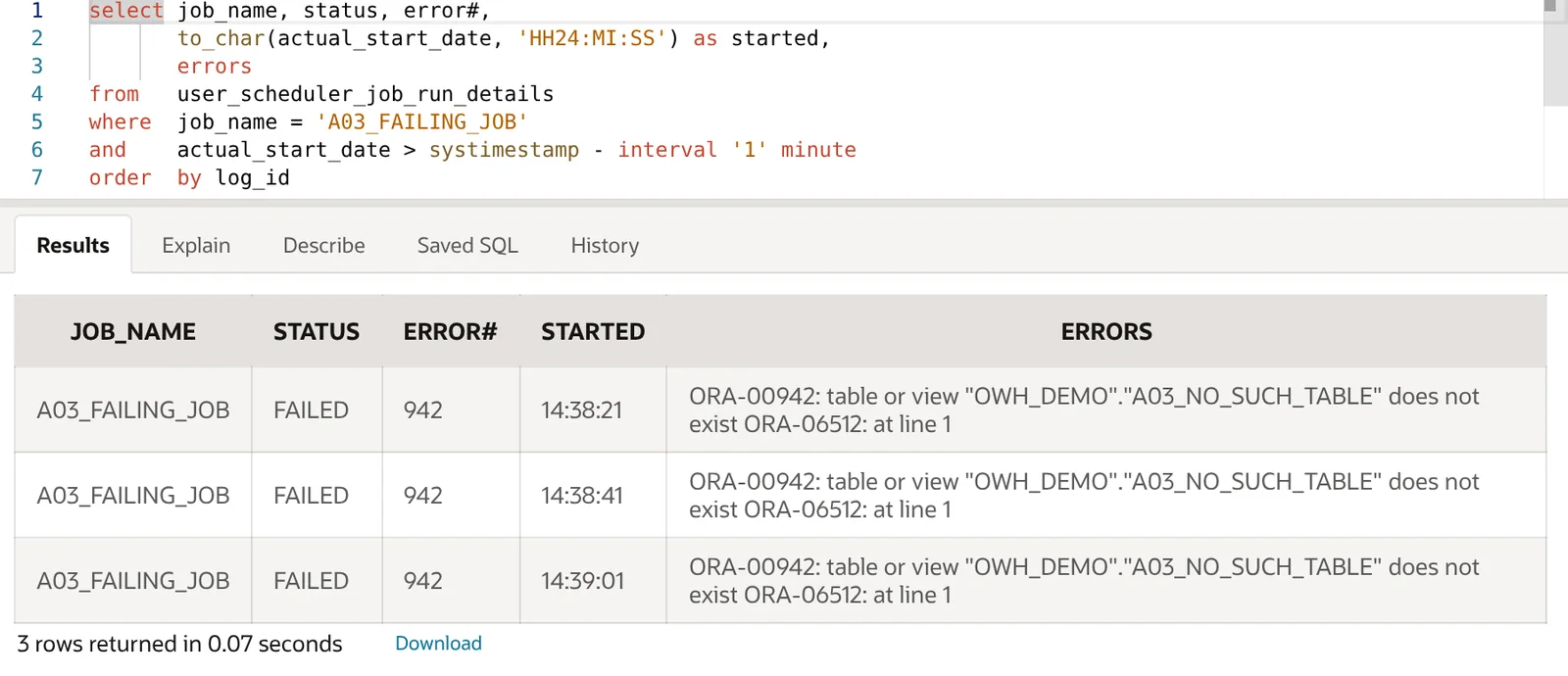
ERRORS holds the error stack and ADDITIONAL_INFO often repeats it with more context.
The fastest way to debug the action itself is to run the job in your own session. use_current_session => true raises the error straight back to you instead of hiding it in a log:
exec dbms_scheduler.run_job('A03_FAILING_JOB', use_current_session => true)

ERROR at line 1:
ORA-00942: table or view "OWH_DEMO"."A03_NO_SUCH_TABLE" does not exist
ORA-06512: at line 1
ORA-06512: at "SYS.DBMS_ISCHED", line 262
ORA-06512: at "SYS.DBMS_SCHEDULER", line 637
The run-details rows are kept according to the job’s logging level and the Scheduler’s LOG_HISTORY attribute (30 days in this lab), so old failures eventually disappear.
Check 4: the repeat_interval is not what you meant
An invalid calendar string fails when you create the job, so that case is easy:
repeat_interval => 'FREQ=DAILY;BYHOUR=25'
ORA-27414: Invalid BYHOUR clause value

repeat_interval => 'every 5 minutes'
ORA-27465: invalid value every 5 minutes for attribute REPEAT_INTERVAL
ORA-27418: syntax error in repeat interval or calendar
The dangerous cases are strings that are valid but schedule something else. Two of them caught in the lab:
BYMONTHDAY=31 skips short months
DBMS_SCHEDULER.EVALUATE_CALENDAR_STRING returns the next run date for any calendar string, so you can list future runs before you create the job:
declare
  l_start timestamp with time zone := timestamp '2026-10-01 00:00:00 +00:00';
  l_after timestamp with time zone := l_start;
  l_next  timestamp with time zone;
begin
  for i in 1 .. 5 loop
    dbms_scheduler.evaluate_calendar_string(
      'FREQ=MONTHLY;BYMONTHDAY=31;BYHOUR=6;BYMINUTE=0;BYSECOND=0',
      l_start, l_after, l_next);
    dbms_output.put_line(to_char(l_next, 'YYYY-MM-DD HH24:MI Dy'));
    l_after := l_next;
  end loop;
end;
/
BYMONTHDAY=31 |
BYMONTHDAY=-1 |
|---|---|
| 2026-10-31 06:00 Sat | 2026-10-31 06:00 Sat |
| 2026-12-31 06:00 Thu | 2026-11-30 06:00 Mon |
| 2027-01-31 06:00 Sun | 2026-12-31 06:00 Thu |
| 2027-03-31 06:00 Wed | 2027-01-31 06:00 Sun |
| 2027-05-31 06:00 Mon | 2027-02-28 06:00 Sun |
A “month-end” job written as BYMONTHDAY=31 silently does not run in November, February, April, June or September. Use BYMONTHDAY=-1 for the last day of the month.
Missing BYMINUTE and BYSECOND
Any part you leave out is taken from start_date. With a start date of 14:37:22, the lab returned:
FREQ=DAILY;BYHOUR=6                       -> 2026-11-01 06:37:22
FREQ=DAILY;BYHOUR=6;BYMINUTE=0;BYSECOND=0 -> 2026-11-01 06:00:00
If someone checks the job at 06:05 they will think it did not run. Always spell out BYMINUTE=0;BYSECOND=0 for fixed-time jobs. The free DBMS_SCHEDULER Interval Builder writes these strings for you and previews the next runs, which catches both mistakes before the job exists.
Check 5: no job worker is available (JOB_QUEUE_PROCESSES)
Scheduler and DBMS_JOB jobs are executed by job workers, and JOB_QUEUE_PROCESSES caps how many can exist per CDB or PDB. If it is 0, no job runs on its schedule. In the lab, as SYS in the PDB:
alter system set job_queue_processes = 0 scope = memory;A one-off job created after that stayed in SCHEDULED with a next run time that had already passed:
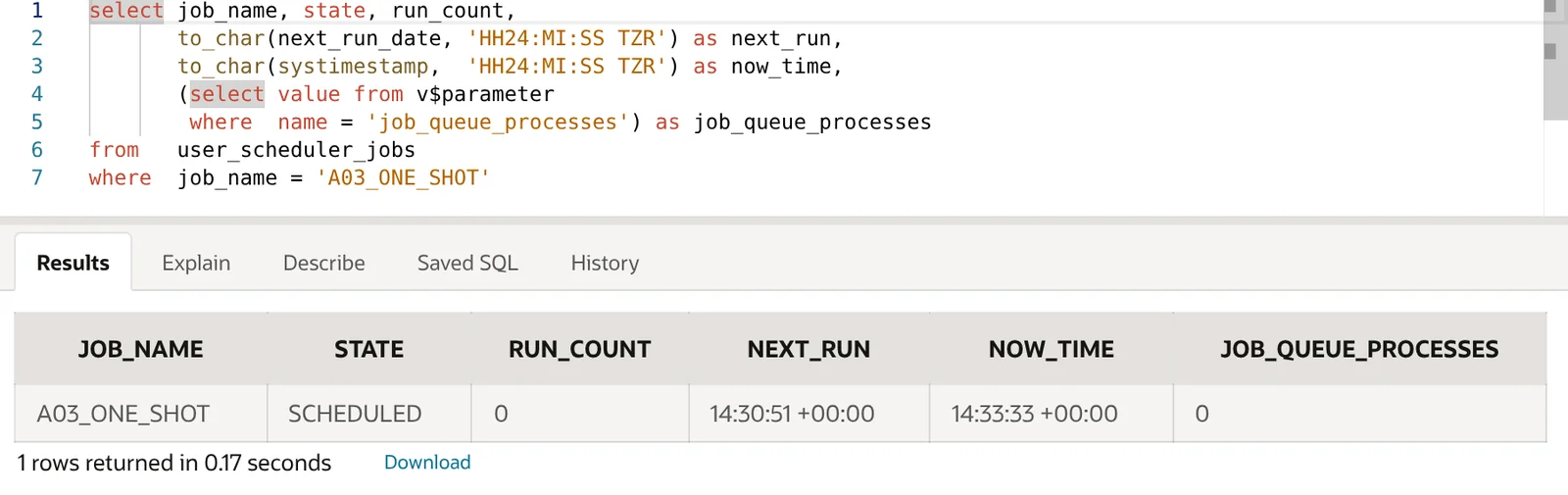
A normal schema user could read the parameter in this lab with select value from v$parameter where name = 'job_queue_processes'; in a locked-down database you may need your DBA to check it.
Two details from the test are worth knowing:
run_job(..., use_current_session => true)still worked with no workers, because it runs in your session. But it did not replace the scheduled run: when workers were available again, the overdue scheduled run also executed, so the procedure ran twice. Keep that in mind for actions that are not safe to repeat.- A value of 1 is not much better on a busy database. In this container the parameter was set to 1, and the APEX background-process job (
ORACLE_APEX_BG_PROCESSES) held that one worker for about 1 minute 58 seconds of every 2 minutes. A user job created at 14:41:45 did not start until 14:43:52. Raising the value only in the PDB to 4 did not help while the CDB root was still at 1; jobs only ran alongside the APEX job once the root value was raised too. That is a lab observation on 23.26.3, not a documented rule, but it is the first thing to check in a container database.
The lab was restored to its original value of 1 after the test. Also check the global SCHEDULER_DISABLED attribute if a DBA may have switched the Scheduler off; it is visible in ALL_SCHEDULER_GLOBAL_ATTRIBUTE (in this lab the query returned no row for it, meaning it was not set).
Check 6: the owner lacks a privilege
Creating a job needs CREATE JOB. Without it the call fails immediately. A test user with only CREATE SESSION and CREATE PROCEDURE got:
ORA-27486: insufficient privileges
ORA-06512: at "SYS.DBMS_ISCHED", line 191
ORA-06512: at "SYS.DBMS_SCHEDULER", line 332
The quieter problem is a job that is created fine but fails at run time because its owner cannot see the code it calls. After granting CREATE JOB, the same user created a job that called OWH_DEMO.A03_LOG_RUN without an execute grant. Every run failed, and the reason was only in DBA_SCHEDULER_JOB_RUN_DETAILS:
OWNER      JOB_NAME             STATUS   ERROR# ERRORS
---------- -------------------- -------- ------ ----------------------------------------
A03_NOPRIV A03_CROSS_SCHEMA_JOB FAILED     6550 ORA-06550: line 1, column 763:
                                                PLS-00201: identifier 'OWH_DEMO.A03_LOG_RUN'
                                                must be declared
After grant execute on a03_log_run to a03_nopriv, the next runs showed SUCCEEDED. Grant object privileges directly to the job owner. Other privileges you may meet: CREATE EXTERNAL JOB for executables, CREATE ANY JOB to create jobs in another schema, and MANAGE SCHEDULER for windows, job classes and global attributes (the lab owner got ORA-27486 calling GET_SCHEDULER_ATTRIBUTE for that reason).
Check 7: the time zone is not the one you expected
If you do not pass a start_date, the calendar is evaluated in the Scheduler’s DEFAULT_TIMEZONE, not your session time zone. Check it first:
select attribute_name, value
from   all_scheduler_global_attribute
where  attribute_name = 'DEFAULT_TIMEZONE';

ATTRIBUTE_NAME       VALUE
-------------------- --------------------
DEFAULT_TIMEZONE     PST8PDT
The lab session and database time zones were both +00:00, but the Scheduler default was PST8PDT. Two jobs with the same FREQ=DAILY;BYHOUR=9;BYMINUTE=0;BYSECOND=0 string: one without start_date, one with a start date in an explicit region.
dbms_scheduler.create_job(
  job_name        => 'A03_TZ_REGION',
  job_type        => 'PLSQL_BLOCK',
  job_action      => 'begin a03_log_run(''A03_TZ_REGION''); end;',
  start_date      => to_timestamp_tz('2026-11-01 09:00:00 Asia/Karachi',
                                     'YYYY-MM-DD HH24:MI:SS TZR'),
  repeat_interval => 'FREQ=DAILY;BYHOUR=9;BYMINUTE=0;BYSECOND=0',
  enabled         => true);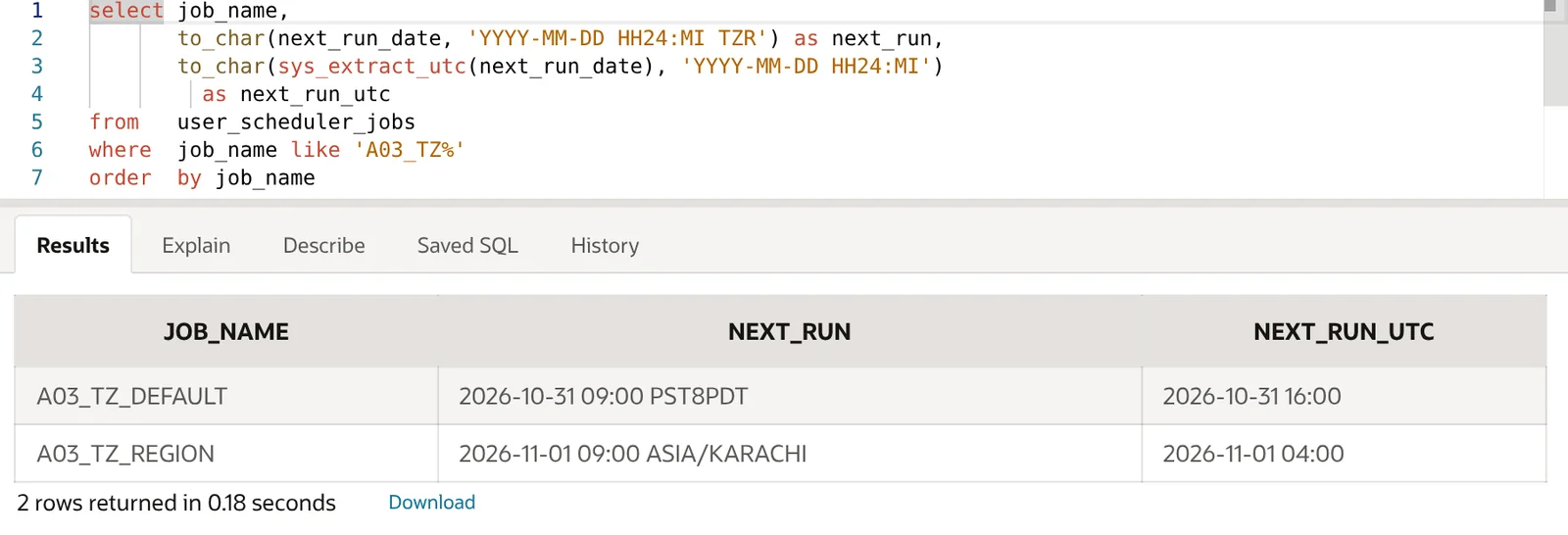
A developer in Karachi expecting 09:00 local time would see the first job fire at 21:00. Pass a start_date with a named region (TZR), not a fixed offset such as +05:00, so daylight saving changes are followed where the region has them. A DBA can also change the default with DBMS_SCHEDULER.SET_SCHEDULER_ATTRIBUTE('default_timezone', ...), which needs MANAGE SCHEDULER.
Check 8: the job already finished
A job with no repeat_interval runs once. With the default auto_drop => true it is then dropped, so it disappears from USER_SCHEDULER_JOBS and people assume it never existed. The job log still has it:
select job_name, operation, status, to_char(log_date,'HH24:MI:SS') logged
from   user_scheduler_job_log
where  job_name in ('A03_VANISHING_JOB','A03_MAX_RUNS_JOB') order by log_id;

JOB_NAME             OPERATION  STATUS     LOGGED
-------------------- ---------- ---------- --------
A03_VANISHING_JOB    RUN        SUCCEEDED  14:35:48
A03_MAX_RUNS_JOB     RUN        SUCCEEDED  14:35:48
A03_MAX_RUNS_JOB     RUN        SUCCEEDED  14:35:51
A03_MAX_RUNS_JOB     COMPLETED             14:35:51
A repeating job with max_runs or an end_date stops with STATE = COMPLETED and ENABLED = FALSE (visible in the triage screenshot for A03_MAX_RUNS_JOB, created with auto_drop => false). A one-off job with auto_drop => false ends as SUCCEEDED. To run it again, set a new start_date or clear the limit, then enable it.
Common mistakes
- Looking in the wrong schema.
USER_SCHEDULER_JOBSonly shows jobs you own. A job created by a deployment user lives in that user’s schema. - Blaming a missing COMMIT. In this lab a PL/SQL block job that inserted a row without
COMMITstill left the row committed after a successful run. Commit explicitly anyway, but look elsewhere if the data is missing. - Testing with
run_jobonly. A manual run in your session proves the code works, not that the schedule, privileges in a background session, or job workers are fine. - Using offsets instead of regions in
start_date, then losing an hour at a daylight saving change. - Ignoring
LOG_HISTORY. If the run details are empty for an old job, they may simply have been purged.
For the full reference, see DBMS_SCHEDULER in the PL/SQL Packages and Types Reference, Scheduling Jobs with Oracle Scheduler and ALL_SCHEDULER_JOB_RUN_DETAILS.
FAQ
How do I check if a DBMS_SCHEDULER job ran?
Query USER_SCHEDULER_JOB_RUN_DETAILS (or DBA_) for the job name. Each run has a row with STATUS, ACTUAL_START_DATE, RUN_DURATION and, for failures, ERROR# and ERRORS. RUN_COUNT and LAST_START_DATE in USER_SCHEDULER_JOBS give a quick summary.
Why is my job SCHEDULED but the next run date is in the past?
The job is due but nothing has picked it up. Check JOB_QUEUE_PROCESSES (0 stops all jobs; a low value can make jobs wait behind others), whether the Scheduler is disabled, and whether long-running jobs are holding the workers (DBA_SCHEDULER_RUNNING_JOBS).
How do I restart a BROKEN job?
Fix the error shown in the run details, then call DBMS_SCHEDULER.ENABLE. In the lab this reset FAILURE_COUNT to 0 and the job resumed on its schedule.
Does DBMS_SCHEDULER use the session time zone?
It uses the time zone of start_date. If you omit start_date, it uses the Scheduler’s DEFAULT_TIMEZONE attribute, which can differ from both the session and the database time zone.
Run the triage query, read the state, and the right check is usually obvious within a minute.