
Oracle APEX 26.2 new features fall into a few groups: APEXlang workflow changes, AI agent settings, Interactive Report improvements, workflow and task options, security integrations and chart changes. This article goes through the ones you can try on a clean APEX 26.2.0 install without a cloud tenancy or an AI subscription. Five are checked in detail: Interactive Report key phrases, APEXlang file-level import with SQLcl, the new chart Lazy Loading property, the application lock and working copy APIs, and the Reasoning Effort and Provider API settings for AI.
For each feature you get what it does, where to find it, what happened in the lab and when it is worth using. A separate section lists the release-note items that were not tested here, so you can see exactly what this article covers. For platform requirements and known issues before upgrading, use the companion Oracle APEX 26.2 upgrade checklist; that material is not repeated here.
Tested on 31 October 2026: Oracle APEX 26.2.0 on Oracle AI Database 26ai Free (23.26.3), ORDS 26.3 and SQLcl 26.3.0, in a local lab with synthetic data. No Generative AI service was reachable, so no AI request was sent. This test does not cover Oracle Cloud, Autonomous AI Database, Deep Data Security, upgraded applications from earlier releases, or production workloads.
Tested here vs. listed in the release notes
The starting point was Oracle’s APEX 26.2 New Features and Changed Behavior pages.
| Feature | Status in this lab |
|---|---|
| Interactive Report key phrases (no LLM) | Tested at runtime |
| Automatic Interactive Report Reset button and new search bar | Tested at runtime and in Component Settings |
APEXlang file-level import (SQLcl -files) |
Tested end to end |
| Chart Lazy Loading property | Checked in Page Designer and dictionary views |
LOCK_APPLICATION, UNLOCK_APPLICATION, CREATE_WORKING_COPY |
Tested in PL/SQL |
| AI Agent Reasoning Effort, Provider API setting | Configured and stored only; no provider called |
| Natural-language computed columns, AI navigation links, Deep Data Security, Resource Principal, workflow and task features | Not tested (see the list near the end) |
Lab setup
All objects use the A01_ prefix. One table holds 60 synthetic orders:
create table a01_orders (
  order_id      number generated always as identity primary key,
  customer_name varchar2(60)  not null,
  category_name varchar2(30)  not null,
  status        varchar2(20)  not null,
  sale_date     date          not null,
  amount        number(10,2)  not null,
  description   varchar2(200)
);
insert into a01_orders (customer_name, category_name, status, sale_date, amount, description)
select 'Customer ' || to_char(mod(level, 12) + 1, 'fm00'),
       case mod(level, 4) when 0 then 'Hardware' when 1 then 'Software' when 2 then 'Services' else 'Training' end,
       case mod(level, 3) when 0 then 'Completed' when 1 then 'Pending' else 'Cancelled' end,
       date '2026-01-01' + mod(level * 7, 300),
       round(50 + mod(level * 37, 950), 2),
       'Synthetic order ' || level
from dual connect by level <= 60;
commit;
An application named APEX 26.2 New Features Lab (ID 26201) was created with the quick Create Application option. Then the Create Page wizard added an Interactive Report page (page 2) and a Bar chart page (page 4), both based on A01_ORDERS.
1. Interactive Report key phrases work without AI
What it does: the Interactive Report search bar now recognises short commands such as filter status by Completed or sort by sale date descending. APEX handles them itself, without calling an AI service. Oracle states that key phrases work in all Interactive Reports, whether or not Natural Language is enabled.
Where to find it: nothing to configure. Run any Interactive Report page and type into the search bar. In this lab the workspace had no AI service at all (select count(*) from apex_workspace_ai_services returned 0).
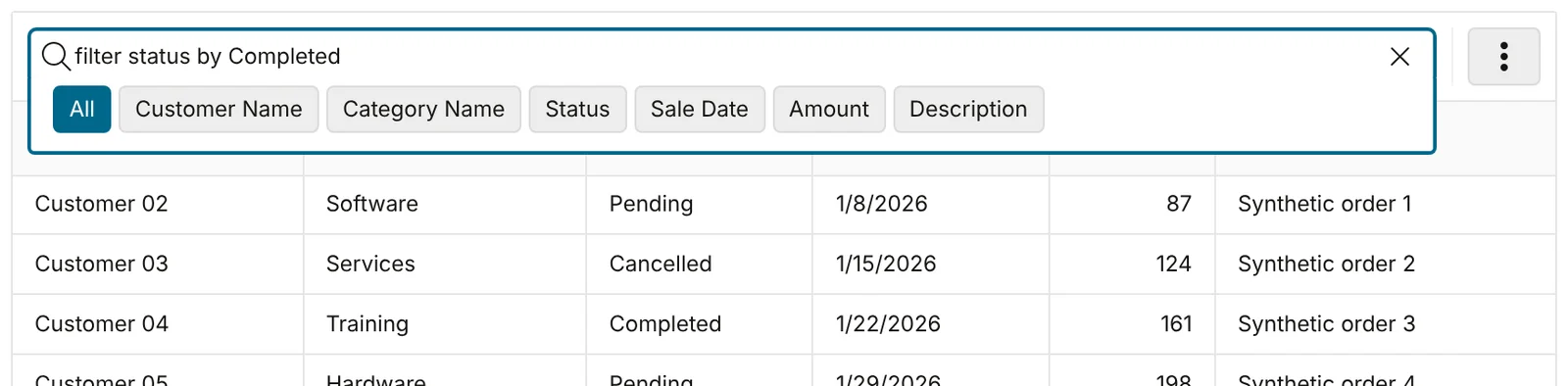
Three phrases were entered one after another: filter status by Completed, sort by sale date descending and break on category name. Each was applied as a normal report setting. The browser’s Ajax requests used the widget action KEY_PHRASE_OR_QUICK_FILTER.
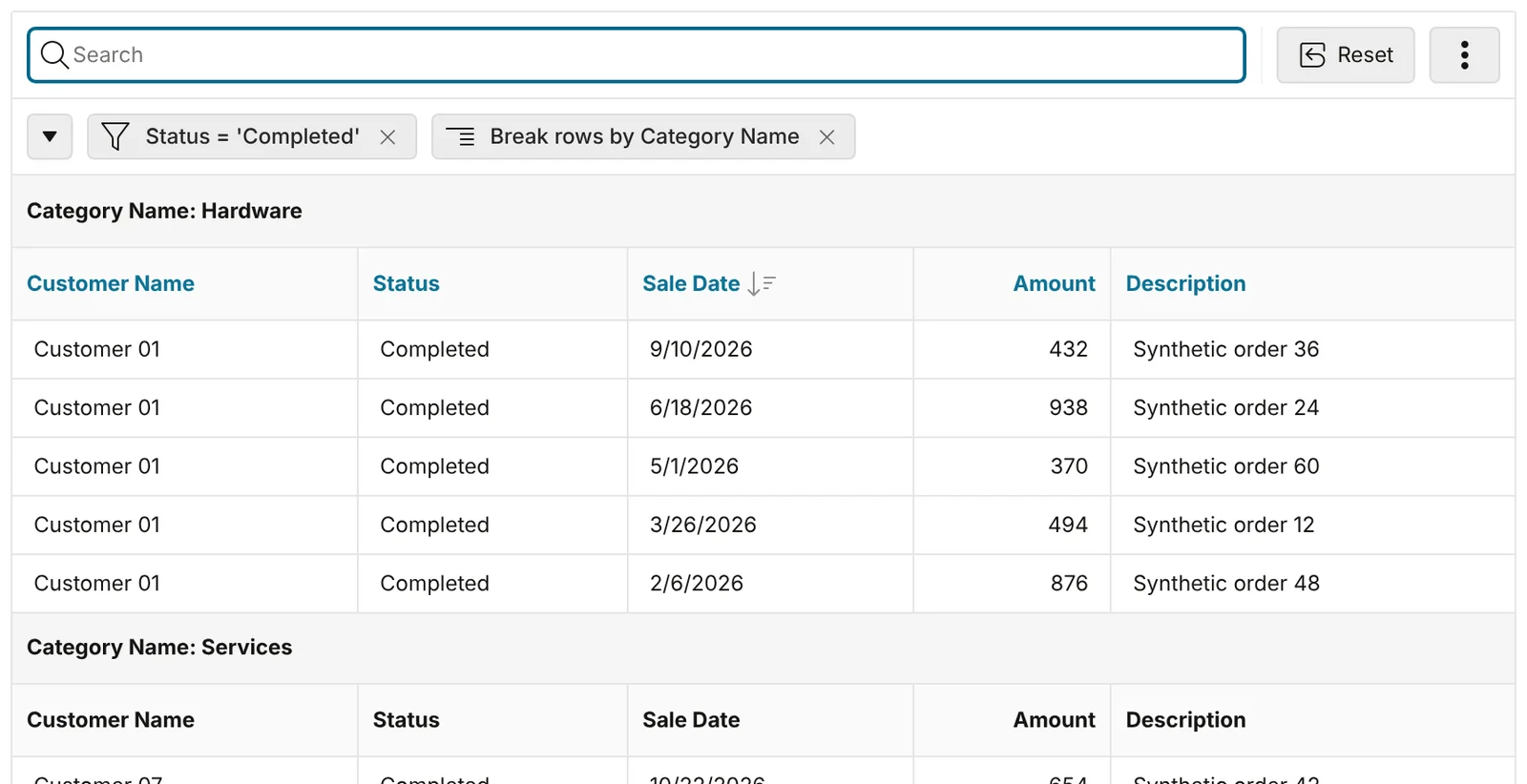
Here is what each phrase did in this lab:
| Typed in the search bar | Result |
|---|---|
filter status by Completed |
Filter Status = 'Completed' |
filter status by completed |
Filter Status = 'completed', 0 rows (the value is case-sensitive) |
sort by sale date descending |
Sort on Sale Date, descending |
break on category name |
Control break on Category Name |
pivot category name by status |
Pivot view, counts per status |
hide description |
Description column hidden |
search customer name for 05 |
Filter Customer Name contains '05' |
search customer name for Customer 05 |
Not recognised: row text search for the whole phrase, 0 rows |
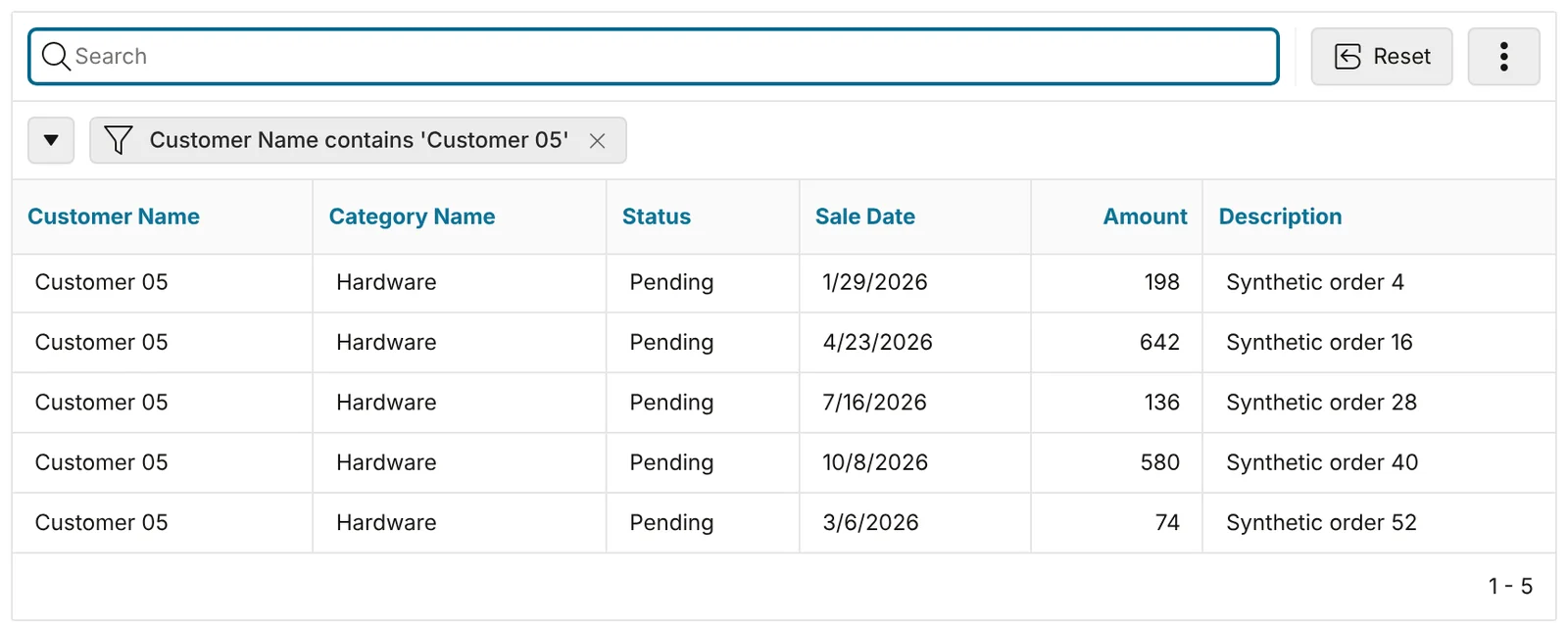
search customer name for "Customer 05" |
Filter Customer Name contains 'Customer 05' |
search customer name for 'Customer 05' |
Not recognised (single quotes did not work) |
show me completed orders |
Not a key phrase: ordinary row text search |
reset |
Report reset to the default |
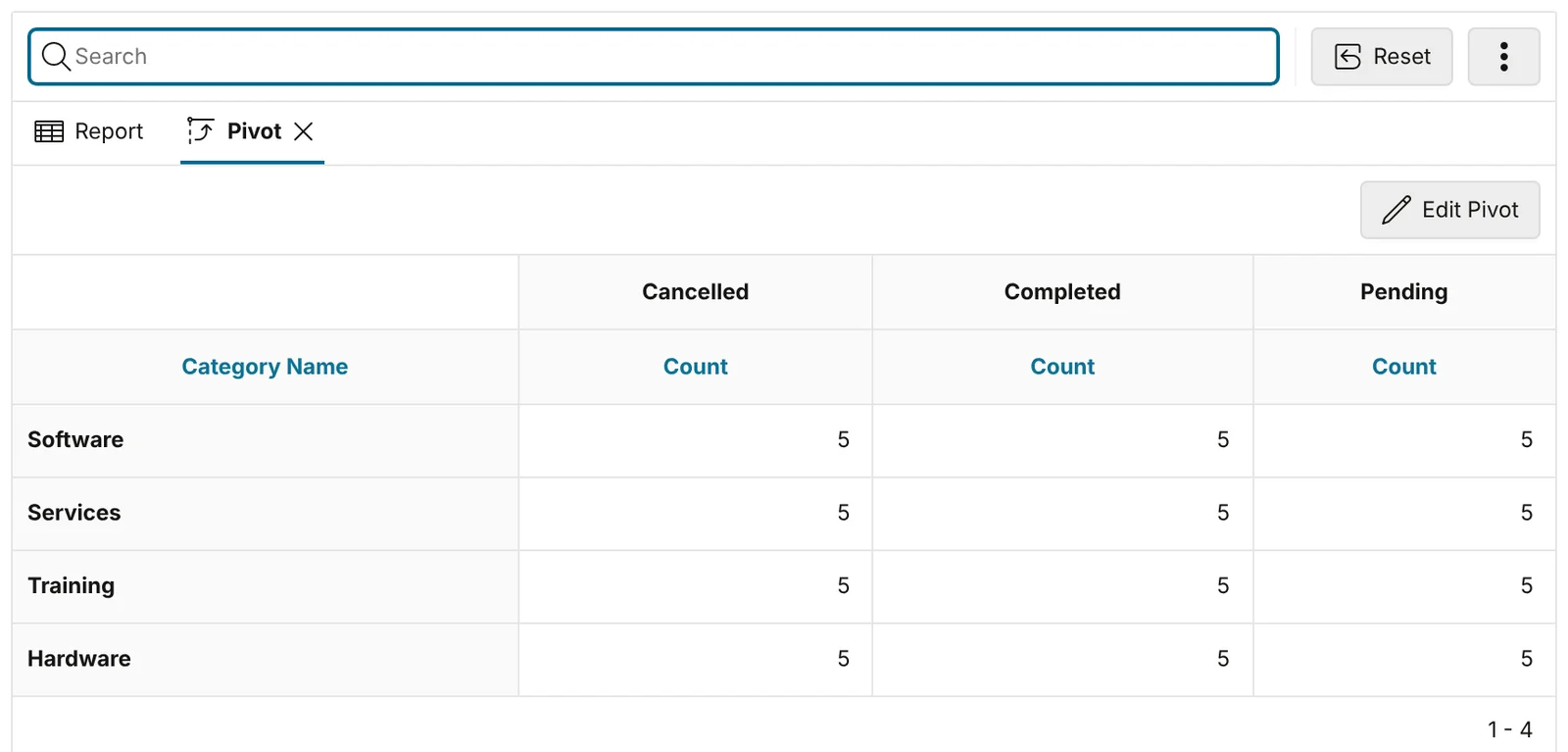
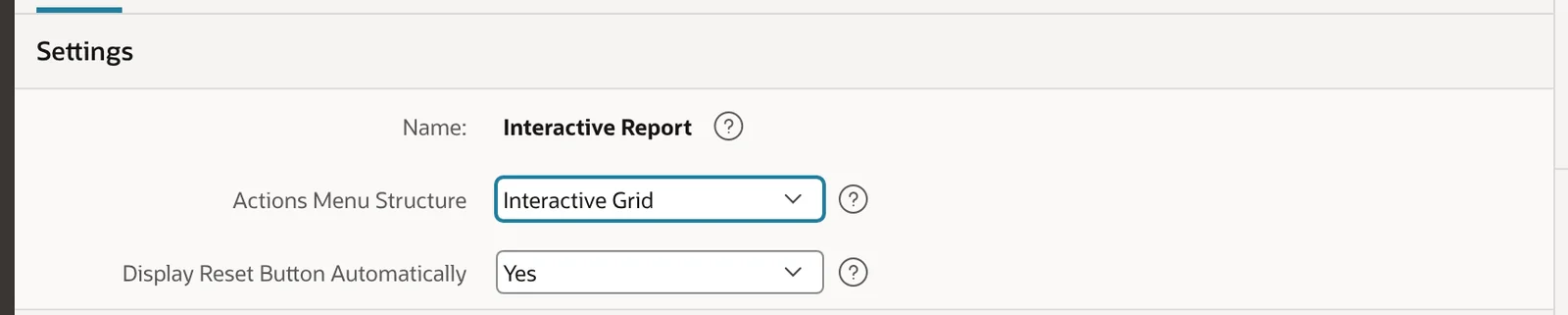
pivot category name by status produced a pivot with one count column per status.The automatic Reset button. A Reset button appeared next to the search bar as soon as the report changed. It is controlled in Shared Components > Component Settings > Interactive Report > Display Reset Button Automatically. In this new 26.2 application it was set to Yes. According to Oracle it defaults to No for existing applications. The upgrade utility can also turn off developer-made reset buttons that match certain rules.
When to use it: for power users who already know the column names. Tell them three things the lab showed: values are case-sensitive for filter, multi-word values need double quotes, and an unrecognised phrase becomes a plain text search without any error message.
2. APEXlang file-level import with SQLcl
What it does: lets you import one or more APEXlang files into an existing application instead of re-importing the whole app. Oracle supports it only through SQLcl and the SQL Developer extension for VS Code (not App Builder), and recommends it for development environments only. If APEXlang is new to you, start with the APEXlang tutorial.
Where to find it: SQLcl 26.3 adds a -files option to apex import. First the application was exported:
SQL> apex export -applicationid 26201 -exptype APEXLANG
Exporting Workspace OWH_LAB - application 26201:APEX 26.2 New Features Lab
File apex-26-2-new-features-lab/application.apx created
The export included a deployments/default.json file. Deployment files are also new in 26.2: they hold deployment values for the application, workspace, subscriptions and theme, separate from the .apx source. In this export it contained only the application ID and the session state protection checksum salt. Two files were then edited locally. On page 4 the chart region was renamed, its height changed and lazy loading switched on. On page 2 the title was changed, but that file was deliberately left out of the import:
--- pages/p00004-sales-chart.apx
     region sales-chart (
-        name: Sales Chart
+        name: Sales by Category
...
         chartLayout {
-            height: 400
+            height: 320
+        }
+        performance {
+            lazyLoading: true
         }

--- pages/p00002-orders.apx
-    title: Orders
+    title: Orders (local edit, not imported)
Validate first, then import only the page 4 file:
SQL> apex validate -input ./apex-26-2-new-features-lab
Validation successful.

SQL> apex import -id 26201 -input ./apex-26-2-new-features-lab -files ./apex-26-2-new-features-lab/pages/p00004-sales-chart.apx
Importing application ID: 26201 into workspace: OWH_LAB
Import successful.
The check query (trimmed output, before and after the import):
select page_id, page_title, last_updated_on
from   apex_application_pages
where  application_id = 26201 and page_id in (2, 4)
order  by page_id;

select r.region_name, c.chart_height, c.lazy_loading
from   apex_application_page_regions r
join   apex_application_page_charts  c on c.region_id = r.region_id
where  r.application_id = 26201 and r.page_id = 4;

-- before
   PAGE_ID PAGE_TITLE      LAST_UPD
---------- --------------- --------
         2 Orders          14:23:54
         4 Sales Chart     14:28:09

REGION_NAME          CHART_HEIG LAZY_LOADING
-------------------- ---------- ------------
Sales Chart          400        No

-- after
   PAGE_ID PAGE_TITLE      LAST_UPD
---------- --------------- --------
         2 Orders          14:23:54
         4 Sales Chart

REGION_NAME          CHART_HEIG LAZY_LOADING
-------------------- ---------- ------------
Sales by Category    320        Yes
Page 2 kept its server title and its last-updated time, so the local edit to that file was ignored. Only page 4 changed (its last-updated value came back empty after the import). The application alias was unchanged and the app still had one current theme. Note that this test imported a page file, not application.apx; the upgrade checklist covers the known issue with importing that file on its own.
When to use it: fast development loops, especially when you or an AI coding tool edit one page at a time. Keep full-application imports for test and production deployments, as Oracle recommends.
3. Chart Lazy Loading property
What it does: decides whether chart data is fetched during server-side page rendering or asynchronously once the region becomes visible. Oracle notes that lazy loading stays enabled for existing applications so their behaviour does not change.
Where to find it: Page Designer, select the chart region, open the Attributes tab, then Performance > Lazy Loading.
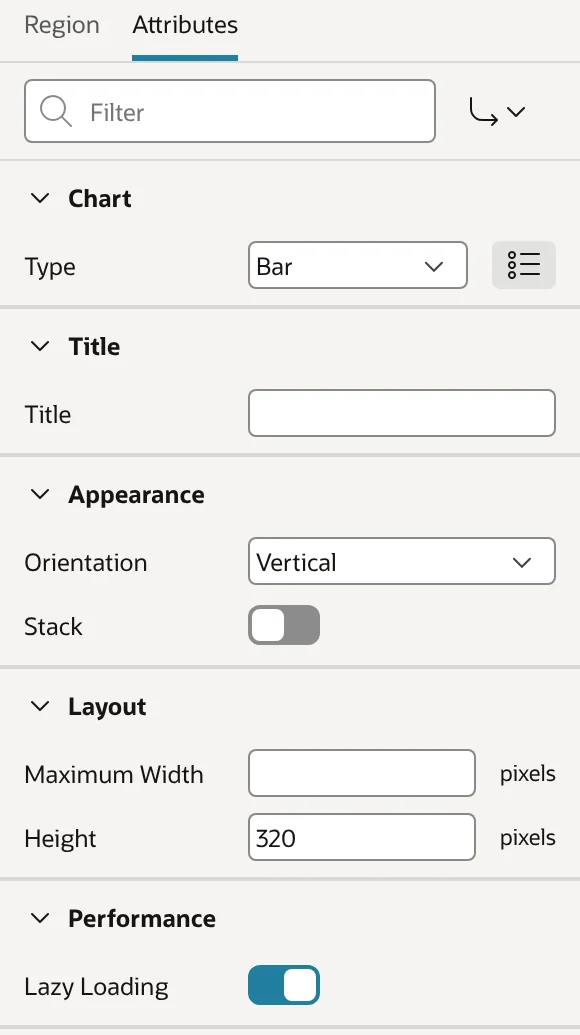
In this lab, the chart created by the 26.2 Create Page wizard started with lazy loading off:
select region_name, chart_type, lazy_loading
from   apex_application_page_charts
where  application_id = 26201;

REGION_NAME          CHART_TYPE LAZY_LOADING
-------------------- ---------- ------------
Sales Chart          Bar        No
When to use it: switch it on for charts that start hidden, for example in tabs, collapsible regions or behind a Region Display Selector, so their queries only run when someone opens them. Oracle lists the visibility techniques that lazy loading supports. If your page shows or hides charts with custom JavaScript, test that the chart still draws when it becomes visible.
4. Application lock and working copy APIs
What it does: APEX_APPLICATION_ADMIN now has LOCK_APPLICATION, UNLOCK_APPLICATION and CREATE_WORKING_COPY. A CI/CD script or development tool can lock an application before changing it, and can create working copies without opening App Builder. See the APEX_APPLICATION_ADMIN reference.
Where to find it: PL/SQL, run as the parsing schema after setting the workspace:
begin
  apex_util.set_workspace('OWH_LAB');
end;
/
begin
  apex_application_admin.lock_application(
    p_application_id => 26201,
    p_lock_as_user   => 'HASSAN',
    p_lock_comment   => 'CI: APEXlang import in progress');
  commit;
end;
/
select locked_by, locked_on, lock_comment from apex_applications where application_id = 26201;

LOCKED_BY  LOCKED_ON        LOCK_COMMENT
---------- ---------------- --------------------------------
HASSAN     2026-10-31 14:41 CI: APEXlang import in progress
When the same owner locked it again (passing 'hassan' in lower case), only the comment changed, to CI: import step 2 of 3. A second developer account, created just for this test, could not take the lock. Unlocking with the wrong owner filter also failed:
ORA-20001: Unable to lock application. It is already locked by another user.
ORA-20001: Unable to unlock application. It is not locked by the specified user.
A user name that is not a workspace developer raised ORA-20003: Invalid value for parameter: p_lock_as_user. Creating a working copy returns the new application ID:
declare
  l_app_id number;
begin
  l_app_id := apex_application_admin.create_working_copy(
                p_application_id           => 26201,
                p_working_copy_name        => 'a01-chart-tweaks',
                p_working_copy_description => 'Created by API for the 26.2 article');
  commit;
  dbms_output.put_line('Working copy application ID: ' || l_app_id);
end;
/
Working copy application ID: 108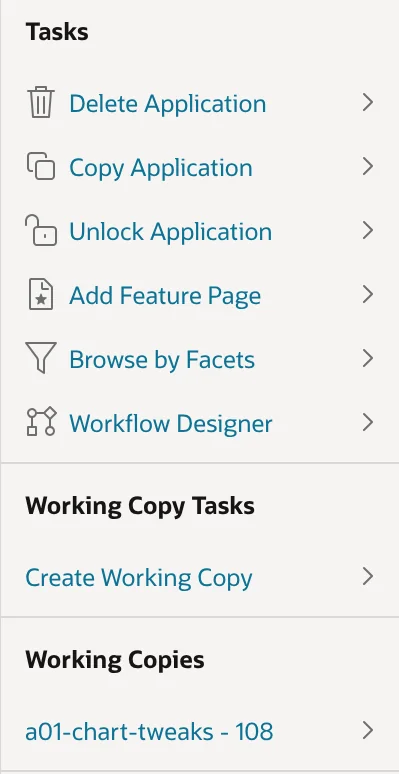
When to use it: in pipelines that import APEXlang into a shared development workspace. Lock first, import, then unlock with p_unlock_as_user so the script cannot remove someone else’s lock. Remember that working copies do not include supporting objects. Oracle’s known issues for the Working Copy feature (merge errors on 19c below 19.16, duplicate component names) also apply here.
5. AI Agent Reasoning Effort and the Provider API setting
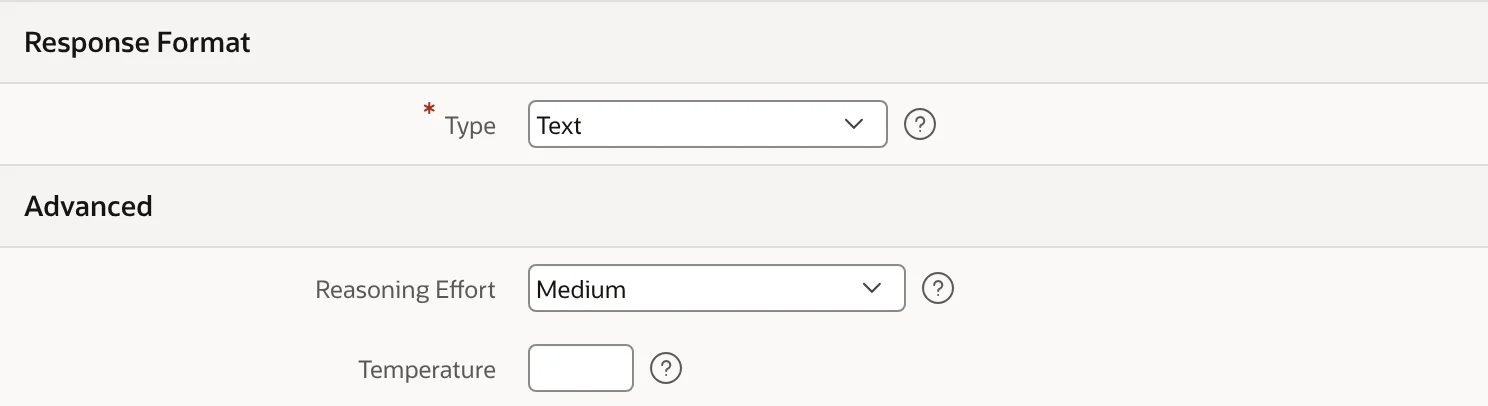
What they do: AI Agents get a declarative Reasoning Effort (Default, None, Minimal, Low, Medium, High, Extra High, Maximum). Generative AI Services get a Provider API setting. For OpenAI, Ollama and Generic services it offers Responses (the new default) or Chat Completions (deprecated). For Gemini it offers Interactions or Generate Text. For OCI it offers Generic or Responses.
Where to find them: Workspace Utilities > Generative AI Services (Provider API under Advanced), and Shared Components > AI Agents (Reasoning Effort under Advanced). Both need a Generative AI service. To show the settings, a placeholder Ollama service pointing at http://localhost:11434 was created, with nothing running there. Then an agent was set to Medium. No AI request was made, so this shows only how the settings are configured and stored, not how a model responds to them.
select agent_name, remote_server_name, reasoning_effort
from   apex_appl_ai_agents where application_id = 26201;

AGENT_NAME             REMOTE_SERVER_NAME             REASONING_EFFORT
---------------------- ------------------------------ ----------------
A01 Order Assistant    A01 Placeholder (no provider)  medium

select remote_server_name, provider_type, provider_api, base_url
from   apex_workspace_ai_services;

REMOTE_SERVER_NAME               PROVIDER_T PROVIDER_API
-------------------------------- ---------- ------------
BASE_URL
------------------------------------------------------------
A01 Placeholder (no provider)    OLLAMA     Responses
http://localhost:11434
The new Ollama service defaulted to the Responses API. A data dictionary check also confirmed that APEX_AI.CHAT and APEX_AI.GENERATE accept a P_REASONING_EFFORT parameter in this build. In the APEXlang export the agent appeared as advanced { reasoningEffort: medium }, so the setting is visible in source control. The placeholder service and agent were deleted after the test.
When to use it: only after testing with your provider and model. Oracle notes that support varies by provider, model and Provider API, and that higher effort can increase latency and token usage. Leave it on Default unless you have measured a benefit.
Listed in the release notes but not tested in this lab
- Natural-language computed columns in Interactive Reports and AI-generated navigation in Show AI Assistant: both need a working AI provider.
- Subscription mapping during APEXlang import in App Builder.
- Workflow and task changes: custom Action Task outcomes, the task Fail event, Draft activities, PNG/SVG diagram export and
APEX_WORKFLOW.MIGRATE_INSTANCE. - Deep Data Security integration, Resource Principal authentication and workspace-level network ACLs (
WEBSERVICE_USE_SCHEMA_ACL). apex.region.multipleRefresh, the ForegroundTimer class and chart refresh APIs.- Universal Theme 26.2 and Theme Roller updates, the Utility CSS framework, Mail Queue reporting, the Manage Service wizard and translations for saved report metadata.
Also check Changed Behavior: the Export wizard no longer has an option to exclude supporting objects, and a Static ID can no longer contain a Tab character.
Common mistakes
- Assuming key phrases are case-insensitive.
filter status by completedfound no rows because the filter is an exact match. - Leaving multi-word values unquoted. Use double quotes. Unquoted values and single quotes fell back to a full-row text search.
- Using file-level import as a deployment method. It is meant for development. Deploy the full application to test and production.
- Calling the lock API without a workspace context. Call
apex_util.set_workspacefirst when running outside App Builder, and pass a real workspace developer asp_lock_as_user. - Expecting Reasoning Effort to do anything without a provider. It is just a stored setting until a supported model receives it.
FAQ
Do Interactive Report key phrases need an AI service in APEX 26.2?
No. In this lab they worked in a workspace with no Generative AI service, and Oracle states they run locally whether or not Natural Language is enabled.
Can I import a single APEXlang page from App Builder?
No. Oracle supports file-level import only through SQLcl and the SQL Developer extension for VS Code. In SQLcl 26.3 that is apex import ... -files <path>, and the target application must already exist.
Is chart lazy loading on by default in APEX 26.2?
For existing applications Oracle keeps it enabled so behaviour does not change. In this lab a chart created by the 26.2 Create Page wizard started with Lazy Loading set to No, so check the property on each chart.
What changed compared with APEX 26.1?
APEX 26.1 introduced APEXlang. In 26.2 it gains deployment files, file-level import and subscription mapping. For the earlier release see Oracle APEX 26.1 new features.
Start with the key phrases and file-level import; they are the two 26.2 changes you can use today without any extra infrastructure.