
Oracle APEX plugins are the reason a low-code platform can still do almost anything: a signature pad, an image zoom, a custom chart, a new way to authenticate. But search for “Oracle APEX extensions” and you will find two different things mixed together — plug-ins that extend the components you build with, and the Extensions menu that extends App Builder itself. This guide separates the two, lists all nine plug-in types in APEX 26.1, shows how to install and evaluate one, and points to real examples you can open today.
Short answer: an Oracle APEX plug-in is an extension to the built-in component types — new item, region, dynamic action, process, authentication, authorization, REST Data Source, Generative AI Tool or Template Component types that you then use declaratively in Page Designer. APEX “Extensions” are something else: links and Builder Extension apps that a workspace administrator adds to the Extensions menu in App Builder.
Plug-ins vs Extensions: two different things
Oracle’s own definition is short: “A plug-in is an extension to the built-in types available in APEX.” APEX ships with a fixed set of authentication schemes, authorization schemes, items, regions, dynamic actions and processes. A plug-in adds a new type to one of those lists, so developers can use it declaratively — pick it from a list in Page Designer, set its attributes, done — instead of pasting JavaScript and PL/SQL into every page.
The Extensions menu lives one level higher, in App Builder. A workspace administrator can add custom links to it; the menu only appears on the APEX menu bar once at least one link exists, between Global Search and the Administration menu. Those links can carry substitution strings such as EXT_APP_ID, EXT_PAGE_ID and APP_USER, so a developer tool opens already knowing which application and page you are looking at. Pair that with the Builder Extension Sign-in authentication scheme and the extension app opens without asking the developer to sign in again.
| Plug-ins | Extensions menu | |
|---|---|---|
| What it extends | The component types inside your applications | App Builder itself (the developer’s tools) |
| Who uses it | Developers in Page Designer; end users see the result | Developers working in the workspace |
| Where it lives | Shared Components → Plug-ins, per application | Workspace Administration → Manage Service → Manage Extension Links |
| Shared how | Export / import, copy, or subscribe | Extension subscriptions between workspaces |
Most people searching for “APEX extensions” actually want plug-ins, so the rest of this guide focuses there — but if your team builds internal developer tools, the Extensions menu is worth a look.
The 9 plug-in types in Oracle APEX 26.1
When you create a plug-in, the Type decides where it can be used and which callbacks and standard attributes appear. The Create Plug-in wizard in APEX 26.1 offers these nine:
| Type | What it adds | Typical use |
|---|---|---|
| Item | New page item types | Signature pads, sliders, rich pickers |
| Region | New region types rendered by your own logic | Custom visualisations, specialised viewers |
| Dynamic Action | New client-side actions, grouped by category | Image zoom, notifications, custom UI behaviour |
| Process | New application or page process types | Reusable server-side steps |
| Authentication Scheme Type | New ways to establish a user’s identity | Custom sign-in integrations |
| Authorization Scheme Type | New checks for page, process or component access | Reusable access rules |
| REST Data Source | Support for REST services that need special handling | APIs with non-standard paging or authentication |
| Generative AI Tool | A generative AI tool available to APEX | Giving an AI feature a custom capability |
| Template Component | HTML-template-based region, report or column types — no PL/SQL needed | Cards, badges, timelines, reusable UI blocks |
Each plug-in also has a Static ID that APEX uses internally. Oracle recommends prefixing it with your organisation’s domain so it is globally unique — for example COM.MYCOMPANY.SLIDER. Template Components that are part of a theme are always prefixed with THEME$. In APEX 26.1 each plug-in also gets an APEXlang Name, the camel-case name used in APEXlang exports; change it with care, because it affects APEXlang import and export.
Template Components: plug-ins without PL/SQL
Template Components, introduced in APEX 23.1, are the easiest plug-ins to build and the ones most teams should reach for first. You write an HTML template with placeholders and template directives; APEX turns the placeholders into attributes in Page Designer. They support actions and menu buttons with row-level conditions, plus your own CSS and JavaScript files.
The Available as setting decides where a Template Component can be used:
- Multiple (Report) — a region showing many rows, with pagination options.
- Single (Partial) — a single row, or a column in an interactive report.
- Region Only — a region showing static values, rendered without any wrapping HTML. Oracle recommends adding
APEX$DOM_IDas anidattribute inside the template.
Template Components that belong to a theme appear under Shared Components → Templates; standalone ones appear under Shared Components → Plug-ins.
How to install an Oracle APEX plug-in
Most plug-ins are distributed as a single .sql export file. To install one:
- On the Workspace home page, open App Builder and click Import.
- Drag in the file, set File Type to Plug-in, check the file character set, and click Next.
- Choose Import Into Application — plug-ins are installed per application.
- Install. If the import contains a subscribed plug-in, APEX also asks how to handle the subscription.
Two details save trouble later. Installing into an application overwrites an existing plug-in with the same name, and the install is all-or-nothing: if anything fails, it rolls back. You also cannot install into an application that another developer has locked.
Once installed, the plug-in appears wherever its type belongs — a new item type in the item list, a new action in the Dynamic Action list, and so on. To reuse it in another application, open Shared Components → Plug-ins → Copy from another app. Choose Copy and Subscribe instead of a plain copy if you want one master version that you can refresh into every subscribing application. And before you remove or upgrade a plug-in, the Utilization page shows every page, component and region that uses it.
Where to find Oracle APEX plugins
- apex.world plug-ins — the community directory, and the place Oracle’s own documentation points to for examples.
- The Oracle APEX GitHub repository — Oracle’s sample plug-ins and code.
- Your own team — the best plug-in is often the one you extract from code you have already pasted into five pages. Here is how to build your first one from scratch.
How to evaluate a plug-in before it reaches production
A plug-in runs inside your application with your application’s privileges, so treat it like code you are about to own. Before installing one in anything that matters, check:
- Version compatibility. Which APEX versions has it actually been tested on? An export from a newer release cannot be imported into an older one.
- Licence. Open source, free but closed, or commercial — and whether that fits how your organisation ships software.
- The PL/SQL. Read the render and AJAX callbacks. Look for bind variables rather than string-built SQL, and for output that is escaped before it reaches the page.
- AJAX callbacks. Anything a browser can call is an endpoint. Check that it validates its input and respects your authorization rules.
- External dependencies. Does it load files from a public CDN? Many organisations need every file served from their own instance.
- Maintenance. When was it last updated, who maintains it, and is there an issue tracker?
- Test where it cannot hurt. Install in a development application first, then copy-and-subscribe into the applications that need it, so upgrades flow from one place.
Real examples from this journal
Two plug-ins built for real projects show the range — one commercial item plug-in, one free dynamic action plug-in.
BioSig Pro V2 — an item plug-in for signatures
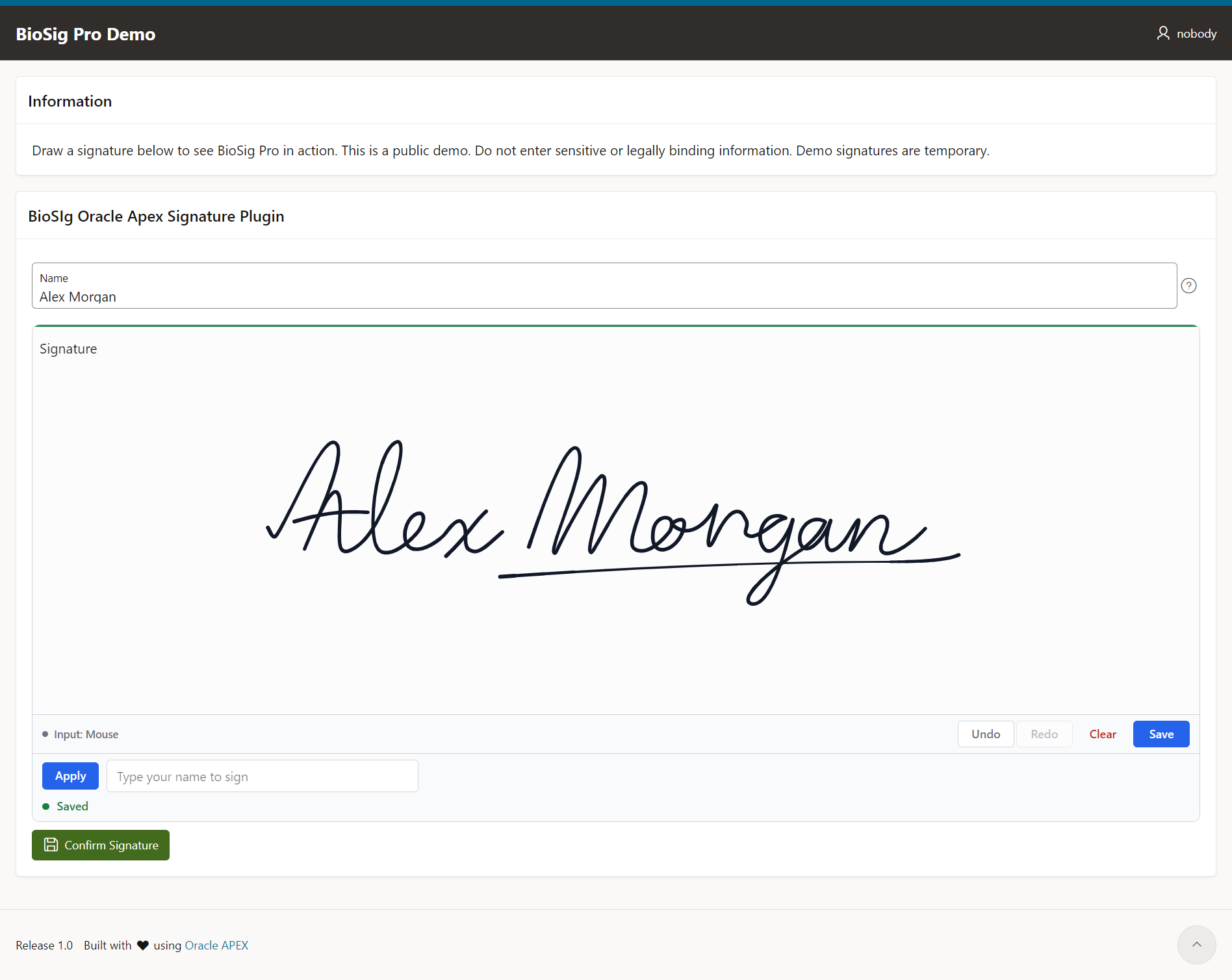
BioSig Pro V2 adds a signature-capture item type: mouse, touch and stylus input, autosave, undo/redo, and server-side SHA-256 verification before a signature is confirmed. It is a good illustration of why a plug-in beats copy-paste — the page item stores only a UUID, while the signature itself is uploaded separately and stored in Oracle.
Because it is a plug-in, all of its behaviour is configured declaratively — canvas size, pen, pressure, typed signatures and raster format are attributes in Page Designer rather than code on the page:
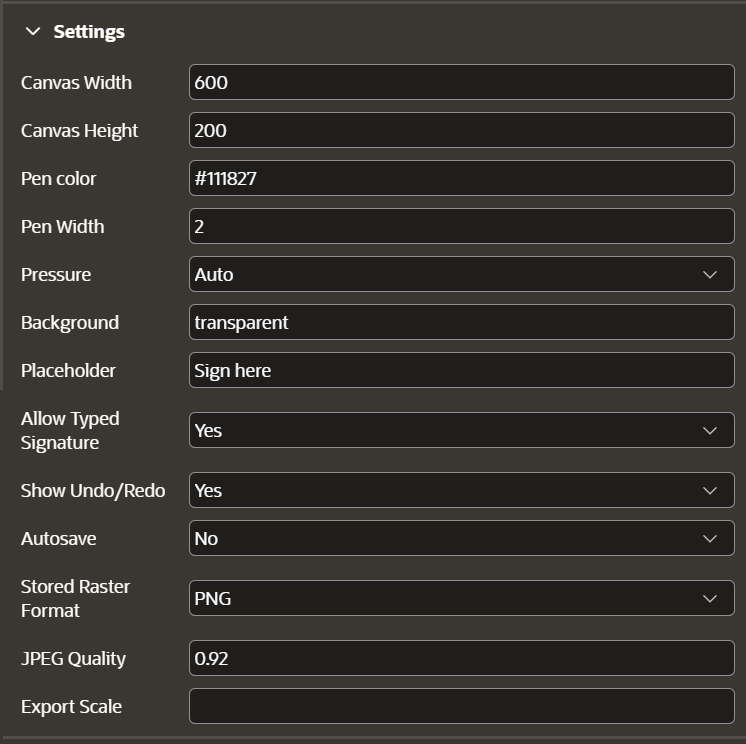
Image Zoom — a free dynamic action plug-in
Image Zoom adds coordinate-aware zooming, panning and fullscreen to an image region. You import the .sql file, create a dynamic action on the image region and pick the plug-in as the action — no extra libraries or CDN links. It is a small, readable example if you want to see how a dynamic action plug-in is put together.
Both are listed, with the free and open-source tools, on the Tools & Plugins page.
Building your own plug-in
In App Builder, open Shared Components → Plug-ins → Create and choose From Scratch. Give it a name, a domain-prefixed Static ID and a Type; the wizard then shows the callbacks and standard attributes that type supports. The PL/SQL for rendering, validation, execution and AJAX callbacks can sit in the plug-in itself or, for performance, in a database package. You can also start As a Copy of an Existing Plug-in — the quickest way to begin a Template Component from one that already works.
When it is ready, export it from Shared Components → Plug-ins → Export Plug-in (or App Builder → Workspace Utilities → Export → Plug-ins) to get a readable .sql script you can keep in source control and import anywhere.
Frequently asked questions
Are Oracle APEX plugins free?
Many are free and open source — most of the apex.world directory, and plug-ins like Image Zoom. Others are commercial, such as BioSig Pro. Always check the licence before using one in a product you ship.
Can I use one plug-in in several applications?
Yes. Plug-ins are installed per application, but you can copy one from another app — and choose Copy and Subscribe so every subscribing application can be refreshed from a single master copy.
What is the difference between a plug-in and a Template Component?
A Template Component is a plug-in — one of the nine types. It is built from an HTML template with directives instead of PL/SQL, which makes it the simplest way to add a new region, report or column type.
What are Oracle APEX extensions?
In APEX terms, “extensions” usually means the Extensions menu in App Builder: links and Builder Extension apps that a workspace administrator publishes for developers. Workspaces can share these through extension subscriptions once hosting is enabled in Administration Services.
How do I see where a plug-in is used before changing it?
Open Shared Components → Plug-ins → Utilization. It lists every page, component and region that uses each plug-in.
Prepared with AI-assisted research and drafting. Plug-in types, installation steps and Extensions menu details were checked against the Oracle APEX 26.1 App Builder User’s Guide and Administration Guide on 30 October 2026. BioSig Pro and Image Zoom details come from their own documentation on this site.