 By
By Oracle APEX authorization needs to cover the page, the submitted action, and the record being changed. In this tested APEX 26.1 lab, two requesters could edit their own notes but could not approve requests or update each other’s rows. A manager could read all three synthetic records, edit another owner’s notes, and approve a request.
The useful part is the evidence: real authenticated accounts, visible server-side denials, guarded SQL updates, rollback-only cross-owner tests, and a native application export that was imported and checked again. You can download the application and repeat the same checks.
Test environment: Oracle APEX 26.1.0 and Oracle AI Database 26ai 23.26.1.0.0, tested on 5 October 2026. The original app was 136; its native export was imported as app 137 in the same workspace and parsing schema. This is a focused application-layer authorization lab, not a penetration test or production security certification.
What should Oracle APEX authorization protect?
Start with a small access matrix. Authentication establishes who signed in. Authorization decides which page, action, and record that person may use. Oracle’s authorization guide explains how schemes control access to application components.
| Operation | Requester A | Requester B | Manager |
|---|---|---|---|
| Read and edit A’s notes, ID 2 | Allow | Deny | Allow |
| Read and edit B’s notes, ID 3 | Deny | Allow | Allow |
| Open Manager Review, page 4 | Deny | Deny | Allow |
| Approve a request, including own row | Deny | Deny | Allow |
| Create or delete requests | Not implemented in this lab | ||
There are three seeded requests. ID 1 is an extra synthetic record owned by BUDDY_BOY; A owns ID 2 and B owns ID 3. A manager sees all three. An authenticated account absent from the role table is denied by the member predicate; that additional account scenario was not separately exercised in this run.
Keep the security layers separate
- UI visibility: whether a link or button is displayed. Use this to keep the interface clear.
- Page access: whether the signed-in user may enter a page at all.
- Process authorization: whether a submitted action may execute on the server.
- Record access: whether the particular row may be read or changed by the current user.
- Session State Protection: whether URL/session-state changes satisfy the configured checksum rules.
For this experiment, the Manager Review navigation entry and Test manager approval button deliberately remain visible to requesters. That makes the server denials easy to reproduce. Do not interpret the screenshots as hidden-button bypass tests.
Install the downloadable authorization demo
Download the Oracle APEX authorization demo for 26.1. The ZIP includes the untouched native f136.sql export, setup.sql, the exact submit process, a rollback-only diagnostic, read-only verification SQL, installation instructions, public verification notes, and the export checksum. It contains no passwords or authentication accounts.
- Use a disposable demo workspace and a parsing schema with no existing
BUDDY_AUTH_*objects. Reviewsetup.sqland run it once through SQL Workshop → SQL Scripts. It is not a destructive reset script. - Import
f136.sqlin App Builder. Select Auto Assign New Application ID and the schema used for setup. The application export has no Supporting Objects installation script; schema setup is a separate step. - Keep Oracle APEX Accounts authentication. Have a workspace administrator create
DEMO_REQUESTER_A,DEMO_REQUESTER_B, andDEMO_MANAGERas unlocked End User accounts. The account owner chooses and enters each password through the normal UI. - Keep the supplied application-role mapping: A and B are
REQUESTER; the manager isMANAGER. That manager role does not grant workspace administration or development privileges. - Run the seven checks below. Keep an authorized developer connection available for the separate read-only database checkpoints.
Oracle’s workspace user guide distinguishes End Users from developers and administrators. APEX Accounts belong to the workspace repository, so use a dedicated demo workspace and review access to other applications using the same authentication scheme.
Production boundary: Oracle does not recommend APEX Accounts for production and recommends a full-featured external identity provider. This tutorial uses the native scheme to keep the authorization experiment reproducible. It does not implement custom passwords, MD5 hashing, or an identity-provider integration.
Build the trusted actor and row policy
The installed package reads the current actor from the APEX session context:
upper(sys_context('APEX$SESSION', 'APP_USER'))Oracle documents this form of APP_USER access in Using Built-in Substitution Strings. The lab normalizes usernames to uppercase to match its role mapping. No page item, URL role, posted username, or browser variable supplies the actor.
The report and form read from this view, created by setup.sql:
create or replace view buddy_auth_visible_requests as
select r.request_id, r.title, r.owner_name,
       r.status, r.notes, r.updated_at
from buddy_auth_requests r
where exists (
  select 1
  from buddy_auth_roles a
  where a.user_name = upper(sys_context('APEX$SESSION', 'APP_USER'))
    and (a.role_code = 'MANAGER' or r.owner_name = a.user_name)
)
with check option;
The role row is required even for an owner. The manager predicate widens access to every fixture row. WITH CHECK OPTION belongs to the view definition, but this form’s write protection is implemented explicitly in the package below. Do not rely on a filtered report as the only restriction on updates.
Put the ownership condition inside the UPDATE
These are the complete write routines inside BUDDY_AUTH_API. The downloadable setup contains the package specification and full body. When adapting the pattern, replace the corresponding package routines rather than pasting them into a page region.
procedure save_notes(p_request_id number, p_notes varchar2) is
begin
  update buddy_auth_requests r
     set notes = p_notes,
         updated_at = systimestamp
   where request_id = p_request_id
     and exists (
       select 1 from buddy_auth_roles a
       where a.user_name = current_actor
         and (a.role_code = 'MANAGER' or r.owner_name = a.user_name)
     );
  if sql%rowcount != 1 then
    raise_application_error(-20001,
      'Request unavailable or action not permitted.');
  end if;
end;

procedure approve_request(p_request_id number) is
begin
  update buddy_auth_requests
     set status = 'APPROVED',
         updated_at = systimestamp
   where request_id = p_request_id
     and exists (
       select 1 from buddy_auth_roles a
       where a.user_name = current_actor
         and a.role_code = 'MANAGER'
     );
  if sql%rowcount != 1 then
    raise_application_error(-20001,
      'Request unavailable or action not permitted.');
  end if;
end;
Both routines make the permission predicate part of the write statement. A zero-row update returns the same generic message for an unavailable ID and an unauthorized ID. The API accepts only the inputs each action needs: notes for the save and an ID for approval. It never accepts a replacement owner or a client-provided role.
There is no COMMIT in these reusable routines. The normal APEX request owns the transaction; the diagnostic can call the same routines and roll its temporary changes back. This is application-layer authorization. A schema owner can access the underlying table directly, so this pattern does not replace Oracle VPD or database privilege design.
Configure the Oracle APEX authorization schemes
Under Shared Components → Security → Authorization Schemes, the native application contains two PL/SQL Function Returning Boolean schemes:
| Scheme | Function body | Evaluation point |
|---|---|---|
| Demo Member | return buddy_auth_api.is_member; |
Always (No Caching) |
| Demo Manager | return buddy_auth_api.is_manager; |
Always (No Caching) |
IS_MEMBER requires a matching role-table entry. IS_MANAGER also requires ROLE_CODE = 'MANAGER'. Both use the trusted actor. The native export was checked for these exact function bodies and NOCACHE settings.
Always (No Caching) is a deliberate choice for this small lab. Oracle’s evaluation-point documentation explains the trade-off: a once-per-session result is efficient, but a changing role or session-state dependency may require reevaluation. Choose a production policy deliberately and test role revocation; concurrent role changes were not tested here.
In Page Designer, attach the schemes through the component’s Security → Authorization Scheme property. Oracle describes the supported attachment points in Attaching an Authorization Scheme.
| Component | Source or setting |
|---|---|
| Page 1 Home | Demo Member |
| Page 2 My Requests | Demo Member; Interactive Report from BUDDY_AUTH_VISIBLE_REQUESTS |
| Page 3 Edit Request Notes | Demo Member; normal Form from the same view; REQUEST_ID primary key |
| Page 4 Manager Review | Demo Manager; Classic Report from the same view |
| Page 3 submit process | Demo Member; Execute Code; explicit request dispatch |
On page 3, P3_TITLE, P3_OWNER_NAME, P3_STATUS, and P3_UPDATED_AT are Display Only. Only P3_NOTES is editable. The server routines still enforce permitted writes; changing how an item looks is not the record-level policy.
Replace automatic DML with the guarded submit process
The native lab replaces the generated automatic row-processing process with Processing → Process form Edit Request Notes → Execute Code. It runs after submit, requires Demo Member, and has no single When Button Pressed restriction because it dispatches the three named requests itself:
begin
 if :REQUEST = 'SAVE' then
  buddy_auth_api.save_notes(:P3_REQUEST_ID, :P3_NOTES);
 elsif :REQUEST = 'APPROVE' then
  if not apex_authorization.is_authorized('Demo Manager') then
   raise_application_error(-20002,'Manager authorization is required for this action.');
  end if;
  buddy_auth_api.approve_request(:P3_REQUEST_ID);
 elsif :REQUEST = 'GUARD_TEST' then
  apex_application.g_print_success_message := buddy_auth_guard_test;
 else
  raise_application_error(-20003,'Unsupported demo action.');
 end if;
end;
The button request names are SAVE, APPROVE, and GUARD_TEST. An unsupported request is rejected. Approval checks the named scheme using APEX_AUTHORIZATION.IS_AUTHORIZED; the called API independently applies its manager condition inside the update.
When adapting this to an existing page, remove or disable the competing automatic DML path. Leaving an unguarded second process active would undermine this design. This demo has no production Create or Delete path; the generated Create entry is excluded with the Commented Out build option.
Seven tested Oracle APEX authorization checks
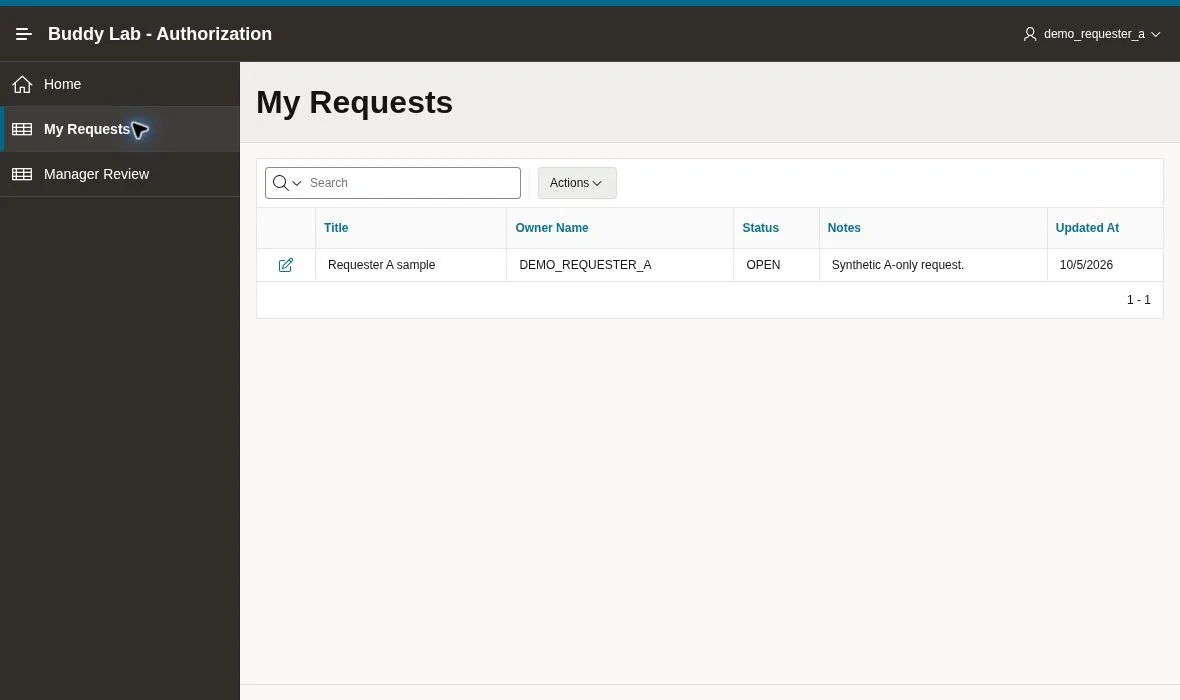
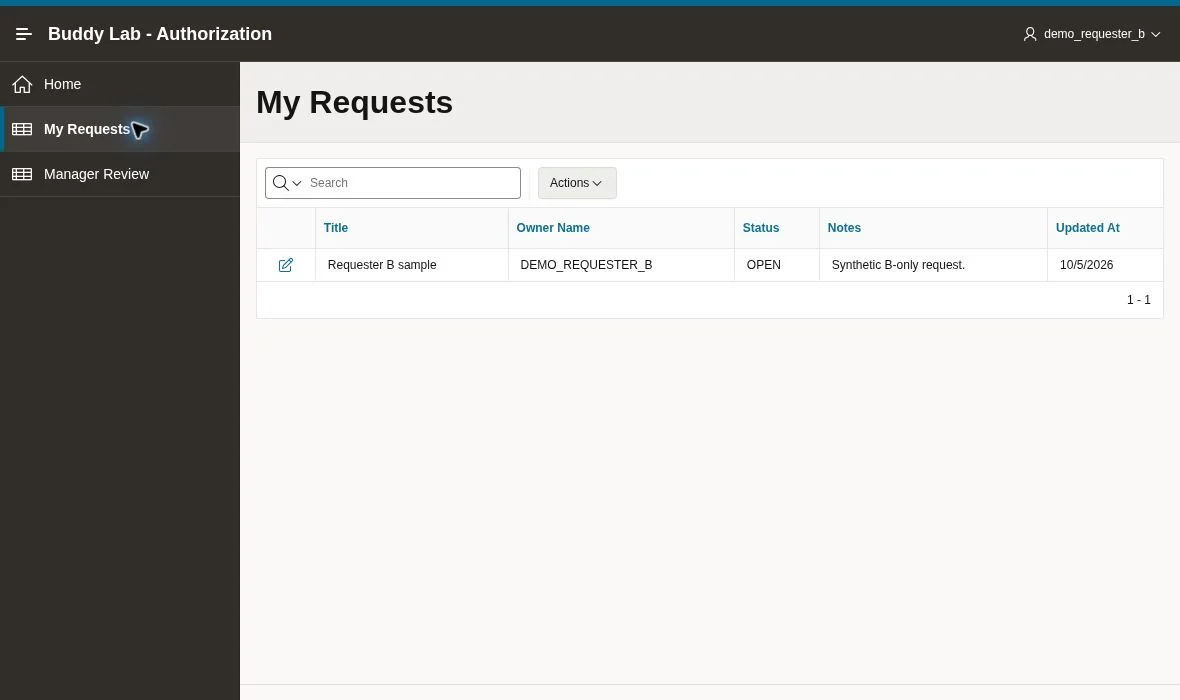
1. Requester reports show only owned rows
Sign in as DEMO_REQUESTER_A, open My Requests, and confirm that only ID 2 appears. Sign out and repeat as DEMO_REQUESTER_B; only ID 3 should appear. Both results were observed under the actual authenticated runtime usernames.
2. Each requester can save their own notes
Open the owned row, edit Notes, and select Apply Changes. A saved Requester A authorized notes update; B saved Requester B authorized notes update. Each report retained its new text. Status stayed OPEN during those requester tests.
Test allowed behavior as carefully as denial. A policy that blocks everyone may look safe in an error screenshot but still fails the access matrix.
3. The manager page rejects requesters
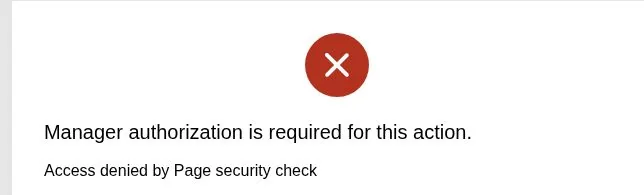
While signed in as each requester, use the deliberately visible Manager Review entry. Both attempts returned a page-security denial. The observed diagnostic was APEX.AUTHORIZATION.ACCESS_DENIED, associated with Demo Manager.
4. The server rejects a requester approval submit
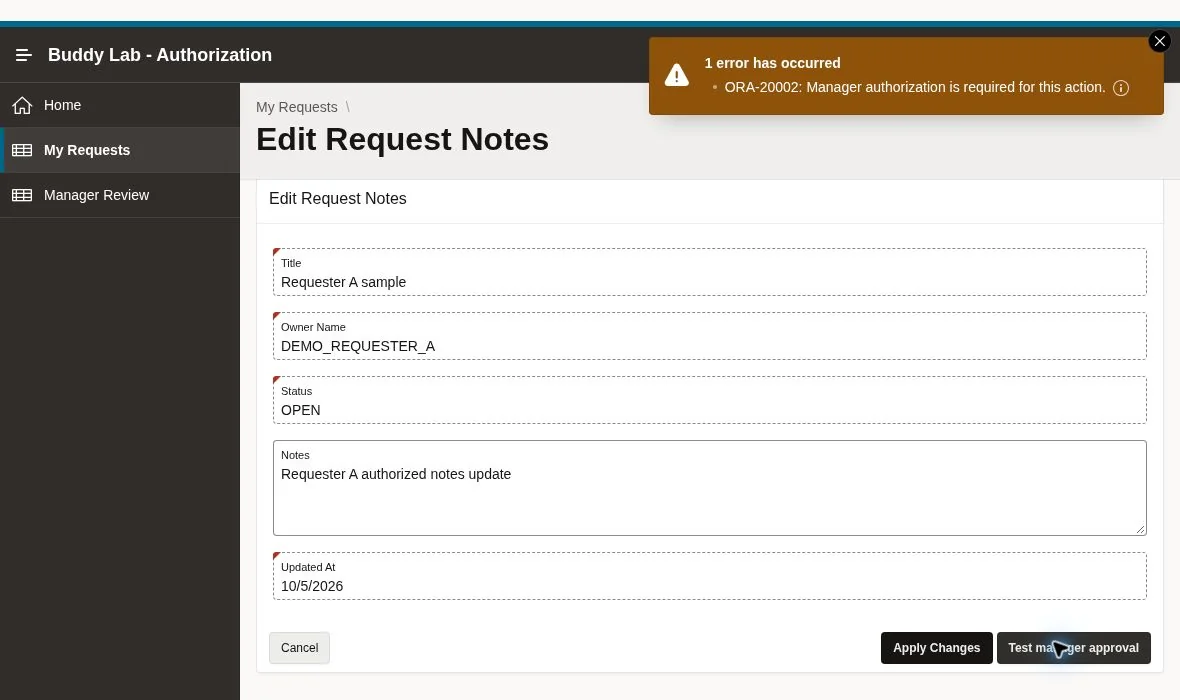
Open an owned row and press Test manager approval. Both requesters received ORA-20002: Manager authorization is required for this action. This is an actual server-side process denial. Owning the record does not authorize approval.
5. Cross-owner record guards deny reads and writes
Select Run rollback-only guard tests. The lab-only function uses the real runtime APP_USER, accepts no actor, role, or target ID from the browser, and chooses fixed synthetic targets. A tests foreign ID 3; B tests foreign ID 2. Their approval probes use their own row, confirming that ownership still does not grant manager authority.
The function checks the real filtered view and CAN_READ predicate, then calls the actual SAVE_NOTES and APPROVE_REQUEST routines. Temporary DML is enclosed by a savepoint and rolled back on normal and error paths. It compares the foreign target’s notes, status, and timestamp before and after.
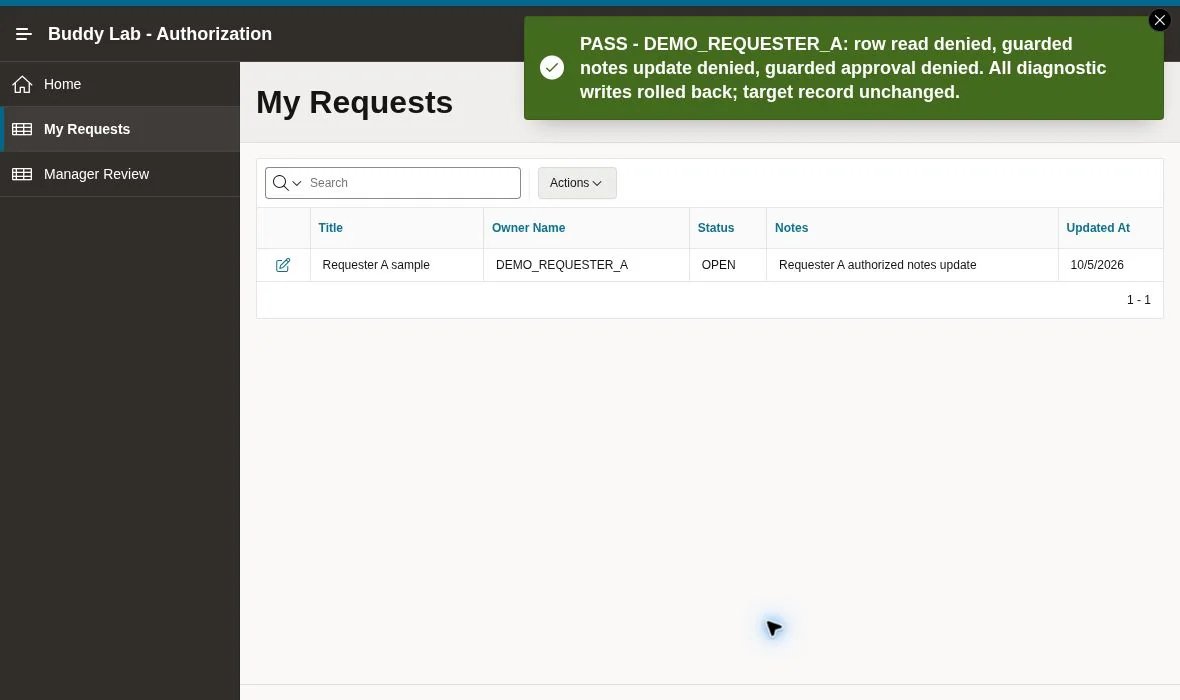
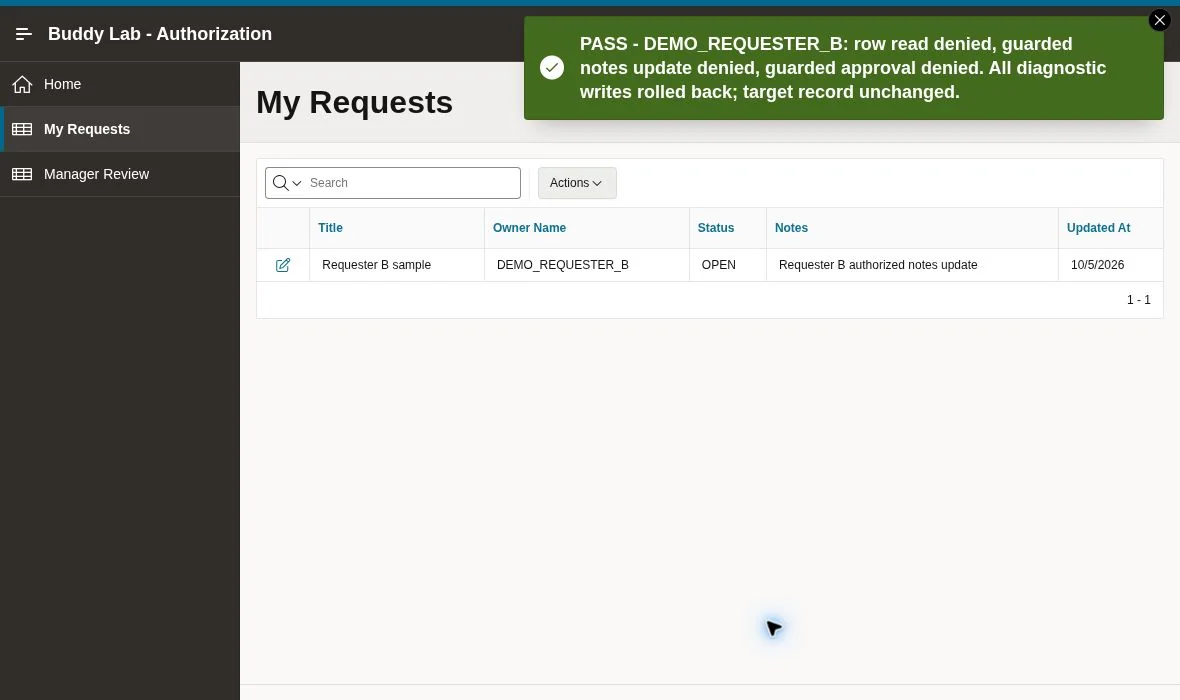
Both requester runs reported PASS. A separate authorized SQL read confirmed that A’s rejected actions left B’s original notes and timestamp unchanged. Do not publish a schema-owner query as though it ran with requester privileges; it serves as an independent data checkpoint.
6. The manager’s allowed path really works
Sign in as DEMO_MANAGER. Manager Review should load and display all three records. In the actual run, the manager edited A’s notes and successfully approved ID 2. The returned report showed APPROVED, and the database checkpoint confirmed it.
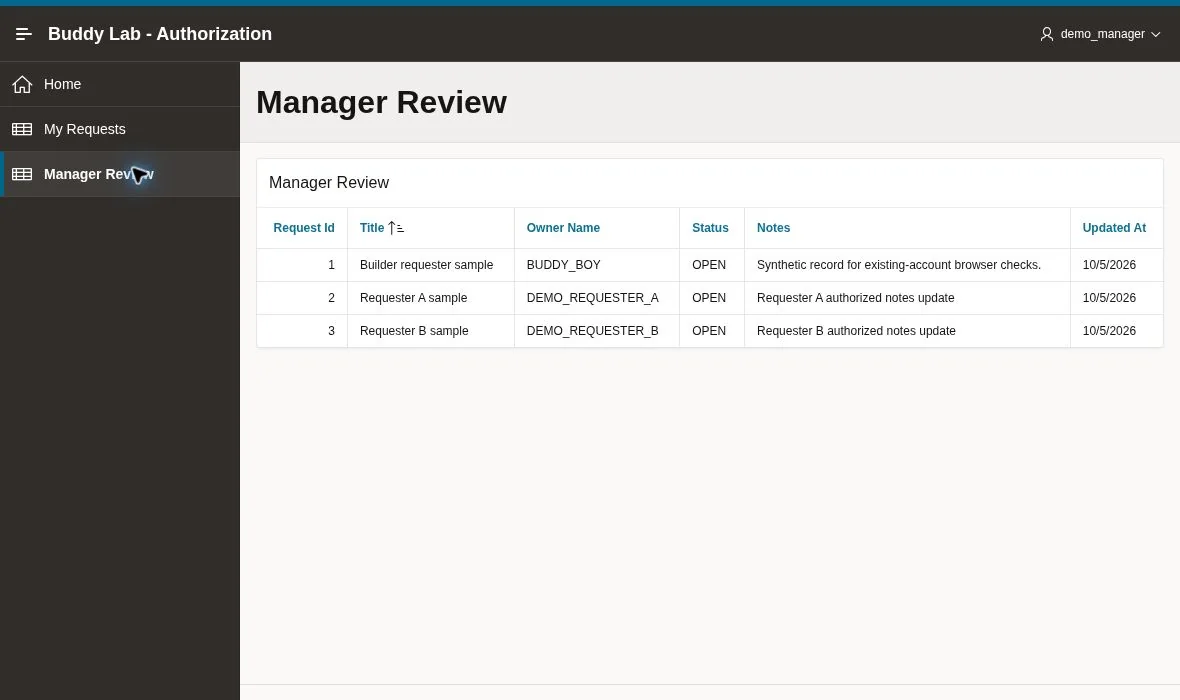
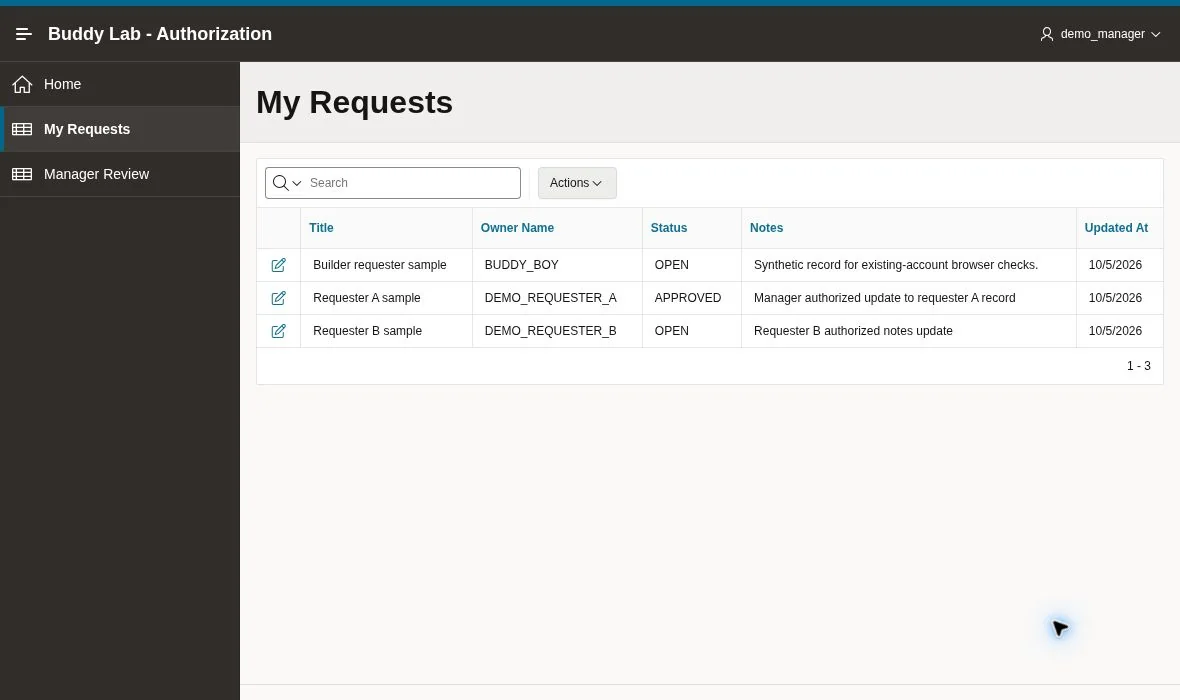
The manager also ran the diagnostic’s allow path. Its read, temporary notes update, and temporary approval succeeded, followed by rollback and restoration checks. That distinction matters: a PASS from the harness does not mean its temporary approval was committed.
7. Import the native export and repeat key checks
The exact f136.sql was imported through the native wizard with Auto Assign New Application ID. APEX reported that application 137 was successfully imported. In that copy, requester A authenticated, saw only ID 2, saved notes, was denied manager approval and Manager Review, and passed the rollback-only guard diagnostic.
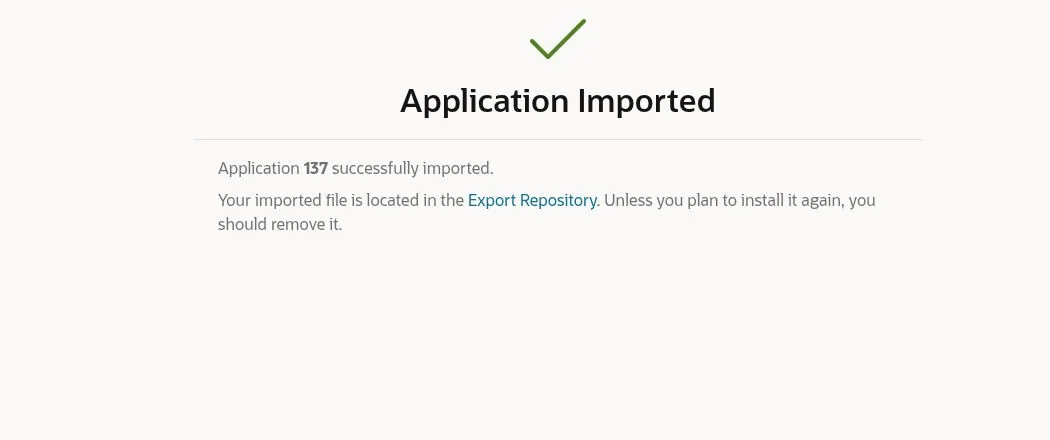
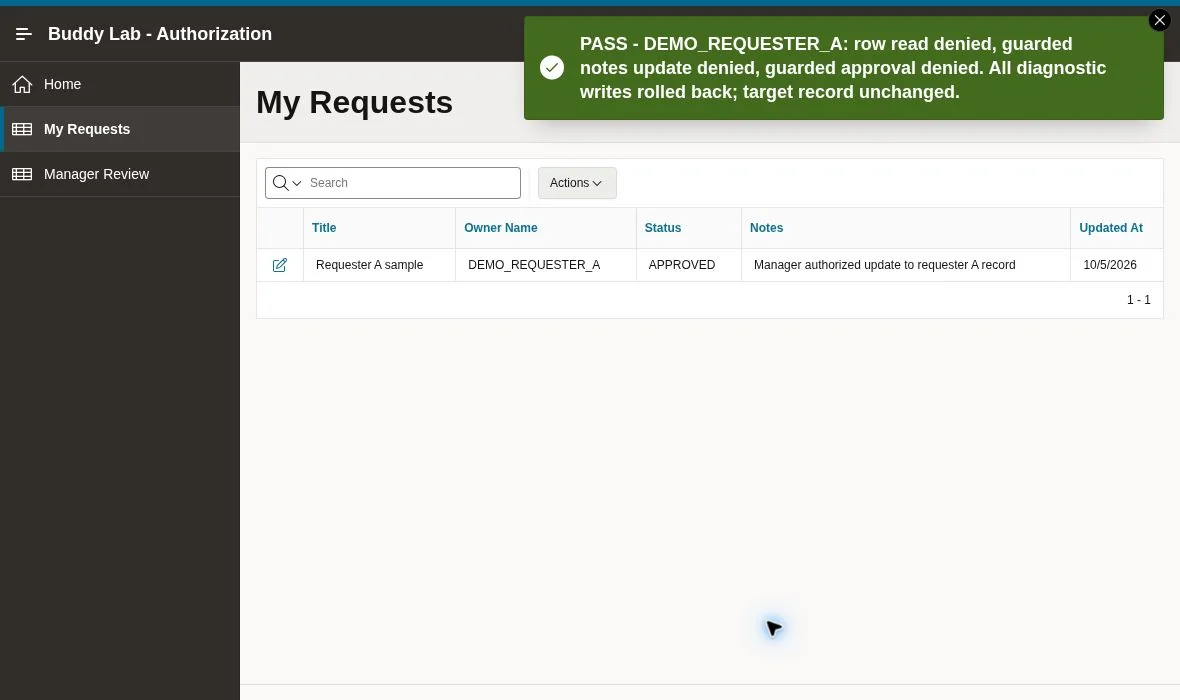
Import scope: both applications used the same workspace and BUDDY schema. App 137 reused the objects already installed for app 136. This does not establish a clean-schema installation, and the complete B/manager regression was performed in app 136 rather than repeated in app 137.
Why the checksum test is separate evidence
In one additional check, A’s owned edit link was changed from ID 2 to foreign ID 3 while retaining its old checksum. APEX rejected the URL with a Session State Protection violation before foreign data appeared.
That result verifies a tampering barrier, not execution of the guarded UPDATE predicate. The record-policy evidence comes from the view/API diagnostic and database checks. Keep checksums enabled; do not weaken them just to make a negative test reach a later layer. Oracle’s Session State Protection guide explains the page/item settings and checksum mechanism.
Verify the database after negative tests
Use this read-only checkpoint through an authorized developer connection. The package also includes verification-read-only.sql for object and compilation checks.
select request_id, owner_name, status, notes,
       to_char(updated_at, 'YYYY-MM-DD HH24:MI:SS.FF3') updated_at
from buddy_auth_requests
order by request_id;

select name, type, line, position, text
from user_errors
where name like 'BUDDY_AUTH_%'
order by name, sequence;
The final observed rows matched the deliberate actions: ID 1 remained unchanged; ID 2 was APPROVED and held the later imported-app requester save; ID 3 remained OPEN with B’s authorized notes. No diagnostic marker or rejected cross-owner write persisted. The compilation-error check returned no rows after installation.
Common Oracle APEX authorization mistakes to avoid
- Hiding the control and stopping there. Apply page/process authorization and guard the record write even when production UI hides an unavailable action.
- Trusting a posted owner or role. Resolve the actor from the authenticated server context and read the authorization mapping server-side.
- Filtering the report but updating the base table by ID alone. Every alternative form, AJAX callback, REST endpoint, import, and background job needs its own appropriate authorization path.
- Treating a cached result as immediate revocation. Set and test the evaluation policy, especially when roles can change during a session.
- Exposing technical error details to ordinary users. These screenshots are cropped lab evidence. Production error handling should avoid exposing internals and should log useful diagnostics securely.
- Mixing authorization with concurrency protection. This custom notes API does not implement optimistic lost-update detection. If two authorized editors can work on one row, add and test a compatible concurrency policy as well.
For the separate concurrency problem, see the tested two-session lost update detection tutorial. Before importing into a different APEX release, review the APEX 26.1 upgrade and import checklist.
Frequently asked questions
Does a button authorization scheme secure the whole operation?
Apply authorization to the protected server operation and enforce record permissions in its data path. A button’s rendering rule alone does not prove that every route to the operation is protected.
Can a requester approve their own record?
Not in this matrix. Requesters may edit their own notes. Approval requires the MANAGER application role, including when the requester owns the target record.
Does the demo use Oracle VPD?
No. It uses a filtered application view and guarded PL/SQL routines. Schema-owner access and other privileged SQL paths remain outside this end-user application policy.
Is the download a production-ready security framework?
No. It is a reproducible learning fixture with synthetic data and lab-only diagnostics. Production work still needs an identity-provider decision, privilege review, audit/error handling, coverage of every data path, and security testing appropriate to the application.
What was not tested?
A separate empty-schema install, hostile HTTP/fuzz testing, external identity providers, concurrent role changes, load behavior, and every APEX component were not tested. A separate Builder administrator session was retained during testing, while the runtime identities and predicates used the named End Users.
The takeaway
A useful Oracle APEX authorization test has an expected allow/deny result, a real authenticated identity, a specific target record, and a database checkpoint. Keep those four together. Then a denied page, a rejected process, and a guarded row update each tell you exactly which part of the policy worked.