 By
By You have exported an Oracle APEX application as SQL at least once. What came out was a single file, four thousand lines long, full of internal ID numbers nobody could read. Your reviewer could not make sense of it. Your Git diff showed one giant blob every time anything changed.
That file is gone in Oracle APEX 26.1. APEXlang replaces it.
This apexlang tutorial walks through the complete workflow for editing existing Oracle APEX apps outside the Builder. You will export an app to organized .apx files, open them in VS Code, make changes with real code completion, validate without a database connection, and import the result back in under a minute. No Page Designer. No clicking through menus. Just files you can read and a compiler that tells you exactly what is wrong before you try to import anything.
This tutorial focuses on apps you already have. If you want to generate a brand new app from a Markdown spec instead, the previous article on building from scratch with APEXlang and Claude Code covers that workflow separately.
What Is APEXlang and What Does It Replace?
APEXlang is Oracle’s Open Application Specification Language for Oracle APEX. It is a declarative, human-readable format that represents every part of your APEX application as structured text files. Pages are pages. Regions are regions. Your PL/SQL sits in a fenced code block where any developer can read it. The Oracle APEX team introduced APEXlang in May 2026 as the foundation for a new style of application development where humans and AI agents work from the same readable source files.
How APEXlang replaced Oracle’s YAML export format
Previous versions of Oracle APEX offered a YAML export for readable application review. It was read-only. You could look at it but you could not edit it, validate it, or import it back. Oracle APEX 26.1 removes YAML entirely. APEXlang is its replacement, and unlike YAML, it is a fully compilable language with strict validation, code completion in VS Code, and a compiler that rejects bad syntax before it can touch your app. If you want the full picture of what else changed in this release, the APEX 26.1 new features article covers the complete release.
What you need before starting this tutorial
Four things:
- Oracle APEX 26.1 — APEXlang does not work on older versions
- SQLcl 26.1.2 or greater — for export, validate, and import from the command line
- SQL Developer extension 26.1.2 for VS Code — optional but highly recommended for code completion and the Problems panel
- An existing APEX application to work with
If you do not have an APEX 26.1 environment yet, the Oracle Cloud Free Tier setup guide gets you running at no cost.
What Does the APEXlang File Structure Look Like?
When you export an app in APEXlang format, APEX delivers a ZIP file named after your application alias. Unzip it and you find a clean, organized directory:
employees/
├── application.apx            ← top-level app definition
├── page-groups.apx
├── .apex/
│   └── apexlang.json          ← DO NOT EDIT
├── deployments/
│   └── default.json           ← app ID lives here
├── pages/
│   ├── p00000-global-page.apx
│   ├── p00001-home.apx
│   ├── p00002-employees.apx
│   ├── p00003-employee.apx
│   └── p09999-login.apx
├── shared-components/
│   ├── authentications.apx
│   ├── authorizations.apx
│   ├── breadcrumbs.apx
│   ├── lists.apx
│   └── lovs.apx
└── supporting-objects/
    └── deinstall-script.sql
Pages, shared components, and deployments
Each page gets its own .apx file. The filename includes both the page number and the alias: p00003-employee.apx. Shared components — authorization schemes, LOVs, navigation lists — live in their own directory with one file per component type. A Git diff on page 3 shows only what changed on page 3. Not a 4,000-line blob with one line different.
The application ID lives in deployments/default.json, not inside any .apx file. This separation means the same codebase can import into dev, test, and production by changing one JSON value:
{
  "app" : {
    "id" : 104,
    "runtime" : { "debugging" : true }
  }
}
The file you must never edit manually
.apex/apexlang.json stores the meta-metadata version the compiler needs:
{ "mmdVersion" : "26.1.0+3102" }This version tells the APEXlang compiler which APEX release’s rules to apply when validating your files. Change it and the compiler validates against the wrong spec. Leave it exactly as exported, always.
How Do You Export an Oracle APEX App to APEXlang?
Three paths. All produce the same ZIP. Use whichever fits your workflow.
Export from APEX Builder
Open the Export page in APEX Builder. The File Type dropdown now includes APEXlang alongside the SQL options. Select APEXlang, choose your export type, and click Export Application. APEX downloads the ZIP.
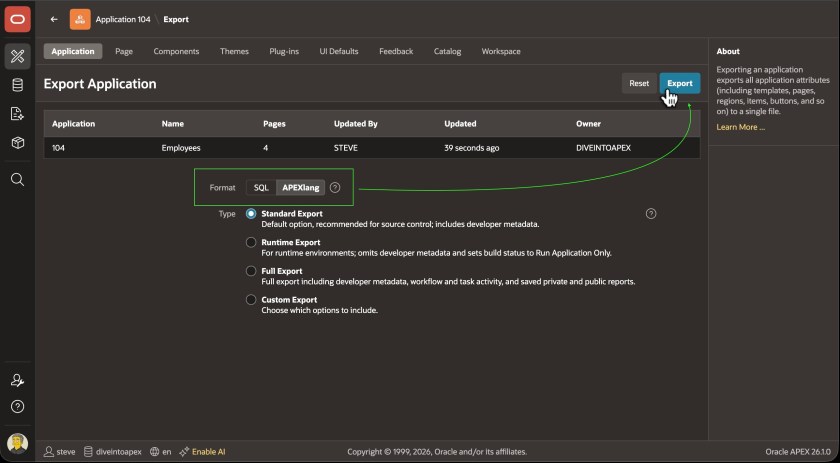
APEX 26.1 introduced four export types for both SQL and APEXlang formats. Standard Export includes developer comments — use this for source control. Runtime Export strips comments and sets the app to run-only — use this for production deployments. Full Export includes runtime data for environment migrations but should not go into source control. Custom Export gives you flashback options and granular control over every export setting.
Export using SQL Developer in VS Code
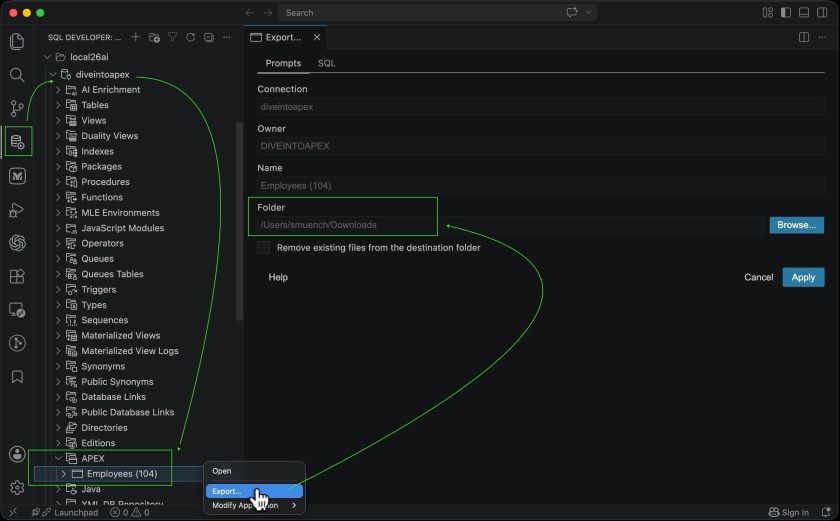
Open the SQL Developer extension in VS Code and expand your database connection. Navigate to the APEX folder, right-click your application, and select Export. Choose a target directory and click Apply. The extension creates a subdirectory named after your app alias and writes all .apx files into it.
Export using SQLcl command line
Connect to your workspace parsing schema and run:
apex export -applicationid 104 -exptype APEXLANGAdd -dir /path/to/folder to set the output location. Without it, SQLcl exports to the current directory in a folder named after the app alias.
How Do You Read and Edit APEXlang Syntax?
Opening a .apx file for the first time is readable immediately. No internal IDs. No encoded values. Component names, property names, and your actual SQL and PL/SQL exactly as you wrote them.
Components, property groups, and the @ reference rule
Every component follows the same pattern: component type, identifier, then properties in parentheses:
page 3 (
    name: Employee
    alias: EMPLOYEE
    title: Employee

    appearance {
        pageMode: modalDialog
        dialogTemplate: @/drawer
        templateOptions: [
            #DEFAULT#
            js-dialog-class-t-Drawer--pullOutEnd
        ]
    }
)
Property groups like appearance, source, and layout use curly braces. Properties are camelCase: value. Boolean values are true or false. Quotes are not required in most cases. Arrays use square brackets with each value on its own line.
References to other components use the @ prefix. A button that references a region with identifier employees uses region: @employees. References to Universal Theme components or global page components use @/ with a forward slash: dialogTemplate: @/drawer. This distinction matters. Use the wrong prefix and the compiler rejects the reference.
The interactive APEXlang Atlas lets you browse every component type, every valid property, and example syntax for each. Keep it open while editing.
SQL, PL/SQL, JavaScript, HTML, and CSS inside .apx files
Multi-line code uses fenced code blocks with a language tag. The tag is not decorative. The compiler uses it to validate code placement:
source {
    type: sqlQuery
    sqlQuery:
        ```sql
        select EMPNO, ENAME, DNAME
          from EMP_DEPT_V
        ```
}
PL/SQL in a process or dynamic action:
plsqlCode:
    ```plsql
    update emp
       set sal = nvl(sal,0) + 100
    where empno = :EMPNO
    returning sal into :P2_NEW_SALARY;
    ```
Browser-side JavaScript uses javascript-browser. Server-side JavaScript (MLE) uses javascript-mle. HTML uses html. CSS uses css. Put browser JavaScript in a javascript-mle block and the compiler rejects it. The tag enforces correct runtime context, not just highlighting.
How Do You Validate APEXlang Before Importing?
Validation is the step in this apexlang tutorial that saves the most time. Run it before every import. It is faster than discovering errors after the import fails halfway through.
apex validate — the command that works without a database connection
Connect SQLcl with /nolog and point validate at your app directory:
sql /nolog
apex validate -input /path/to/employees
No schema connection needed. The APEXlang compiler validates purely from the file contents and the mmdVersion in .apex/apexlang.json. You can run this in a CI/CD pipeline, on a laptop with no database access, or in a pre-commit hook. If validation passes, you see:
Validation successful.If it fails, you get file, line, column, error type, and a plain-English description:
File: pages/p00003-employee.apx
Line: 117
Column: 12
Type: REFERENCE_NOT_FOUND
Error: Reference not found: @employe
To capture errors for later review or to feed directly to an AI agent for fixing:
spool validation-errors.log
apex validate -input /path/to/employees
spool off
The deep dive by Steve Muench of the Oracle APEX team has a clean shell script that wraps this into a single command you can call from anywhere on your machine.
VS Code Problems panel — errors before you even run validate
The SQL Developer extension validates .apx files as you type. Squiggly underlines appear under invalid values immediately. The Problems panel shows the file, line, and error in the same format as the SQLcl output — without you running a single command.
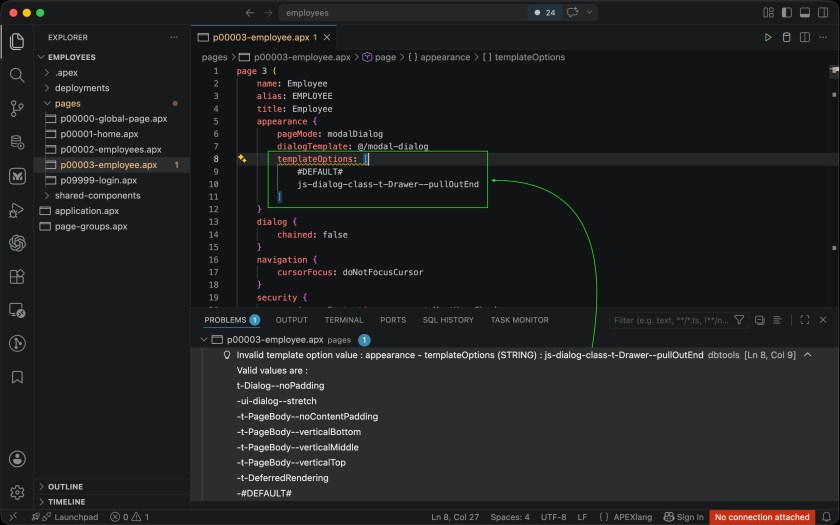
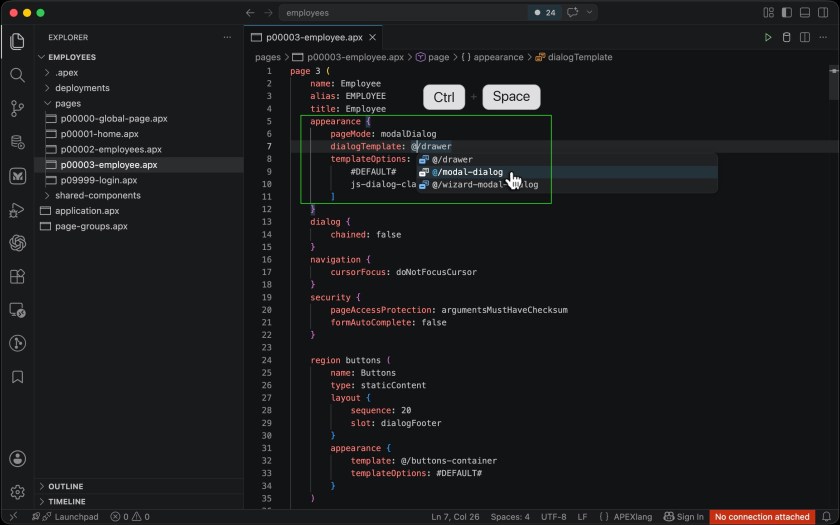
Press Ctrl+Space anywhere in a .apx file to trigger code completion. The extension knows which properties are valid at the cursor position based on the component type and its parent context. Change a page from modalDialog to a standard page and the template completion list updates automatically to show only valid options for the new mode.
How Do You Import APEXlang Back Into Oracle APEX?
Import only after apex validate returns clean. The import command runs validation again automatically, but a clean pre-import validate keeps the feedback loop tight and catches errors before they interrupt a deployment script.
Import from APEX Builder
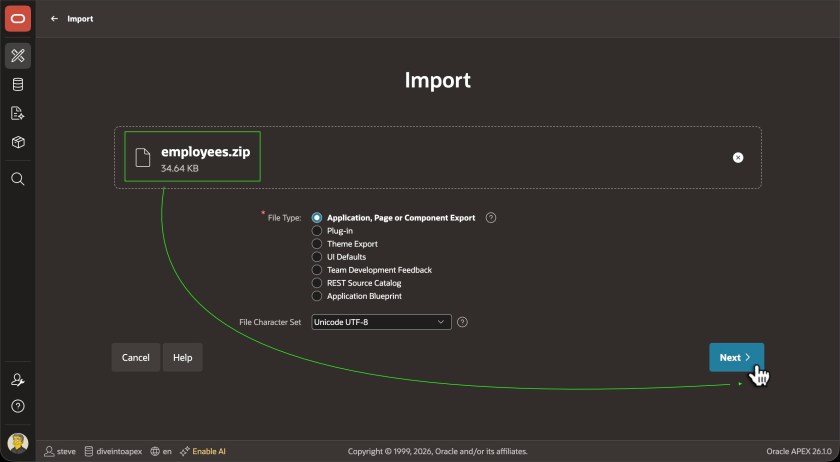
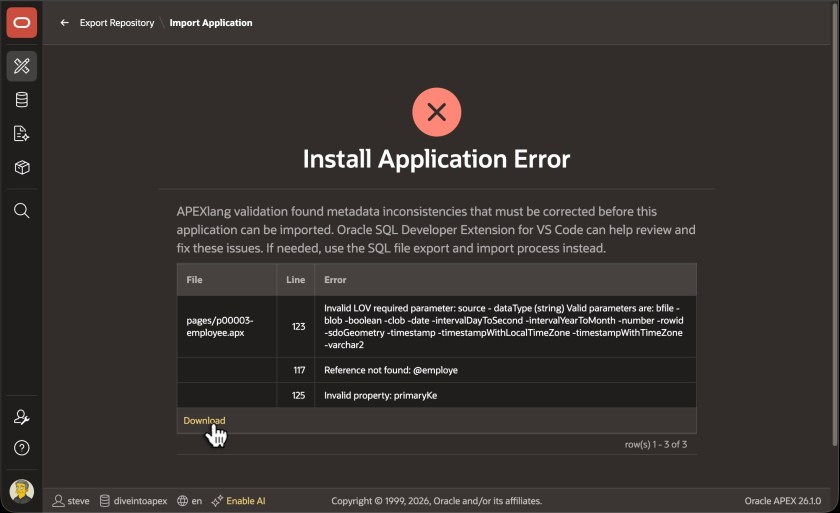
On the Import page in APEX Builder, drag the ZIP file or select it manually. The wizard detects APEXlang automatically. Choose your application ID and click Import Application. APEX validates and compiles. If anything fails, you see the full error list with a link to download it as a CSV file you can hand to an AI agent.
If this is your first APEXlang import in a workspace, APEX may prompt you to REST-enable your parsing schema. The Blueprint Scaffolding walkthrough documents that step in detail including the exact SQL to run.
Import using the VS Code Play button
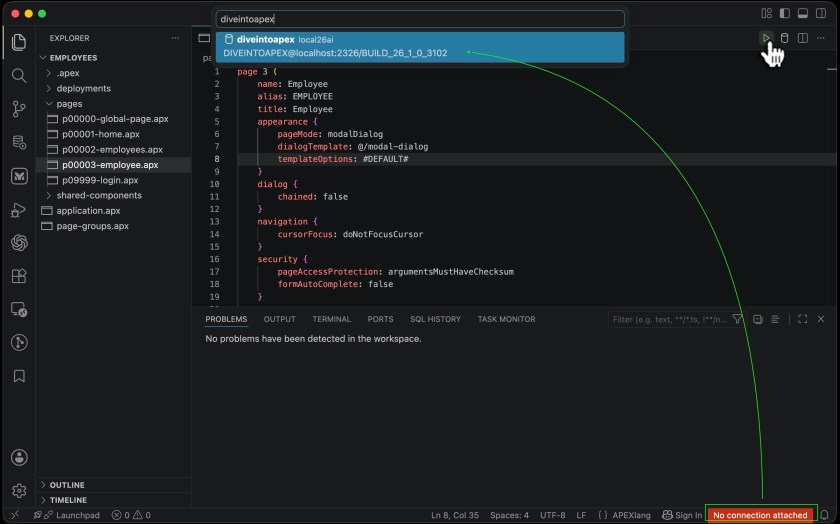
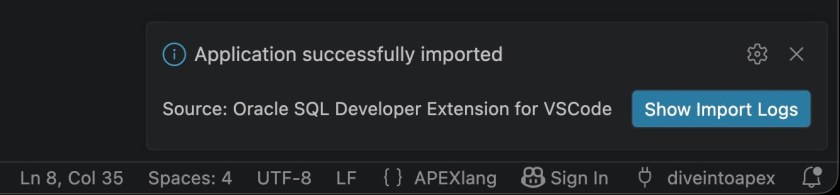
With your application folder open in VS Code, click the Import Application button — the Play icon in the top right of the editor. VS Code checks for unsaved files, prompts for a connection if needed, then imports. The result appears as a popup in the editor.
Import using SQLcl
apex import -input /path/to/employeesSQLcl validates first. If clean, it imports and confirms. If not, errors appear in the console in the same format as apex validate.
How Do You Use AI Agents With APEXlang Skills?
This is where this apexlang tutorial connects to the agentic development workflow. The validate → import loop becomes most productive when an AI agent handles the repetitive changes and you review the diff.
Installing skills with skills sync
Run this in SQLcl:
sql /nolog
skills sync
This downloads Oracle’s APEXlang skills from GitHub and makes them available in Claude, Codex, and other supported AI agents. Skills are reusable prompts that teach the agent how APEXlang components work, what valid syntax looks like, and how to use apex validate to check its own output before handing files back to you.
What the 8 APEXlang skills can change
Once the skills are installed, you describe what you want in plain language and the agent updates the .apx files. Then you validate and import:
- Translations — “Translate my application to Spanish”
- Page Generation — “Add a faceted search page on the ORDERS table”
- Help Text — “Add contextual help text to every form”
- PL/SQL Refactoring — “Move my inline page processes into a PL/SQL package”
- PII Protection — “Find columns containing personal data and add authorization schemes”
- Page Layout — “Move the sales chart below the recent orders report”
- Cross-page Changes — “Add a breadcrumb region to every page”
- Smart Search and Replace — “Rename all Save buttons to Apply Changes”
After the agent updates the files, run apex validate. Give the error log back to the agent if anything fails. Import when clean. The complete loop runs without opening Page Designer once.
What Is the APEXlang View Inside Page Designer?
You do not need to leave APEX Builder to see APEXlang. It is built in to Page Designer.
How to open it and what it shows
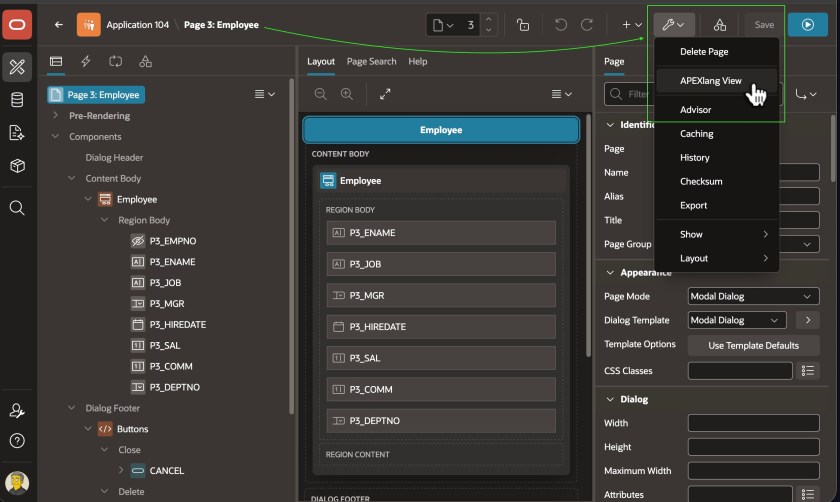
In Page Designer, look for the APEXlang View option in the page menu. A panel opens showing the complete APEXlang definition of the current page — all components, all properties, all nested items in readable format. It is read-only and loads on demand.
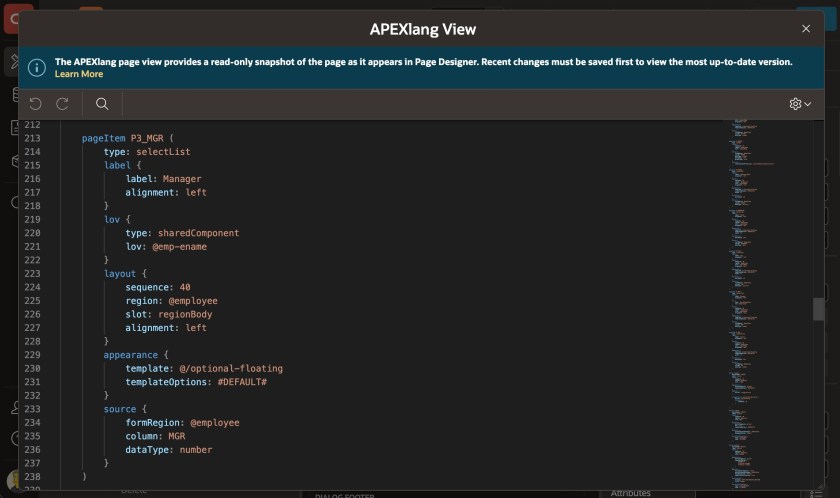
One detail worth remembering: the view only reflects saved changes. Unsaved edits in Page Designer do not appear. Save the page first, then open the APEXlang View.
How APEXlang replaced YAML in Working Copy diffs
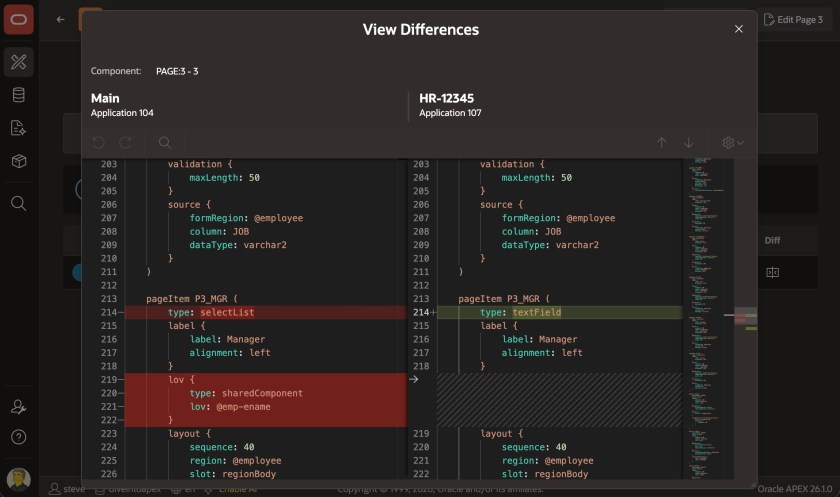
When you compare a Working Copy to the main application in APEX Builder, the diff now shows APEXlang. A region that changed from an Interactive Report to a Content Row shows exactly that change as readable text — not a wall of encoded SQL with one character different somewhere inside it. This is what a meaningful diff looks like.
Key Takeaways
The cycle in this apexlang tutorial is always the same. Export. Edit. Validate. Import. Four steps. Once that loop becomes muscle memory, you start treating APEX apps the way developers treat any other codebase — something you can review, version, diff, and hand to a colleague without explaining what an internal ID number means.
APEXlang does not replace APEX Builder. It runs alongside it. Use Builder for the visual work you already do quickly. Use APEXlang for the changes that are faster as text: bulk renames, cross-page additions, AI-assisted updates, and anything you want tracked cleanly in Git.
The apex validate command without a database connection is the detail most developers miss first. Add it to your workflow before the first import and you will rarely see an import failure again.
If you want to generate a new app from a spec before you get to this editing workflow, the Blueprint Scaffolding walkthrough shows exactly how Oracle APEX converts a Markdown file into a running application. And if you are tracking what goes wrong at runtime once your APEXlang-built app is live, the centralized error logging framework captures errors, call stacks, and session context automatically.
Drop a comment below if you hit something in the APEXlang workflow that is not documented anywhere else. That is usually the most useful thing I can write about next.
Hassan Raza
An Oracle ACE Associate and Senior Oracle Application Developer at S&H Software Solution. I specialize in Oracle APEX, SQL, and PL/SQL and write about Oracle development at oraclewithhassan.com