

 By
By You have spent years clicking through Page Designer. You know every dropdown, every property panel, every “Save” button. And then Oracle APEX 26.1 dropped with APEXlang and a GitHub repo full of skills, and suddenly the entire game changed.
In my previous article on APEX 26.1 new features, I covered what APEXlang is and why it matters. This article is different. This one is the actual setup. The real commands. The mistakes we made so you don’t have to. By the end, you will have a working pipeline where Claude Code in VS Code generates APEXlang files, SQLcl validates and imports them, and your APEX application updates without you touching the browser once.
We built a full HR Recruitment System for S&H Software Solution using this exact workflow. I am going to walk you through every step.
What APEXlang Actually Is (In One Paragraph)
Before setup, you need a mental model. Oracle describes APEXlang as “an open, declarative, human-readable specification language” for APEX applications. Forget the marketing. Here is what that means in practice: your entire APEX application, every page, every region, every button, every SQL source, now lives as structured .apx text files on your hard drive. Files you can open in VS Code. Files an AI can read, edit, and generate. Files you can commit to Git, diff, and review like normal code.
This is the gap Oracle closed with 26.1. Previously, your app lived inside the database as metadata that no AI could meaningfully read or write. Now it lives in files. That changes everything about how you develop.
The Full Stack You Need
Here is the exact stack. No fluff, no alternatives.
- Oracle APEX 26.1 installed and accessible via ORDS
- Oracle AI Database 23ai (or standard Oracle DB 19c+)
- SQLcl 26.1 — the command-line tool that validates and imports APEXlang
- Java 17 LTS — required by SQLcl
- Node.js 18+ — required by Claude Code
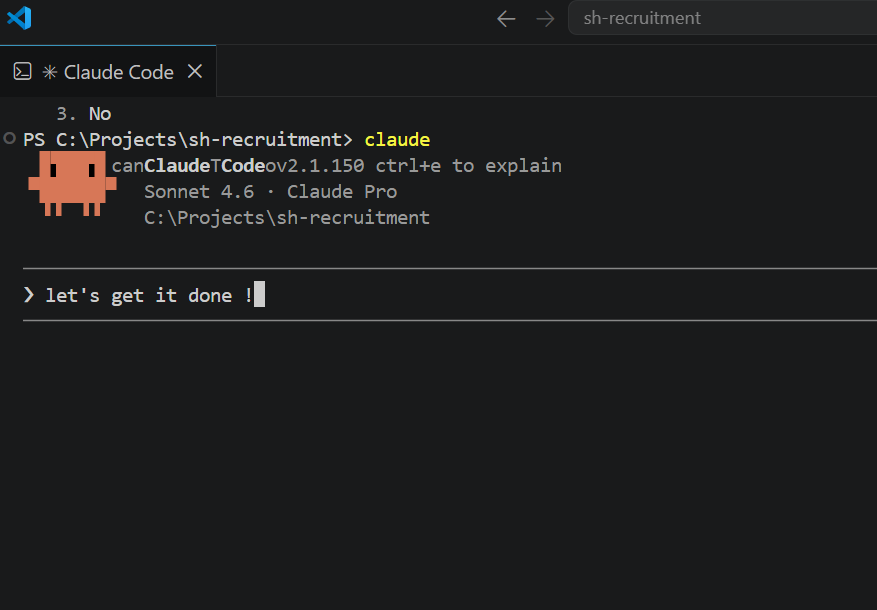
- Claude Code — Anthropic’s CLI agent (installed as a VS Code extension)
- VS Code — your editor and the hub where everything connects
- oracle/skills GitHub repo — APEXlang syntax reference files Claude reads before generating anything
The oracle/skills repo is not optional. It is the piece that makes Claude Code generate correct APEXlang instead of hallucinated syntax. More on that shortly.
How These Tools Connect
The mental model is simple:
Claude Code (reads/writes .apx files in VS Code)
          |
    apex-lang/ folder on your machine
          |
    SQLcl: apex validate → apex import
          |
    Oracle DB → APEX 26.1 workspace
          |
    Live application in browser
Claude Code never touches the database directly. It edits text files. SQLcl is the bridge that pushes those files into APEX. This separation matters because every single import goes through APEX’s own validator first. If the file is wrong, APEX tells you exactly which line and why before anything breaks.
Step-by-Step Setup
Step 1: Install Java 17 and SQLcl
Download Java 17 from Oracle. Run the installer. Then verify:
java -version
# Expected: java version "17.x.x"
Download SQLcl from Oracle as a zip file. Extract it to a folder like C:\sqlcl\. Add C:\sqlcl\bin to your system PATH. Then verify:
sql -v
# Expected: SQLcl: Release 26.1.x Production
If you see 'sql' is not recognized, your PATH is not set. Go to Windows Environment Variables, find the Path entry under System Variables, and add the bin folder path.
Step 2: Install Claude Code
You need Node.js 18 or higher. Check with node --version. Then install Claude Code globally:
npm install -g @anthropic-ai/claude-codeIn VS Code, install the Claude Code extension from the marketplace. Sign in with your Claude.ai account. The extension adds a sidebar panel where you can give Claude instructions that apply across your entire project.
Step 3: Connect SQLcl to Your Oracle DB
Open your VS Code terminal and connect:
sql username/password@//your-db-host:1521/your-service-nameRun a quick test once inside the SQL> prompt:
SELECT banner FROM v$version;If you see your Oracle version returned, you are connected. If you get a timeout, your firewall is blocking port 1521. This is the most common issue teams run into. The solution is either opening the port on the server or using a private VPN like Tailscale to create a secure tunnel between your machine and the database server. We spent a full day sorting this out during our setup. Do not skip the network check early.
If you need a managed APEX environment to practice on first, this guide on setting up APEX on Oracle Cloud Free Tier gives you a working environment in under an hour with no firewall headaches.
Step 4: Create Your Project Folder
mkdir C:\Projects\my-apex-app
cd C:\Projects\my-apex-app
mkdir apex-lang db apex-skills
code .
Now clone the Oracle skills repo into your project:
git clone https://github.com/oracle/skills.git apex-skillsThis pulls down the official APEXlang reference files that teach Claude the correct syntax for every APEX component type. Cards regions, interactive reports, form items, breadcrumbs, dynamic actions. All of it is documented in that repo with exact property names and valid values.
Step 5: Create Your CLAUDE.md File
This is the single most important file in your project. Claude Code reads it at the start of every session. Create CLAUDE.md at the project root and include:
# My APEX Project

## Environment
- Oracle APEX: 26.1.0
- DB Host: your-db-host
- DB Port: 1521
- Service: your-service-name
- ORDS URL: https://your-ords-url/ords
- Workspace: your-workspace
- App ID: your-app-id

## SQLcl Connection
sql username/password@//your-db-host:1521/your-service

## Commands
- Validate: apex validate -input apex-lang/your-app-folder
- Import:   apex import -input apex-lang/your-app-folder

## APEX Skills Reference (MANDATORY)
Before writing ANY APEXlang component, read the relevant
file from ./apex-skills/apex/apexlang/references/
Never guess parameter signatures. Skills first, always.

## Rules
- No em dashes in generated content
- All PL/SQL must have EXCEPTION blocks
- Use bind variables always, never string concatenation
- Check apex-skills before every .apx file you write
The CLAUDE.md file gives Claude persistent memory about your project. Without it, you repeat yourself on every session. With it, Claude knows your DB connection, your app ID, your conventions, and exactly where to find the syntax references. If you want to go further with AI-assisted Oracle development tooling, this open-source schema documentation generator produces LLM-ready documentation of your entire schema that you can also drop into your project context.
The Golden Rule That Took Us Hours to Learn
Stop here. This is the most important section in the article.
When we started building with APEXlang and Claude Code, we made one critical mistake. We asked Claude to generate APEXlang page files from scratch. Claude would produce 280 lines of code using wwv_flow_imp calls with plugin IDs, template IDs, and parameter names it invented from training data. Some of it looked right. None of it worked.
Here is why. Every Oracle APEX instance has its own internal IDs for plugins, templates, and components. These IDs are not consistent between installations. An ID that works on one server fails on another. When Claude generates these from memory, it is guessing. And the errors are silent at generation time but catastrophic at import time.
The Correct Workflow: Export First, Modify Second
The workflow that actually works is this:
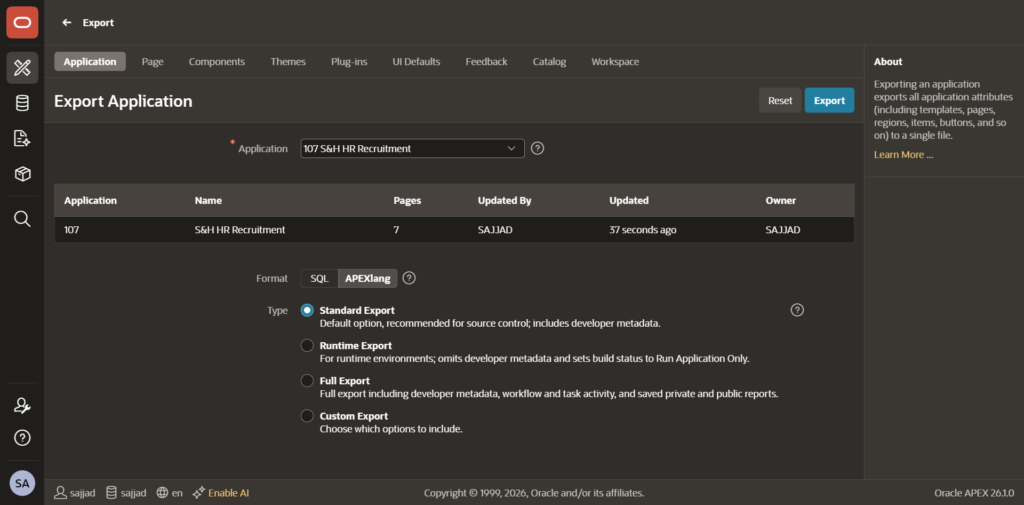
- Create your blank pages in APEX App Builder (one time, in the browser)
- Export the app in APEXlang format from App Builder (Export/Import, choose APEXlang, download the zip)
- Unzip the exported files into your
apex-lang/folder - Run
apex validate -input apex-lang/your-appto confirm the files are clean - Tell Claude Code to read the real exported files and modify them
- Run
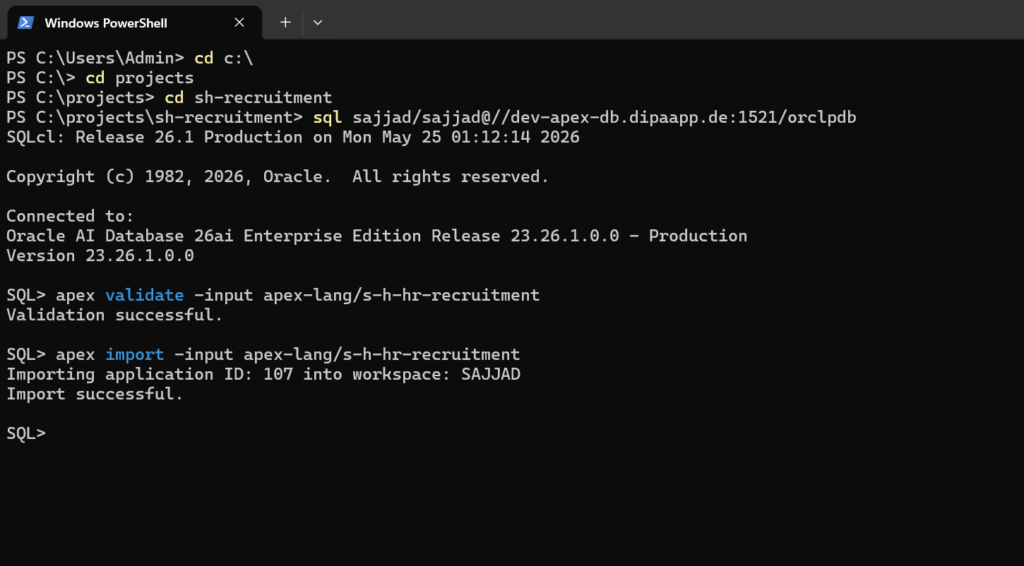
apex validateagain, thenapex import
Steps 1 and 2 happen once. After that, Claude modifies real files with real IDs. Every import works. The validator catches anything Claude gets wrong before it touches the database.
Why the oracle/skills Repo Matters
Even when Claude reads real exported files, it still needs to know the correct APEXlang DSL syntax for properties and values. The oracle/skills repo fills that gap. Before Claude writes any component, it reads the relevant skill file. The skill file tells Claude that a Cards region uses type: cards, that a card action uses type: redirectUrl, that template options go in an array, not a string. These are the exact details that cause validation errors when guessed.
Our prompt rule for every Claude session: read the skill file first, read the real exported file second, write the APEXlang last.
A Real Example: The S&H HR Recruitment System
We built this application live using the workflow above. Here is what happened in practice.
Schema First
In the Claude Code panel, we gave Claude a prompt describing three tables: SH_DEPARTMENTS, SH_JOB_POSTS, and SH_APPLICATIONS. Claude generated a complete SQL script with sequences, before-insert triggers, check constraints on status columns, and foreign key indexes. We ran it through SQLcl:
sql username/password@//host:1521/service @db/sh_schema.sqlThree tables. Done. Zero GUI clicks.
Dashboard Page with KPI Metrics
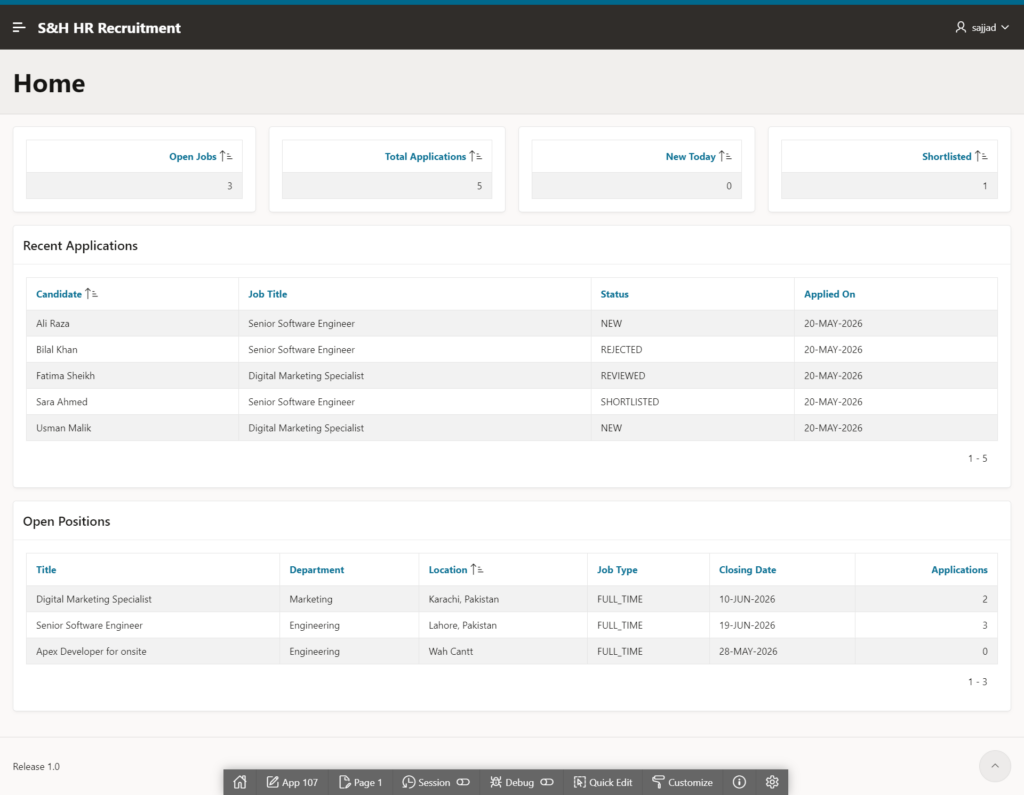
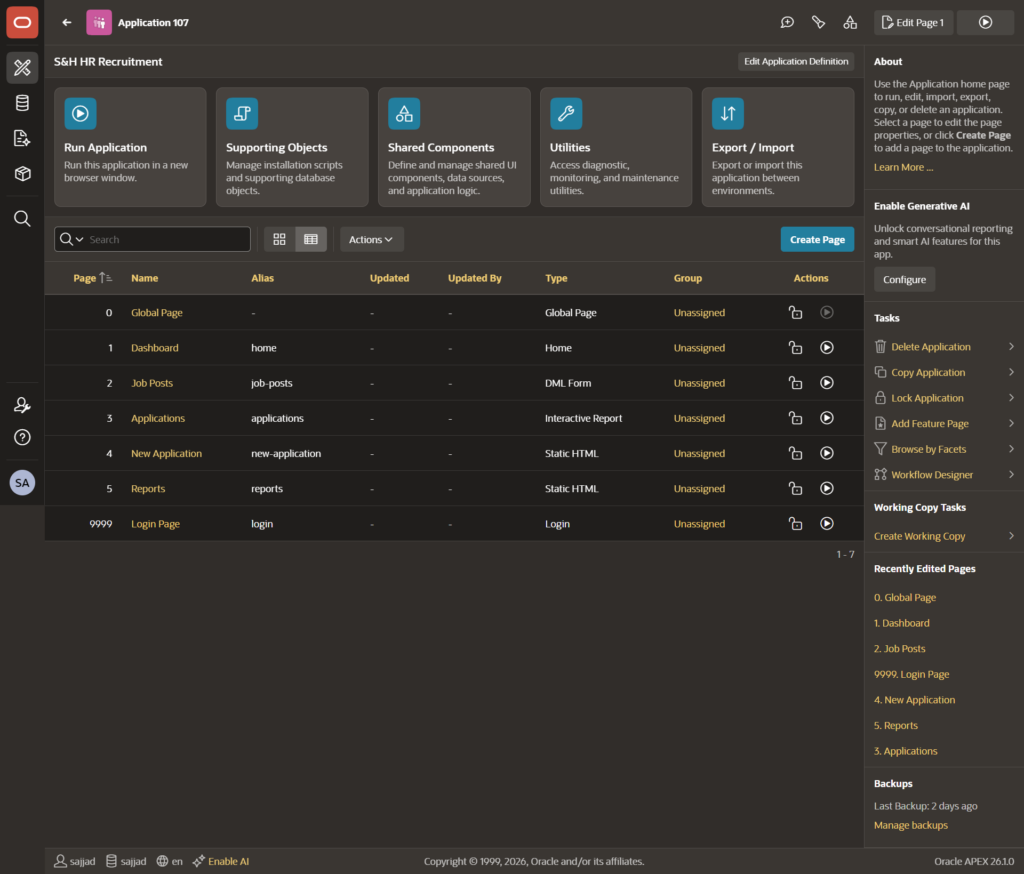
We told Claude to read the real exported home page file and add four classic report regions, each pulling a single count from the database. Open Jobs. Total Applications. New Today. Shortlisted. Claude modified the p00001-home.apx file in place. We validated, imported, and the dashboard rendered with live numbers from the SH_ tables on the first try.
Applications Page with Status Badges
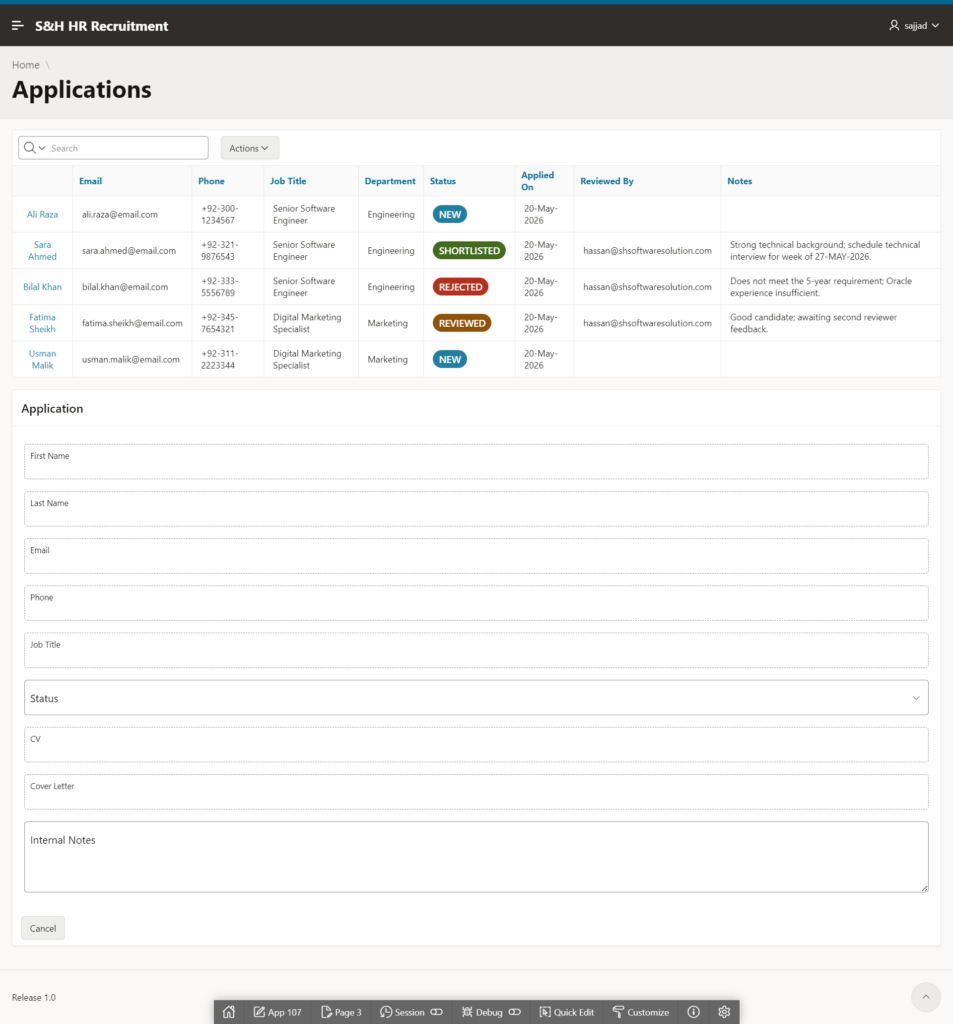
This is where it got impressive. We asked Claude to build an interactive report with HTML badges for job status. The SQL used a CASE statement to wrap each status in a Bootstrap-style span:
CASE j.status
  WHEN 'OPEN'   THEN '<span class="t-Badge t-Badge--success t-Badge--pill">OPEN</span>'
  WHEN 'DRAFT'  THEN '<span class="t-Badge t-Badge--warning t-Badge--pill">DRAFT</span>'
  WHEN 'CLOSED' THEN '<span class="t-Badge t-Badge--danger t-Badge--pill">CLOSED</span>'
END AS status_badge
The column was configured with escape special characters disabled so APEX renders the HTML. Green pills for open roles. Red for closed. Yellow for drafts. All from a file Claude wrote and SQLcl imported. No Page Designer.
What You Must Keep in Mind
These are the things that will trip you up if you skip them.
APEXlang Export Is GUI-Only in 26.1
There is no SQLcl command to export in APEXlang format. The apex export command in SQLcl produces SQL split files, not APEXlang. The official release notes confirm this: APEXlang export happens through App Builder’s Export/Import interface. You click Export once, download the zip, unzip it into your project, and from that point forward everything is command-line. That one GUI step is unavoidable in this release.
Your Schema Must Be REST-Enabled
APEXlang import requires at least one schema in the workspace to be REST-enabled through ORDS. If the import fails with a REST-related error, ask your APEX admin to enable ORDS REST access for the schema. This is a one-time configuration in ORDS settings and takes two minutes.
You Cannot Import a Single Page
In APEX 26.1, APEXlang import works at the application level. Every import pushes the entire application. This means every time you change one page, the full import runs. It takes a few seconds. Plan your workflow around it. We found it fastest to batch changes across multiple pages before running a single import.
Always Validate Before Import
Make apex validate a reflex. Every time. Before every import. The validator runs in under a second and catches syntax errors, invalid property values, and missing required fields with exact line numbers. It has saved us from broken imports more times than we can count. Treat a failed validation the same way you treat a compiler error: fix it before moving forward.
Never Let Claude Generate wwv_flow_imp Calls
If Claude ever produces code with wwv_flow_imp_page.create_page_plug or similar calls, stop immediately. That is the old SQL split format. It requires workspace context, specific package grants, and instance-specific IDs that Claude does not have. Tell Claude to use APEXlang DSL format only, and to check the oracle/skills references before writing anything. The APEXlang format is clean, readable YAML-like syntax. If the output does not look like region foo ( with indented properties, something went wrong.
How to Structure Your Prompts to Claude Code
After building multiple pages this way, here is the prompt structure that produces consistent results.
Start every page-building prompt with the mandatory read instructions:
Read these files first (MANDATORY before writing anything):
1. apex-skills/apex/SKILL.md
2. apex-skills/apex/apexlang/references/ — all relevant files
3. apex-lang/your-app/pages/p0000X-page-name.apx (the real exported file)Now modify pXXXXX.apx to add [your requirements here].
Then describe what you want clearly: region type, SQL source, column configuration, button behavior. The more specific you are, the better the output. Mention which slot the region belongs in (body, breadcrumbBar, etc.). Mention the sequence number. Claude will follow the structure of the existing file and add your requirements in the correct format.
After Claude modifies the file, validate immediately and paste any errors back into Claude. It will fix them. Most validation errors resolve in one or two iterations.
Frequently Asked Questions
Do I Need a Claude Pro Subscription?
Yes. Claude Code requires a Claude.ai Pro or Max subscription. The Claude Pro plan gives you access to Claude Sonnet, which handles complex code generation tasks well. For heavy development sessions with large .apx files, the Max plan gives you significantly more context capacity per session.
Can I Use This Workflow on Oracle Cloud Free Tier?
Yes, with one limitation. Oracle Cloud Free Tier gives you APEX access through apex.oracle.com or through your Autonomous Database. The APEX installation is fully 26.1 compatible. The only difference is that direct port 1521 access may require additional network configuration on your Autonomous Database instance. Everything else works identically.
What Happens If the Import Overwrites My Manual Changes?
It will. Every APEXlang import pushes the entire application state from your files. If you made manual changes in the browser after your last export, those changes will be lost on the next import. The workflow requires discipline: do not mix browser edits with file-based edits. Pick one approach for each session. If you need to make a quick browser change and want to keep it, export the app again before your next Claude Code session.
Is APEXlang Stable Enough for Production Development?
For new applications, yes. The format is official, Oracle-supported, and validated before every import. The main limitation in 26.1 is that you cannot import individual pages, only full applications. For teams working on large existing applications, adopt the workflow incrementally: start new features in APEXlang while keeping existing pages untouched until you are comfortable with the pipeline. Oracle is actively developing the tooling and the constraints of 26.1 will reduce in future releases.
The Results After One Day of Building
Here is what we shipped for S&H Software Solution using this workflow in a single extended session:
- A full database schema with 3 tables, sequences, triggers, constraints, and indexes
- A live dashboard with 4 KPI metric cards pulling real counts from the database
- An interactive report of job posts with color-coded status badges
- A full job creation and editing form with department dropdown, date picker, and all fields
- An applications pipeline with candidate details, CV text, internal notes, and status management
Every single page was built through Claude Code generating APEXlang, SQLcl validating and importing, and the browser just showing the result. The only GUI clicks were the initial blank page creation and the one APEXlang export. Everything else was terminal commands.
That is the workflow. It takes some setup time. The first session will feel slow while you learn the pattern. The second session will be faster. By the third session, building a fully functional APEX page from a plain English description will take you under ten minutes.
What to Do Next
Start small. Create one blank APEX 26.1 application with a single page. Export it in APEXlang format. Open the .apx file in VS Code and read it. Understand the structure. Then give Claude a simple task: add a static HTML region with a heading. Validate. Import. See it in the browser.
That one small loop will teach you more than reading about it ever could. Once it clicks, the rest scales naturally.
If you are thinking about where this fits in your broader Oracle development career path, this guide on starting your Oracle developer career in 2026 covers how AI-assisted development like this changes the skills that matter most going forward. And if you are feeling stuck in your current workflow, this article on why Oracle developers plateau addresses exactly the mindset shift this kind of tooling requires.
Drop your questions in the comments below. What part of the setup gave you the most trouble? What are you building first? I read every single one.
Hassan Raza
An Oracle ACE Associate and Senior Oracle Application Developer at S&H Software Solution. I am specialized in Oracle APEX, SQL, and PL/SQL and writes about Oracle development at oraclewithhassan.com
3 Comments
Comments are closed.