 By
By I built a long data-heavy form in Oracle APEX last month. The kind of form where users have to scroll down to find the input they need, make a change, and submit. Every time they submitted, the page reloaded and jumped them back to the top. Users had to scroll all the way down again.
“Hassan, why does the page keep jumping to the top?” one of our team members asked me after the tenth time scrolling the same form.
That was the moment I realized something simple but powerful: a smooth page reload experience is not a luxury. It is a core part of user experience, especially in enterprise apps where users are doing repetitive work on long forms.
So I built a small utility that saves the user’s scroll position before a page submits, then smoothly restores it after the page reloads. No server-side logic, no hidden items, no complexity. Just pure JavaScript using sessionStorage and window.scrollTo.
In this article, I am going to show you exactly how to implement oracle apex smooth scroll in your applications, and more importantly, why this small interaction detail matters for your users.
What Is Oracle APEX Smooth Scroll?
Oracle APEX smooth scroll is a technique that remembers where a user was scrolled on a page before they submit a form or button, then automatically scrolls them back to that exact position after the page reloads. All of it happens with a smooth animation, not a jarring jump.
Featured Snippet Answer: Oracle APEX smooth scroll is a JavaScript utility that saves browser scroll position using sessionStorage before a page submit, then smoothly restores it after page reload using window.scrollTo with behavior smooth. It requires no server round-trips, no Dynamic Actions, and no hidden APEX items. Just paste the code into Page Load JavaScript and register your buttons.
Why Does Scroll Position Matter in Oracle APEX?
When a user submits a form or button on a long page, the browser does a full page reload. By default, the page reloads at the top. Y position equals zero. For a user who was scrolled 3000 pixels down, this is frustrating. They lose context about where they were.
This is especially painful in Oracle APEX when you have:
- Long edit forms with many fields that require scrolling
- Data entry screens where users switch between different sections
- Report pages with 20+ columns where users scroll right
- Interactive reports with inline edit buttons scattered down the page
A smooth scroll restore tells the user “your action was registered, and here is where you were working.” It is a small detail that signals polish.
How Oracle APEX Smooth Scroll Works Under the Hood
Let me break down the flow step by step so you understand exactly what is happening.
The 4-Step Flow
Step 1: User Clicks a Button Before the button submits the page, JavaScript intercepts the click event and saves the current scroll position to sessionStorage. SessionStorage is perfect for this because it is per-tab and auto-clears when the tab closes.
Step 2: Page Submits and Reloads The form submits normally. The browser makes a server round-trip. The page reloads completely from the top.
Step 3: Page Load JavaScript Fires As soon as the page has finished rendering, your “Page Load” JavaScript executes. This is where the magic happens.
Step 4: Scroll Restores Smoothly The JavaScript reads the saved scroll position from sessionStorage, then uses window.scrollTo with behavior smooth to animate back to that position. The user sees the page scroll smoothly, not snap instantly.
The entire operation happens in about 100 milliseconds. Users experience it as one continuous action, not separate steps.
How to Implement Oracle APEX Smooth Scroll: Step-by-Step
Here is the complete implementation with real code you can copy and paste right now.
Step 1: Add the JavaScript to Your Page
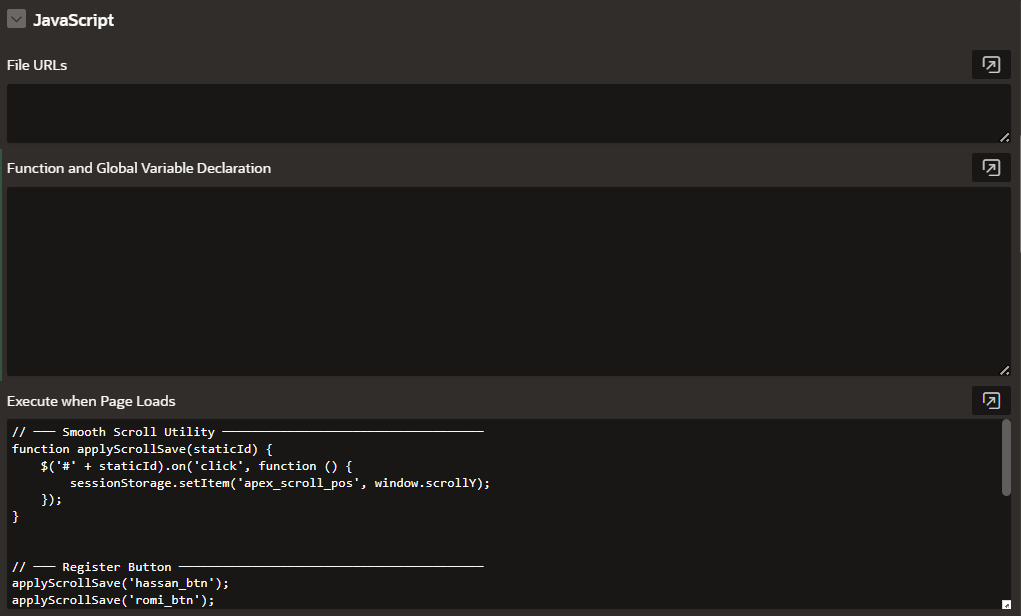
In your APEX page, go to:
Page > Execute when Page Loads
Paste this complete JavaScript block:
// ----- Smooth Scroll Utility -----
function applyScrollSave(staticId) {
  $('#' + staticId).on('click', function () {
    sessionStorage.setItem('apex_scroll_pos', window.scrollY);
  });
}

// ----- Register Your Buttons -----
applyScrollSave('hassan_btn');
applyScrollSave('romi_btn');
// Add more buttons here: applyScrollSave('your_btn_id');

// ----- Restore Scroll on Page Load -----
(function () {
  var savedPos = sessionStorage.getItem('apex_scroll_pos');
  if (savedPos) {
    sessionStorage.removeItem('apex_scroll_pos');
    setTimeout(function () {
      window.scrollTo({
        top: parseInt(savedPos, 10),
        behavior: 'smooth'
      });
    }, 100);
  }
})();
That is all the code you need.
Step 2: Set Static IDs on Your Buttons
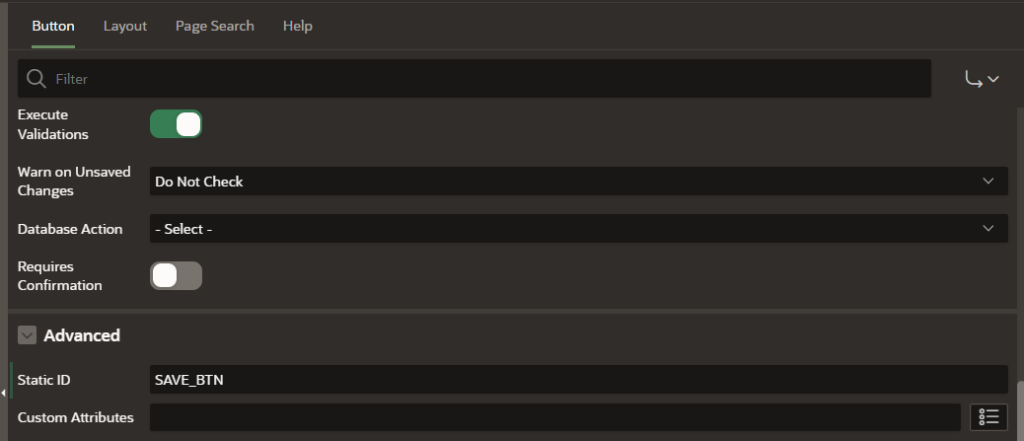
For each button you want to track, open the button in APEX and set its Static ID:
Button > Static ID: your_button_id
For example, if you have a Save button, set the Static ID to SAVE_BTN. If you have an Update button, set it to UPDATE_BTN.
Step 3: Register the Button in Your JavaScript
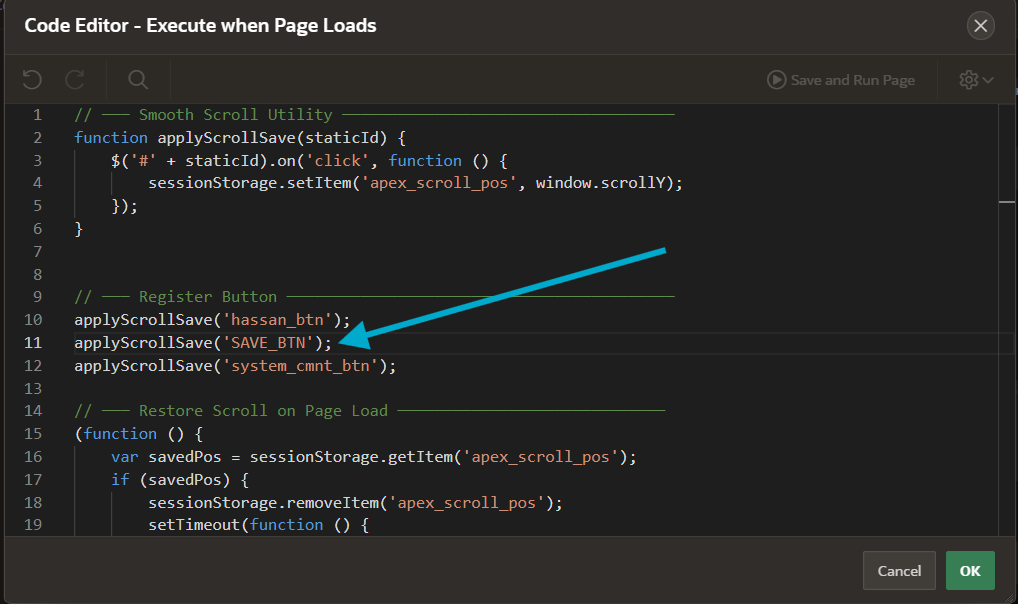
In the “Register Your Buttons” section, add one line for each button:
applyScrollSave('SAVE_BTN');
applyScrollSave('UPDATE_BTN');
That is it. The moment a user clicks your Save or Update button, their scroll position is saved. After the page reloads, they are scrolled back to exactly where they were.
Real-World Example: A Long Data Entry Form
Let me show you a practical example. Imagine you have an employee data form with sections:
- Employee Details (rows 1-15, requires scrolling down)
- Employment History (rows 16-35, requires more scrolling)
- Benefits Information (rows 36-50, further down)
A user is filling in row 40 under Benefits. They click a Save button. Normally the page reloads and they are at the top. With oracle apex smooth scroll, the page scrolls back down to row 40 automatically.
Here is what your JavaScript would look like:
// ----- Smooth Scroll Utility -----
function applyScrollSave(staticId) {
  $('#' + staticId).on('click', function () {
    sessionStorage.setItem('apex_scroll_pos', window.scrollY);
  });
}

// ----- Register Your Buttons -----
applyScrollSave('SAVE_EMP_BTN');
applyScrollSave('VALIDATE_EMP_BTN');
applyScrollSave('SUBMIT_EMP_BTN');

// ----- Restore Scroll on Page Load -----
(function () {
  var savedPos = sessionStorage.getItem('apex_scroll_pos');
  if (savedPos) {
    sessionStorage.removeItem('apex_scroll_pos');
    setTimeout(function () {
      window.scrollTo({
        top: parseInt(savedPos, 10),
        behavior: 'smooth'
      });
    }, 100);
  }
})();
Three buttons registered, three lines of code. Users keep their context.
Alternative Method: CSS Class Approach (Zero Configuration)
If you have 10 or more buttons and do not want to manually register each one, there is a better way. Use a shared CSS class that automatically applies scroll-save behavior to any button with that class.
Replace your JavaScript with this:
// ----- Auto-Apply Scroll Save to All Matching Buttons -----
$(document).on('click', '.js-scroll-save', function () {
  sessionStorage.setItem('apex_scroll_pos', window.scrollY);
});

// ----- Restore Scroll on Page Load -----
(function () {
  var savedPos = sessionStorage.getItem('apex_scroll_pos');
  if (savedPos) {
    sessionStorage.removeItem('apex_scroll_pos');
    setTimeout(function () {
      window.scrollTo({
        top: parseInt(savedPos, 10),
        behavior: 'smooth'
      });
    }, 100);
  }
})();
Now, for each button you want to track, just add the CSS class:
Button > CSS Classes: js-scroll-save
That is all. No JavaScript change needed. Add ten new buttons tomorrow, assign the class, and they all work automatically.
When to Use the CSS Class Method
Use the CSS class method if you have:
- Many buttons (5 or more) that need scroll save
- Multiple pages with similar patterns
- A team that adds buttons frequently
The CSS class approach scales better. New buttons work automatically. No code changes required.
Understanding sessionStorage vs localStorage
A common question I get: should I use sessionStorage or localStorage?
Use sessionStorage every time for scroll position. Here is why.
SessionStorage is tab-isolated. If your user has the same page open in two browser tabs, each tab has its own scroll position. They do not interfere. SessionStorage also auto-clears when the tab closes, which is exactly what you want for temporary data like scroll position.
LocalStorage, on the other hand, persists across browser sessions and tabs. For scroll position, that is overkill and can cause weird behavior. A user might close a tab, open it again a week later, and have the page scroll to an old position that no longer makes sense.
SessionStorage is always the right choice for temporary, session-specific state like scroll position.
Important Timing: Why the 100ms Delay Matters
You might notice the 100ms setTimeout delay in the code:
setTimeout(function () {
  window.scrollTo({
    top: parseInt(savedPos, 10),
    behavior: 'smooth'
  });
}, 100);
This is intentional and critical.
Without that delay, window.scrollTo fires before the browser has fully painted the page layout. The scroll command happens, but it gets silently ignored because the layout is still rendering. The result: the page does not scroll at all and the user is confused.
The 100ms delay gives the browser time to:
- Render all HTML
- Execute CSS
- Apply any dynamic region refreshes
- Paint the final layout
Then, after 100ms, we safely tell the browser to scroll. It works every time.
Adjusting for Heavy Pages
On pages with Interactive Reports, charts, or other heavy components that take longer to render, you might need to increase the delay:
setTimeout(function () {
  window.scrollTo({
    top: parseInt(savedPos, 10),
    behavior: 'smooth'
  });
}, 150);  // Increase to 150ms for heavy pages
On lighter pages, 100ms is plenty. Pay attention to how your specific page performs and adjust if you notice the scroll not working reliably.
When You Do NOT Need Oracle APEX Smooth Scroll
There are cases where you should not use this technique because scroll position is already preserved:
Modal Dialogs: When you open a modal dialog and close it, the page scroll position is naturally preserved. No code needed.
Inline Region Refresh: When you refresh a region without a full page reload, scroll is preserved. Only use this technique for buttons that trigger a full page submit.
AJAX Requests: If you are using APEX Dynamic Actions with Execute PL/SQL with “No Page Submit” checked, the page does not reload. Scroll is automatic. This technique is not needed.
Only use oracle apex smooth scroll when you have actual full page reloads triggered by button submits.
Browser Support and Modern Standards
The smooth scroll behavior is natively supported in all modern browsers starting with APEX 23.2. You do not need any external JavaScript library or polyfill.
This syntax:
window.scrollTo({
  top: 500,
  behavior: 'smooth'
});
Works out of the box in Chrome, Firefox, Safari, and Edge. No fallbacks needed.
If your organization is on APEX 20.x or earlier and needs to support older browsers, you can replace smooth behavior with instant scroll by removing the behavior property:
window.scrollTo({
  top: parseInt(savedPos, 10)
});
It will be instant instead of smooth, but it still works.
Best Practices for Oracle APEX Smooth Scroll
Here are habits that separate a quick implementation from a solid production pattern.
Document Your Buttons: Always add a comment listing which buttons have scroll-save applied, especially if using the manual method. Six months from now, when a new developer joins your team, they need to know what is registered.
// ----- Register Your Buttons -----
// SAVE_BTN, UPDATE_BTN, DELETE_BTN are scroll-save enabled
applyScrollSave('SAVE_BTN');
applyScrollSave('UPDATE_BTN');
applyScrollSave('DELETE_BTN');
Test on Mobile: Smooth scroll can feel sluggish on slower mobile devices. Test your page on actual mobile phones to make sure the animation feels natural. If it does not, consider removing the smooth behavior for mobile users:
var isMobile = window.innerWidth < 768;
window.scrollTo({
  top: parseInt(savedPos, 10),
  behavior: isMobile ? 'auto' : 'smooth'
});
Use Consistently: Either use scroll-save on all buttons on a page, or none. Mixing (some buttons scroll, others do not) confuses users. If you add scroll-save to your Save button but not your Delete button, users get inconsistent behavior.
Clean Up Old Positions: In rare cases where a page fails to submit and reload, the stale scroll position might linger. It clears automatically on tab close, but to be extra safe, you can add a timeout:
setTimeout(function () {
  sessionStorage.removeItem('apex_scroll_pos');
}, 30000); // Clear after 30 seconds if not used
Common Issues and Troubleshooting
Scroll Not Restoring at All
Cause: JavaScript is not executing or the button is not registered.
Fix: Check your browser console (F12) for errors. Make sure the Static ID you registered matches exactly the Static ID on your button. Static IDs are case-sensitive.
Scroll Restores but Position Is Wrong
Cause: The page height changed, so the saved Y position no longer points to the right element.
Fix: This can happen if your page has a lot of dynamic content that loads at different speeds. Increase the setTimeout delay to 150ms or 200ms to give more time for content to render.
Works on First Submit, Not on Second
Cause: The sessionStorage value was not being cleared, or a new value was overwritten before the page reloaded.
Fix: Make sure the code includes sessionStorage.removeItem('apex_scroll_pos'); to clear the value after it is used. Check that you are not calling applyScrollSave multiple times on the same button.
Performance Impact
You might be wondering: does this add overhead to my page?
No. The performance impact is minimal.
- Saving scroll position: one line of JavaScript on click. Negligible.
- Restoring scroll position: happens once per page load, takes less than 1ms. Unnoticeable.
- SessionStorage: browser built-in feature, no external library or network calls.
This is one of the few optimizations where you get significant UX improvement with near-zero performance cost.
Next Steps: Enhancing the User Experience Further
Smooth scroll position is one piece of a larger UX puzzle. Here are other enhancements that work well alongside it:
If you are building enterprise APEX applications with a lot of user interaction, you might also be interested in error handling and logging. I wrote a detailed guide on a centralized error logging framework that works beautifully with interactive forms: A Centralized Error Logging Framework for Oracle APEX
For more APEX UI and UX patterns like this one, check out my complete collection of APEX UI tips and tricks on the blog.
Quick Reference Table
| Item | Value / Location |
|---|---|
| Where to Paste Code | Page > Execute when Page Loads |
| Required for Each Button | Static ID (set on button) |
| To Register a Button | applyScrollSave(‘YOUR_STATIC_ID’) |
| Storage Method | sessionStorage (per-tab, auto-clears) |
| Scroll Delay | 100ms (increase to 150ms for heavy pages) |
| Supported APEX Version | 20.2+ (23.2+ for smooth behavior) |
| CSS Class Alternative | Add class js-scroll-save to button |
| Browser Support | All modern browsers (Chrome, Firefox, Safari, Edge) |
| Performance Cost | Negligible (less than 1ms per page load) |
| Server Calls Required | Zero. Pure client-side JavaScript. |
Wrapping Up
Oracle APEX smooth scroll is a small detail that makes a massive difference in user experience. Your users scroll down a long form, make a change, submit, and the page smoothly brings them back to exactly where they were. No confusion. No lost context. No frustration.
The implementation is simple: paste one JavaScript block, set Static IDs on your buttons, register them. That is all. No Dynamic Actions, no hidden items, no server-side logic.
The next time you are building a long form or data entry screen in Oracle APEX, add this simple pattern. Your users will notice. And more importantly, they will appreciate the thought you put into their experience.
What kind of APEX page are you planning to add smooth scroll to? Drop it in the comments. I read every single one and I would love to hear about your use case.
Hassan Raza
Oracle ACE Apprentice | S&H Software Solution, Pakistan