 By
By Most enterprise Oracle APEX applications are great at managing data but completely silent when it comes to communicating with users outside the system. Approvals wait in queues. Notifications get missed. The moment someone needs to reach a customer on WhatsApp, they grab their phone, send a message manually, and that conversation is gone from the system forever. No record. No visibility. No traceability.
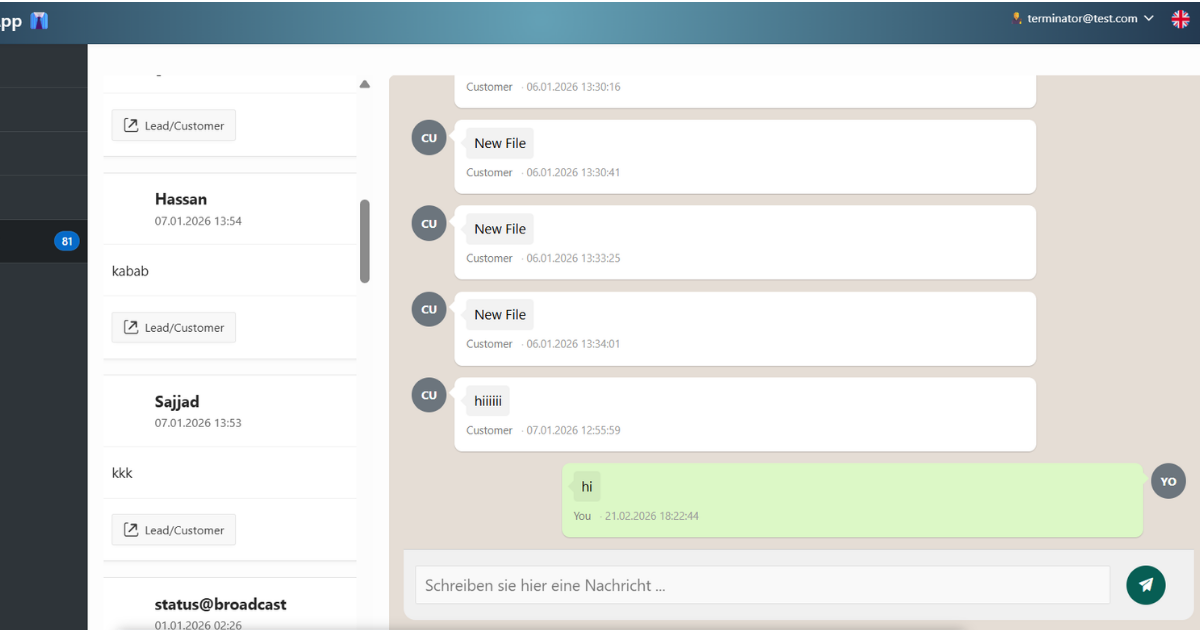
I wanted to fix that. In this tutorial I will walk you through integrating WhatsApp messaging directly inside an Oracle APEX application, end to end. Users will be able to send and receive WhatsApp messages without leaving APEX. Every conversation will be logged in the database, linked to a record, and visible to the whole team.
The stack is Oracle APEX for the UI, ORDS for exposing REST endpoints, PL/SQL with UTL_HTTP for outbound messaging, WAAPI as the WhatsApp API provider, and n8n for processing incoming webhooks.
Architecture Overview
Before writing any code it helps to understand how the pieces connect.
Outbound flow (APEX to WhatsApp): User types a message in APEX → APEX process calls PL/SQL → PL/SQL uses UTL_HTTP with Oracle Wallet → WAAPI delivers it to WhatsApp
Inbound flow (WhatsApp to APEX): Contact replies on WhatsApp → WAAPI fires a webhook → n8n receives and parses the payload → n8n calls an ORDS REST endpoint → ORDS runs PL/SQL → message stored in Oracle DB → APEX displays it in the chat
Each component does one job. Nothing is tightly coupled.
Step 1: SSL Configuration with Oracle Wallet
This is the step most developers skip, and then they spend hours debugging ORA-29024: Certificate validation failure. Oracle will not make any outbound HTTPS call unless the server’s SSL certificate is trusted inside an Oracle Wallet. Think of it the same way a browser needs to trust a certificate before showing you a green padlock.
1.1 Export the WAAPI SSL Certificate
Open https://waapi.app in Chrome. Click the padlock icon in the address bar, then click Connection is secure, then Certificate is valid. Navigate to the Details tab and click Export. Save the file in Base-64 encoded .crt format. Do the same for the intermediate certificate if one is shown in the certificate chain.
Copy both .crt files to your database server, for example into /tmp/certs/.
1.2 Create the Oracle Wallet
# Create the wallet directory
mkdir -p /opt/oracle/wallet/whatsapp
chmod 755 /opt/oracle/wallet/whatsapp

# Create the wallet with auto-login enabled
orapki wallet create \
  -wallet /opt/oracle/wallet/whatsapp \
  -pwd YourStrongWalletPassword \
  -auto_login
The -auto_login flag generates both ewallet.p12 (password-protected) and cwallet.sso (auto-login). With SSO in place your PL/SQL code does not need to supply the password on every call.
1.3 Import the Certificates
Import root first, then intermediate. Order matters.
# Import root certificate
orapki wallet add \
  -wallet /opt/oracle/wallet/whatsapp \
  -trusted_cert \
  -cert /tmp/certs/waapi_root.crt \
  -pwd YourStrongWalletPassword

# Import intermediate certificate
orapki wallet add \
  -wallet /opt/oracle/wallet/whatsapp \
  -trusted_cert \
  -cert /tmp/certs/waapi_intermediate.crt \
  -pwd YourStrongWalletPassword
If you see PKI-04003: The trusted certificate is already present in the wallet on the root certificate, that is fine. It just means the root CA is already trusted by default in Oracle’s built-in trust store.
1.4 Verify the Wallet
orapki wallet display \
  -wallet /opt/oracle/wallet/whatsapp \
  -pwd YourStrongWalletPassword
You should see both certificates listed under Trusted Certificates. If the list is empty, the import failed. Double-check your file paths and certificate format.
Step 2: Grant ACL Network Access
The wallet alone is not enough. Oracle also requires explicit network access grants using DBMS_NETWORK_ACL_ADMIN. Without this your UTL_HTTP call will throw ORA-24247: network access denied by access control list (ACL). Run these as SYSDBA.
-- Grant HTTP and connect access to the WAAPI domain
BEGIN
  DBMS_NETWORK_ACL_ADMIN.APPEND_HOST_ACE(
    host       => 'waapi.app',
    lower_port => 443,
    upper_port => 443,
    ace        => xs$ace_type(
                    privilege_list => xs$name_list('http', 'connect', 'resolve'),
                    principal_name => 'YOUR_SCHEMA_NAME',
                    principal_type => xs_acl.ptype_db
                  )
  );
  COMMIT;
END;
/

-- Grant wallet access to the same schema
BEGIN
  DBMS_NETWORK_ACL_ADMIN.APPEND_WALLET_ACE(
    wallet_path => 'file:/opt/oracle/wallet/whatsapp',
    ace         => xs$ace_type(
                    privilege_list => xs$name_list('use_client_certificates'),
                    principal_name => 'YOUR_SCHEMA_NAME',
                    principal_type => xs_acl.ptype_db
                  )
  );
  COMMIT;
END;
/
Replace YOUR_SCHEMA_NAME with the actual schema your APEX workspace runs on. This is case-sensitive. Verify both grants were applied:
SELECT host, lower_port, upper_port, acl
  FROM dba_network_acls
 ORDER BY host;

SELECT acl, principal, privilege, is_grant
  FROM dba_network_acl_privileges
 ORDER BY acl;
Both the host ACE and the wallet ACE need to be visible. If only one of them is set, UTL_HTTP will still fail.
Step 3: The Database Layer
Two tables carry the entire messaging module. Keep them clean and simple.
3.1 Conversations Table
CREATE SEQUENCE chat_conv_seq START WITH 1 INCREMENT BY 1 NOCACHE;

CREATE TABLE chat_conversation (
  conv_id        NUMBER        DEFAULT chat_conv_seq.NEXTVAL PRIMARY KEY,
  phone_number   VARCHAR2(50)  NOT NULL,
  contact_name   VARCHAR2(255),
  linked_id      NUMBER,           -- Optional FK to any record (customer, lead, etc.)
  linked_type    VARCHAR2(100),    -- e.g. 'CUSTOMER', 'LEAD', 'ORDER'
  wa_chat_id     VARCHAR2(500),    -- Chat ID returned by WAAPI (e.g. 491234567890@c.us)
  is_active      VARCHAR2(3)   DEFAULT 'YES',
  created_at     TIMESTAMP     DEFAULT SYSTIMESTAMP,
  created_by     VARCHAR2(255)
);
3.2 Messages Table
CREATE SEQUENCE chat_msg_seq START WITH 1 INCREMENT BY 1 NOCACHE;

CREATE TABLE chat_message (
  msg_id         NUMBER        DEFAULT chat_msg_seq.NEXTVAL PRIMARY KEY,
  conv_id        NUMBER        NOT NULL REFERENCES chat_conversation(conv_id),
  direction      VARCHAR2(1)   NOT NULL CHECK (direction IN ('S','R')),
  msg_type       VARCHAR2(20)  DEFAULT 'text',
  msg_body       CLOB,
  media_url      VARCHAR2(2000),
  wa_msg_id      VARCHAR2(500),    -- Message ID from WAAPI response
  is_sent        VARCHAR2(3)   DEFAULT 'NO',
  is_read        VARCHAR2(3)   DEFAULT 'NO',
  sent_at        TIMESTAMP,
  received_at    TIMESTAMP,
  created_at     TIMESTAMP     DEFAULT SYSTIMESTAMP,
  created_by     VARCHAR2(255)
);
The direction column is S for sent and R for received. That single character drives the CSS alignment in the chat UI. IS_SENT tracks whether the WAAPI call succeeded, so you can identify failed deliveries.
3.3 Configuration Table
CREATE TABLE app_config (
  config_key   VARCHAR2(100) PRIMARY KEY,
  config_value VARCHAR2(4000),
  description  VARCHAR2(500),
  is_active    VARCHAR2(3) DEFAULT 'YES'
);

INSERT INTO app_config VALUES ('WAAPI_BASE_URL',    'https://waapi.app/api/v1',         'WAAPI base endpoint',              'YES');
INSERT INTO app_config VALUES ('WAAPI_INSTANCE_ID', 'YOUR_INSTANCE_ID',                 'Instance ID from WAAPI dashboard', 'YES');
INSERT INTO app_config VALUES ('WAAPI_TOKEN',       'YOUR_BEARER_TOKEN',                'Bearer token from WAAPI',          'YES');
INSERT INTO app_config VALUES ('WALLET_PATH',       'file:/opt/oracle/wallet/whatsapp', 'Oracle wallet path for HTTPS',     'YES');
INSERT INTO app_config VALUES ('WALLET_PWD',        'YourStrongWalletPassword',         'Oracle wallet password',           'YES');
COMMIT;
Step 4: The PL/SQL Messaging Package
This package handles all the business logic: sending messages, logging inbound messages, and finding or creating conversations.
4.1 Package Specification
CREATE OR REPLACE PACKAGE pkg_wa_chat AS

  FUNCTION get_config (
    p_key IN VARCHAR2
  ) RETURN VARCHAR2;

  FUNCTION get_or_create_conv (
    p_phone       IN VARCHAR2,
    p_linked_id   IN NUMBER   DEFAULT NULL,
    p_linked_type IN VARCHAR2 DEFAULT NULL
  ) RETURN NUMBER;

  PROCEDURE send_message (
    p_phone       IN VARCHAR2,
    p_message     IN VARCHAR2,
    p_linked_id   IN NUMBER   DEFAULT NULL,
    p_linked_type IN VARCHAR2 DEFAULT NULL
  );

  PROCEDURE log_inbound (
    p_phone      IN VARCHAR2,
    p_message    IN VARCHAR2,
    p_wa_msg_id  IN VARCHAR2 DEFAULT NULL,
    p_msg_type   IN VARCHAR2 DEFAULT 'text',
    p_media_url  IN VARCHAR2 DEFAULT NULL
  );

END pkg_wa_chat;
/
4.2 Package Body
CREATE OR REPLACE PACKAGE BODY pkg_wa_chat AS

  FUNCTION get_config (p_key IN VARCHAR2) RETURN VARCHAR2 IS
    v_val app_config.config_value%TYPE;
  BEGIN
    SELECT config_value INTO v_val
      FROM app_config
     WHERE config_key = p_key AND is_active = 'YES';
    RETURN v_val;
  EXCEPTION
    WHEN NO_DATA_FOUND THEN RETURN NULL;
  END get_config;

  FUNCTION get_or_create_conv (
    p_phone       IN VARCHAR2,
    p_linked_id   IN NUMBER   DEFAULT NULL,
    p_linked_type IN VARCHAR2 DEFAULT NULL
  ) RETURN NUMBER IS
    v_conv_id NUMBER;
  BEGIN
    SELECT conv_id INTO v_conv_id
      FROM chat_conversation
     WHERE phone_number = p_phone AND is_active = 'YES' AND ROWNUM = 1;
    RETURN v_conv_id;
  EXCEPTION
    WHEN NO_DATA_FOUND THEN
      INSERT INTO chat_conversation (phone_number, linked_id, linked_type, created_by)
      VALUES (p_phone, p_linked_id, p_linked_type, NVL(apex_application.g_user, 'SYSTEM'))
      RETURNING conv_id INTO v_conv_id;
      COMMIT;
      RETURN v_conv_id;
  END get_or_create_conv;

  PROCEDURE send_message (
    p_phone       IN VARCHAR2,
    p_message     IN VARCHAR2,
    p_linked_id   IN NUMBER   DEFAULT NULL,
    p_linked_type IN VARCHAR2 DEFAULT NULL
  ) IS
    v_conv_id     NUMBER;
    v_msg_id      NUMBER;
    v_url         VARCHAR2(500);
    v_token       VARCHAR2(500);
    v_instance    VARCHAR2(100);
    v_wallet_path VARCHAR2(500);
    v_wallet_pwd  VARCHAR2(100);
    v_req         UTL_HTTP.req;
    v_resp        UTL_HTTP.resp;
    v_body        VARCHAR2(4000);
    v_resp_text   VARCHAR2(32767);
    v_http_status NUMBER;
  BEGIN
    v_url         := get_config('WAAPI_BASE_URL');
    v_token       := get_config('WAAPI_TOKEN');
    v_instance    := get_config('WAAPI_INSTANCE_ID');
    v_wallet_path := get_config('WALLET_PATH');
    v_wallet_pwd  := get_config('WALLET_PWD');

    v_conv_id := get_or_create_conv(p_phone, p_linked_id, p_linked_type);

    -- Log the message BEFORE the HTTP call - always have a record
    INSERT INTO chat_message (conv_id, direction, msg_type, msg_body, is_sent, sent_at, created_by)
    VALUES (v_conv_id, 'S', 'text', p_message, 'NO', SYSTIMESTAMP, NVL(apex_application.g_user, 'SYSTEM'))
    RETURNING msg_id INTO v_msg_id;
    COMMIT;

    -- WAAPI chatId format: phone number + @c.us
    v_body := '{"chatId":"' || p_phone || '@c.us",' ||
              '"message":"' || REPLACE(REPLACE(p_message, '\', '\\'), '"', '\"') || '"}';

    UTL_HTTP.set_wallet(v_wallet_path, v_wallet_pwd);

    v_req := UTL_HTTP.begin_request(
      url    => v_url || '/instances/' || v_instance || '/client/action/send-message',
      method => 'POST'
    );

    UTL_HTTP.set_header(v_req, 'Content-Type',  'application/json');
    UTL_HTTP.set_header(v_req, 'Accept',         'application/json');
    UTL_HTTP.set_header(v_req, 'Authorization',  'Bearer ' || v_token);
    UTL_HTTP.set_header(v_req, 'Content-Length', TO_CHAR(LENGTHB(v_body)));
    UTL_HTTP.write_text(v_req, v_body);

    v_resp        := UTL_HTTP.get_response(v_req);
    v_http_status := v_resp.status_code;

    BEGIN
      UTL_HTTP.read_text(v_resp, v_resp_text, 32767);
    EXCEPTION
      WHEN UTL_HTTP.end_of_body THEN NULL;
    END;

    UTL_HTTP.end_response(v_resp);

    IF v_http_status = 200 THEN
      UPDATE chat_message SET is_sent = 'YES' WHERE msg_id = v_msg_id;
      COMMIT;
    END IF;

  EXCEPTION
    WHEN OTHERS THEN
      BEGIN UTL_HTTP.end_response(v_resp); EXCEPTION WHEN OTHERS THEN NULL; END;
      UPDATE chat_message SET is_sent = 'NO' WHERE msg_id = v_msg_id;
      COMMIT;
      RAISE;
  END send_message;

  PROCEDURE log_inbound (
    p_phone     IN VARCHAR2,
    p_message   IN VARCHAR2,
    p_wa_msg_id IN VARCHAR2 DEFAULT NULL,
    p_msg_type  IN VARCHAR2 DEFAULT 'text',
    p_media_url IN VARCHAR2 DEFAULT NULL
  ) IS
    v_conv_id NUMBER;
  BEGIN
    v_conv_id := get_or_create_conv(p_phone);

    INSERT INTO chat_message (
      conv_id, direction, msg_type, msg_body,
      wa_msg_id, media_url, is_sent, is_read,
      received_at, created_by
    ) VALUES (
      v_conv_id, 'R', p_msg_type, p_message,
      p_wa_msg_id, p_media_url, 'YES', 'NO',
      SYSTIMESTAMP, 'WEBHOOK'
    );
    COMMIT;
  EXCEPTION
    WHEN OTHERS THEN ROLLBACK; RAISE;
  END log_inbound;

END pkg_wa_chat;
/

SHOW ERRORS PACKAGE BODY pkg_wa_chat;
One important design decision here: the outbound message is logged to the database before the UTL_HTTP call happens. If the API is down, you still have a record of what was attempted. The IS_SENT flag shows whether delivery actually succeeded.
Step 5: ORDS REST Endpoints
n8n needs a way to push inbound messages into Oracle. We expose this through ORDS. The following PL/SQL block creates the full REST module with two endpoints: one for receiving inbound messages (POST) and one for fetching conversations (GET).
5.1 Enable Your Schema for ORDS
BEGIN
  ORDS.enable_schema(
    p_enabled             => TRUE,
    p_schema              => 'YOUR_SCHEMA_NAME',
    p_url_mapping_type    => 'BASE_PATH',
    p_url_mapping_pattern => 'chat-api',
    p_auto_rest_auth      => FALSE
  );
  COMMIT;
END;
/
5.2 Define the REST Module and Handlers
BEGIN
  ORDS.define_module(
    p_module_name    => 'whatsapp.chat',
    p_base_path      => '/whatsapp/',
    p_items_per_page => 0,
    p_status         => 'PUBLISHED'
  );

  -- Template 1: Inbound message receiver
  ORDS.define_template(
    p_module_name => 'whatsapp.chat',
    p_pattern     => 'incoming'
  );

  ORDS.define_handler(
    p_module_name   => 'whatsapp.chat',
    p_pattern       => 'incoming',
    p_method        => 'POST',
    p_source_type   => ORDS.source_type_plsql,
    p_mimes_allowed => 'application/json',
    p_source        => q'[
DECLARE
  v_body      CLOB;
  v_phone     VARCHAR2(50);
  v_message   VARCHAR2(4000);
  v_wa_msg_id VARCHAR2(500);
  v_msg_type  VARCHAR2(20);
  v_media_url VARCHAR2(2000);
BEGIN
  v_body := :body;
  APEX_JSON.parse(v_body);

  v_phone      := APEX_JSON.get_varchar2(p_path => 'phone');
  v_message    := APEX_JSON.get_varchar2(p_path => 'message');
  v_wa_msg_id  := APEX_JSON.get_varchar2(p_path => 'messageId');
  v_msg_type   := NVL(APEX_JSON.get_varchar2(p_path => 'type'), 'text');
  v_media_url  := APEX_JSON.get_varchar2(p_path => 'mediaUrl');

  pkg_wa_chat.log_inbound(
    p_phone     => v_phone,
    p_message   => v_message,
    p_wa_msg_id => v_wa_msg_id,
    p_msg_type  => v_msg_type,
    p_media_url => v_media_url
  );

  APEX_JSON.open_object;
  APEX_JSON.write('status',  'ok');
  APEX_JSON.write('message', 'Message logged');
  APEX_JSON.close_object;
EXCEPTION
  WHEN OTHERS THEN
    APEX_JSON.open_object;
    APEX_JSON.write('status',  'error');
    APEX_JSON.write('message', SQLERRM);
    APEX_JSON.close_object;
END;
    ]'
  );

  -- Template 2: Conversations list
  ORDS.define_template(
    p_module_name => 'whatsapp.chat',
    p_pattern     => 'conversations'
  );

  ORDS.define_handler(
    p_module_name => 'whatsapp.chat',
    p_pattern     => 'conversations',
    p_method      => 'GET',
    p_source_type => ORDS.source_type_collection_feed,
    p_source      => q'[
SELECT
  c.conv_id,
  c.phone_number,
  c.contact_name,
  c.linked_id,
  c.linked_type,
  TO_CHAR(c.created_at, 'DD-MON-YYYY HH24:MI') AS created_at,
  (SELECT COUNT(*) FROM chat_message m WHERE m.conv_id = c.conv_id) AS total_messages,
  (SELECT COUNT(*) FROM chat_message m
   WHERE m.conv_id = c.conv_id AND m.is_read = 'NO' AND m.direction = 'R') AS unread_count
FROM chat_conversation c
WHERE c.is_active = 'YES'
ORDER BY c.created_at DESC
    ]'
  );

  COMMIT;
END;
/
Your inbound message endpoint URL will be:
https://your-apex-instance.com/ords/chat-api/whatsapp/incomingKeep that URL handy. You paste it into n8n in the next step. Test it first with curl to confirm it is working before wiring it to n8n:
curl -X POST https://your-apex-instance.com/ords/chat-api/whatsapp/incoming \
  -H "Content-Type: application/json" \
  -d '{"phone":"491234567890","message":"Test","messageId":"MSG001","type":"text"}'
You should get back {"status":"ok","message":"Message logged"}.
Step 6: Building the n8n Workflow for Inbound Messages
When someone replies to your WhatsApp, WAAPI fires a webhook. n8n receives it, parses the payload, and posts the cleaned data to your ORDS endpoint. The workflow has four nodes.
6.1 Webhook Node
Add a Webhook node with these settings:
- HTTP Method: POST
- Path: wa-incoming
- Response Mode: Respond Immediately
- Response Code: 200
Respond Immediately is important. WAAPI expects a fast 200 response from the webhook. If you process everything synchronously before responding, WAAPI may time out and retry the webhook multiple times, giving you duplicate messages.
Copy the Production Webhook URL from n8n, go to your WAAPI dashboard, open your instance settings, and paste it as the webhook endpoint.
6.2 If Node: Filter Out Your Own Sent Messages
WAAPI fires webhooks for every message event including the ones you send. Without a filter, your own outbound messages will loop back through n8n and get logged as inbound. Add an If node immediately after the Webhook node:
- Value 1:
{{ $json.body.data.message.fromMe }} - Operation: is equal to
- Value 2: false
Connect only the True branch (fromMe = false means genuinely incoming) to the next node.
6.3 Code Node: Parse the WAAPI Payload
The WAAPI webhook payload looks like this:
{
  "event": "message",
  "data": {
    "message": {
      "id": "XXXXXXXXXXXXXXXXXXXXXXXXXXXXXXXX",
      "body": "Hello, I have a question",
      "from": "491234567890@c.us",
      "fromMe": false,
      "type": "chat",
      "hasMedia": false
    }
  }
}
Add a Code node and paste the following:
const messageData = $input.item.json.body.data.message;

// Strip the @c.us suffix to get a clean phone number
const phone = messageData.from
  ? messageData.from.replace('@c.us', '').replace('@s.whatsapp.net', '')
  : '';

const messageText = messageData.body || '';
const messageId   = messageData.id   || '';
const messageType = messageData.type === 'chat' ? 'text' : (messageData.type || 'text');
const mediaUrl    = messageData.mediaUrl || null;

return {
  phone:     phone,
  message:   messageText,
  messageId: messageId,
  type:      messageType,
  mediaUrl:  mediaUrl
};
6.4 HTTP Request Node: Call Your ORDS Endpoint
Add an HTTP Request node after the Code node and configure it as follows:
- Method: POST
- URL: https://your-apex-instance.com/ords/chat-api/whatsapp/incoming
- Authentication: None
- Send Body: ON
- Body Content Type: JSON
- Specify Body: Using JSON
Paste this in the JSON body field:
{
  "phone":     "={{ $json.phone }}",
  "message":   "={{ $json.message }}",
  "messageId": "={{ $json.messageId }}",
  "type":      "={{ $json.type }}",
  "mediaUrl":  "={{ $json.mediaUrl }}"
}
Under Options, set Response Format to JSON. Then add one more If node after this to check that {{ $json.status }} equals ok. Connect the False branch to a notification or logging node so you are alerted on failures.
Activate the workflow by clicking Active in the top right corner of n8n.
Step 7: Building the APEX Chat UI
The chat page has three areas: a conversation list on the left, a message thread on the right, and a send area at the bottom. You also need one hidden page item: P_CONV_ID to store the selected conversation ID.
7.1 Conversations List
Create a Classic Report with Static ID conv_list:
SELECT
  c.conv_id,
  NVL(c.contact_name, c.phone_number)    AS display_name,
  c.phone_number,
  (SELECT DBMS_LOB.SUBSTR(m.msg_body, 60, 1)
     FROM chat_message m
    WHERE m.conv_id = c.conv_id
    ORDER BY m.created_at DESC
    FETCH FIRST 1 ROW ONLY)              AS last_message,
  (SELECT COUNT(*)
     FROM chat_message m
    WHERE m.conv_id = c.conv_id
      AND m.is_read = 'NO'
      AND m.direction = 'R')             AS unread_count,
  TO_CHAR(c.created_at, 'DD Mon HH24:MI') AS conv_time
FROM chat_conversation c
WHERE c.is_active = 'YES'
ORDER BY c.created_at DESC
On the conv_id column, add a link that sets P_CONV_ID to #CONV_ID# and refreshes the message thread region.
7.2 Message Thread
Create a Classic Report with Static ID msg_thread:
SELECT
  m.msg_id,
  m.direction,
  DBMS_LOB.SUBSTR(m.msg_body, 2000, 1)    AS msg_body,
  m.msg_type,
  m.media_url,
  m.is_sent,
  TO_CHAR(m.created_at, 'DD Mon HH24:MI') AS msg_time,
  CASE m.direction
    WHEN 'S' THEN 'msg-sent'
    WHEN 'R' THEN 'msg-received'
  END                                      AS bubble_class
FROM chat_message m
WHERE m.conv_id = :P_CONV_ID
ORDER BY m.created_at ASC
Add this CSS to the page’s Inline CSS:
.chat-thread {
  display: flex;
  flex-direction: column;
  gap: 12px;
  padding: 20px;
  max-height: 520px;
  overflow-y: auto;
  background: #f5f5f5;
}

.msg-bubble {
  max-width: 68%;
  padding: 10px 14px;
  border-radius: 10px;
  font-size: 14px;
  line-height: 1.5;
  word-wrap: break-word;
}

.msg-sent { align-self: flex-end; }
.msg-sent .msg-bubble {
  background: #dcf8c6;
  border-bottom-right-radius: 2px;
}

.msg-received { align-self: flex-start; }
.msg-received .msg-bubble {
  background: #ffffff;
  border: 1px solid #e0e0e0;
  border-bottom-left-radius: 2px;
}

.msg-time {
  font-size: 11px;
  color: #aaa;
  margin-top: 4px;
  text-align: right;
}
7.3 Send Message Process
Add a Text Area item P_MSG_TEXT and a Button. Create a PL/SQL Process on button click:
DECLARE
  v_phone chat_conversation.phone_number%TYPE;
BEGIN
  IF :P_MSG_TEXT IS NOT NULL AND :P_CONV_ID IS NOT NULL THEN

    SELECT phone_number INTO v_phone
      FROM chat_conversation
     WHERE conv_id = :P_CONV_ID AND is_active = 'YES';

    pkg_wa_chat.send_message(
      p_phone   => v_phone,
      p_message => :P_MSG_TEXT
    );

    :P_MSG_TEXT := NULL;

  END IF;
EXCEPTION
  WHEN OTHERS THEN
    apex_error.add_error(
      p_message          => 'Failed to send: ' || SQLERRM,
      p_display_location => apex_error.c_inline_in_notification
    );
END;
After the process, add a Dynamic Action on button click to Refresh the msg_thread region so the new message appears immediately.
7.4 Auto-refresh for Incoming Messages
Add a Dynamic Action on Page Load with Action Execute JavaScript:
// Poll for new messages every 20 seconds
setInterval(function() {
  if ($v('P_CONV_ID')) {
    apex.region('msg_thread').refresh();
  }
}, 20000);
The $v('P_CONV_ID') check prevents unnecessary refreshes before any conversation is selected.
Step 8: Testing the Full Flow
Test outbound: Open a conversation in APEX, type a message, click Send. Check your WhatsApp test number. Verify in the database:
SELECT msg_id, conv_id, direction,
       DBMS_LOB.SUBSTR(msg_body,100,1) AS body,
       is_sent, created_at
  FROM chat_message
 ORDER BY created_at DESC
 FETCH FIRST 5 ROWS ONLY;
IS_SENT should be YES if WAAPI returned HTTP 200.
Test inbound: Reply from your WhatsApp test number. Check the n8n Executions tab and confirm the webhook triggered. Confirm the HTTP Request node returned {"status":"ok"}. Wait for the 20-second auto-refresh and the reply should appear in the thread.
Common Errors and How to Fix Them
ORA-29024: Certificate validation failure. The certificate in your wallet does not match what WAAPI’s server presents. Re-export it directly from the waapi.app domain in your browser, not from a CA website. Then re-import it.
ORA-24247: network access denied. The ACL is missing or the schema name does not match exactly. Query DBA_NETWORK_ACLS and DBA_NETWORK_ACL_PRIVILEGES and confirm both the host ACE and the wallet ACE are present for your schema.
ORA-29273: HTTP request failed. Most commonly caused by the wallet not being set before the request. Make sure UTL_HTTP.set_wallet() is called on every execution.
ORDS returns 404. The module base path or template pattern does not match the URL. Check USER_ORDS_MODULES, USER_ORDS_TEMPLATES, and USER_ORDS_HANDLERS to see exact paths. Test the endpoint directly with curl before wiring it to n8n.
n8n receives webhooks but the fromMe filter drops everything. Add a Set node before the filter to log the raw payload. Check the exact path to fromMe in your WAAPI instance’s payload, as it can vary slightly by version.
Messages stored in DB but not showing in APEX. Check that the msg_thread report is bound to :P_CONV_ID and that the page item is being set when a conversation row is clicked.
What to Build Next
Once the core is working, a few natural extensions make a real difference in practice. Read receipts: update IS_READ = 'YES' on inbound messages when the user opens a conversation. Media previews: use a Dynamic Content region to render image URLs inline as <img> tags when MSG_TYPE = 'image'. Contact auto-linking: a scheduled PL/SQL job that matches unknown phone numbers against your contacts table and updates CONTACT_NAME automatically. Notification badges: a badge on the nav bar showing total unread count, refreshed by polling a simple count query.
Final Thoughts
This integration makes Oracle APEX a genuine communication hub, not just a data management tool. Every conversation lives in the database. Any team member can see it. Nothing falls through the cracks between a personal phone and the enterprise system.
The architecture is deliberately modular. Swap WAAPI for any other WhatsApp Business API provider and only the UTL_HTTP payload and the API-specific headers change. The wallet, ACL, ORDS, and n8n layers stay identical. That is good design.
If you hit an issue on any specific step, drop a comment below. I am always happy to help.
Hassan Raza
Oracle ACE Apprentice | Senior Oracle APEX Developer at S&H Software Solutions, Pakistan