 By
By Every Oracle developer I know has done this at least once. You open ChatGPT or Claude, paste a table DDL, ask for help writing a query, and the AI gives you something that almost works but gets the column names slightly wrong or misses a constraint entirely. Then you paste another table. Then another. By the time you have given the LLM enough context to actually be useful, you have spent ten minutes copy-pasting DDL that already exists in your database.
I got tired of that workflow. So I built an Oracle schema documentation generator to fix it, and I made it open source so every Oracle developer can use it.
APEX Schema Docs is a free Oracle APEX application that reads your schema through Oracle’s data dictionary views and generates clean, structured documentation in three formats ready to paste directly into any LLM. It takes about two minutes to install and works on Oracle APEX 22.1 and Oracle Database 19c and above.
GitHub repository: https://github.com/Darkhound-droid/apex-schema-docs
Why Every Oracle Developer Needs an Oracle Schema Documentation Generator
The problem is not that AI tools are bad at Oracle SQL. The problem is context. LLMs are only as helpful as the information you give them. When you paste one table at a time, you get one-table-at-a-time answers. When you hand the LLM your entire schema context upfront, the quality of what it produces jumps dramatically.
The issue is that generating that context manually is painful. You might have 40, 80, or 200 tables in a working Oracle schema. Going through them one by one is not a workflow, it is a punishment.
An Oracle schema documentation generator solves this by reading everything from USER_TABLES, USER_TAB_COLUMNS, USER_CONSTRAINTS, and related views automatically. You select the tables you want, pick a format, click generate, and you get a structured document that any LLM can immediately work with.
What APEX Schema Docs Actually Generates
The app produces three output formats and you can switch between them on the same page.
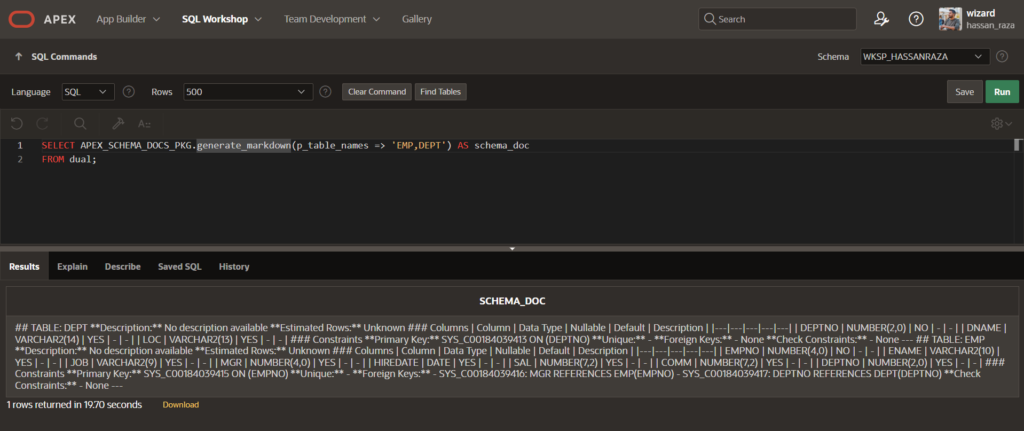
Markdown is the format I use most with Claude and ChatGPT. It looks like this:
## TABLE: EMPLOYEES
**Description:** Stores all active and historical employee records
**Estimated Rows:** 5000

### Columns
| Column     | Data Type     | Nullable | Default | Description        |
|------------|---------------|----------|---------|--------------------|
| EMP_ID     | NUMBER(10)    | NO       | -       | Primary key        |
| FULL_NAME  | VARCHAR2(200) | NO       | -       | Employee full name |
| DEPT_ID    | NUMBER(10)    | YES      | -       | Department ref     |
| HIRE_DATE  | DATE          | NO       | -       | -                  |

### Constraints
**Primary Key:** EMP_PK ON (EMP_ID)
**Foreign Keys:**
  - EMP_DEPT_FK: DEPT_ID REFERENCES DEPARTMENTS(DEPT_ID)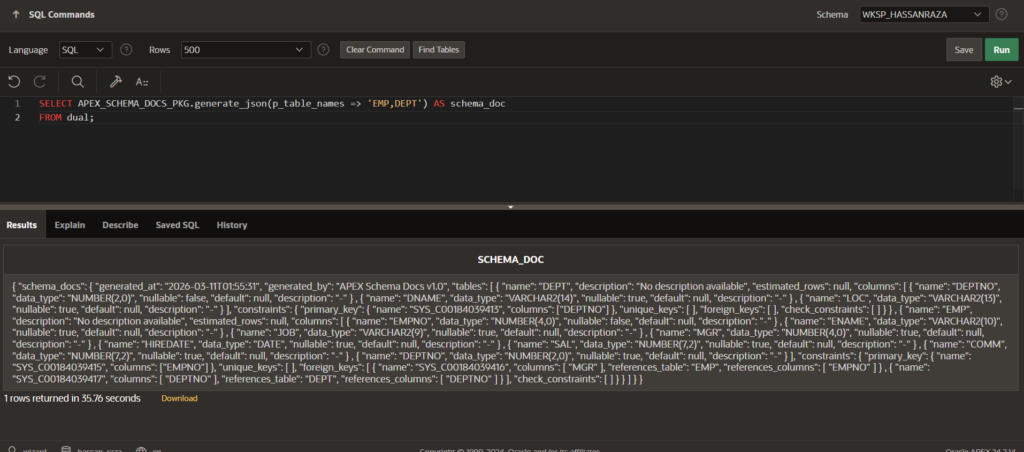
JSON is for developers using LLMs through an API. You get a properly structured JSON document that you can pass directly into a system prompt or context array without any reformatting.
Plain Text is a compact token-efficient version for when you need to fit a large schema inside a tight context window. It strips formatting and keeps only the essential column and constraint information in a readable layout.
The app also shows you an estimated token count before you copy anything. One token is approximately four characters, so you can see immediately whether your selected tables will fit inside your LLM’s context window.
How the Oracle Schema Documentation Generator Works Under the Hood
The whole thing is built on a single PL/SQL package called APEX_SCHEMA_DOCS_PKG. It uses only USER_* data dictionary views, never DBA_* or ALL_*, so it always documents the currently connected schema and does not require DBA privileges to run.
The four key views it queries are:
USER_TABLES and USER_TAB_COMMENTS for table names, estimated row counts, and table-level descriptions. USER_TAB_COLUMNS and USER_COL_COMMENTS for every column, its data type with proper precision and scale formatting, nullable status, default values, and column comments. USER_CONSTRAINTS and USER_CONS_COLUMNS for primary keys, unique constraints, foreign keys, and check constraints.
One thing I was careful about in the constraint handling: Oracle internally stores NOT NULL constraints as C-type check constraints with a search condition like "COLUMN_NAME" IS NOT NULL. If you do not filter these out, your output ends up with a redundant check constraint entry for every single non-nullable column. The package filters them correctly so your output only shows real developer-defined check constraints.
Foreign key resolution is done through a double join that gets both the referenced table name and the referenced column name, not just the constraint name. This means the output reads like DEPT_ID REFERENCES DEPARTMENTS(DEPT_ID) which is actually useful, rather than just the constraint name which forces you to look it up separately.
CLOB output is built using DBMS_LOB.APPEND throughout, never VARCHAR2 concatenation. This matters on any real schema because VARCHAR2 has a 32,767 byte limit in PL/SQL and a medium-sized Oracle schema will blow right through it.
Installing APEX Schema Docs in Three Steps
Prerequisites are minimal. You need Oracle Database 19c or above, Oracle APEX 22.1 or above, and CREATE SESSION, CREATE TABLE, and CREATE PROCEDURE privileges on your schema.
Step 1: Clone or download the repository from https://github.com/Darkhound-droid/apex-schema-docs
Step 2: Run the install script in your schema using SQL Workshop or SQL*Plus:
sql
@sql/install/create_apex_schema_docs_pkg.sqlStep 3: Import the APEX application file app/apex-schema-docs-v1.sql via App Builder > Import, then run it.
That is it. No additional configuration, no APEX plugins, no external dependencies.
How I Use This in My Daily Oracle APEX Development
Here is the actual workflow I follow now when I start an AI-assisted development session.
I open APEX Schema Docs, select the tables relevant to what I am building, and generate Markdown output. I copy that into Claude as the first message with something like “Here is my Oracle schema. I will ask you questions about it in the next message.” Then every question I ask in that session gets answered with full awareness of my actual table structure, column names, constraints, and relationships.
The difference in answer quality is significant. The LLM knows that DEPT_ID in the EMPLOYEES table is a foreign key to DEPARTMENTS. It knows which columns are nullable and which are not. It knows I have a check constraint on STATUS. These details matter when you are asking for help with complex SQL or reviewing PL/SQL logic.
For API-based workflows, I use the JSON output. I keep a schema docs JSON file for each project and include it as a system context document in my LLM API calls so every call in that project has full schema awareness automatically.
What V2 Will Add
V1 covers Tables, Columns, and Constraints. That is deliberately focused because accuracy matters more than coverage, and I wanted the first version to be something the community could trust completely.
The roadmap already has V2 planned with Views and Triggers, V3 with PL/SQL Packages and Procedures plus DBMS_SCHEDULER jobs, and V4 with direct API integration so you can push your schema context to Claude or OpenAI without copy-pasting at all.
If there are specific object types or output features you want to see in V2, open an issue on the GitHub repo. This is an open-source project and community input shapes where it goes next.
Why I Built This as an Open-Source Oracle APEX App
I could have built this as a standalone Python script or a web tool. I built it as an Oracle APEX app for three reasons.
First, your schema data never leaves your database. You run this inside your own APEX environment against your own data dictionary. Nothing is sent anywhere external.
Second, it demonstrates something important: Oracle APEX is a serious application development platform, not just a forms builder. Building a developer tool inside APEX itself is a statement about what low-code can actually do.
Third, the Oracle community genuinely lacks open-source APEX tooling on GitHub. Most Oracle open-source projects are PL/SQL packages or SQL scripts. A full APEX application that solves a real developer workflow problem is rare, and I wanted to contribute something that fills that gap.
If this project is useful to you, please give it a star on GitHub and share it in the Oracle community. Every star and share helps more Oracle developers find it.
Contributing to APEX Schema Docs
The project is MIT licensed and pull requests are welcome. If you want to contribute, the most useful things right now are testing it against different Oracle schema sizes and configurations, opening issues for edge cases you find, and contributing to the V2 object types if you have expertise in APEX plugin development or PL/SQL package introspection.
You can find everything at https://github.com/Darkhound-droid/apex-schema-docs.
If you are using AI tools in your Oracle development workflow and you want to understand how to give LLMs better context across the board, I covered the broader strategy in my guide on How to Start Your Oracle Developer Career in 2026. And if you want to understand the Oracle data dictionary views this package uses in more depth, the 5 PL/SQL Mistakes I Made as a Junior Oracle Developer article covers the kind of dictionary-query hygiene that makes tools like this reliable.
What part of your Oracle workflow are you using AI tools for right now? Drop it in the comments below. I am genuinely curious what the community is doing and whether APEX Schema Docs fits into it.
Hassan Raza
Oracle ACE Apprentice | SH Software Solution, Pakistan