 By
By I still remember the first time I had to automate a nightly data purge at work. My first instinct was to write a PL/SQL script and ask a DBA to set up a cron job on the server. My senior looked at me and said “Hassan, Oracle already has a built-in job scheduler. Why are you going outside the database?”
That was the day I discovered DBMS_SCHEDULER in Oracle and honestly, it changed how I think about database automation completely.
If you are still running manual scripts, relying on OS-level schedulers, or using the old DBMS_JOB package, this DBMS_SCHEDULER Oracle tutorial is for you. I am going to walk you through everything from creating your first Oracle scheduled job to monitoring failures in production, with real copy-paste code for every major scenario.
Let us get into it.
What Is DBMS_SCHEDULER in Oracle?
DBMS_SCHEDULER is Oracle’s built-in job scheduling package that lets you automate PL/SQL procedures, anonymous blocks, and external scripts directly from within the Oracle database. Introduced in Oracle 10g, it has been the recommended approach for Oracle task automation ever since.
Featured Snippet Answer: DBMS_SCHEDULER is Oracle’s built-in job scheduler for automating PL/SQL and database tasks. It lets you create Oracle scheduled jobs with flexible calendars, monitor runs using scheduler dictionary views, capture failures with error details, and orchestrate multi-step workflows using chains. It is the modern replacement for the legacy DBMS_JOB package.
DBMS_SCHEDULER vs DBMS_JOB: What Is the Difference?
This is the most searched question I see from developers coming from older Oracle environments. Here is the honest answer: DBMS_JOB is legacy and you should stop using it today.
Is DBMS_JOB deprecated in Oracle 19c? Yes. Oracle 19c automatically converts existing DBMS_JOB submissions to DBMS_SCHEDULER jobs behind the scenes. The message from Oracle is clear: DBMS_SCHEDULER is the standard for Oracle database automation in 2026.
Here is a quick comparison:
| Feature | DBMS_JOB | DBMS_SCHEDULER |
|---|---|---|
| Execution Type | PL/SQL only | PL/SQL, Executables, Shell Scripts, Chains |
| Transactional | Yes, supports rollback | No, implicit commit |
| Logging | Minimal, manual | Automatic history and run details |
| Scheduling Logic | Date arithmetic (SYSDATE + 1) | Calendaring syntax (FREQ=DAILY) |
| Dependencies | None | Complex job chains with branching |
| External Access | No | Yes, via OS credentials |
DBMS_JOB submissions are transactional and can be rolled back before a commit. DBMS_SCHEDULER Oracle uses an implicit commit so operations are immediate and permanent. DBMS_JOB also only supports PL/SQL blocks and uses basic date arithmetic. In 2026, there is no good reason to use DBMS_JOB in any new Oracle development.
DBMS_SCHEDULER Oracle Architecture: Jobs, Programs, Schedules, and Chains
Before you start creating Oracle scheduled jobs, it helps to understand how DBMS_SCHEDULER is structured. Think of it as a modular system that decouples the “what”, the “when”, and the “how” of any automated task.
Jobs are the runnable things. A job points at either an inline action like a PL/SQL block or stored procedure, or a referenced program and schedule. Everything visible in DBA_SCHEDULER_JOBS is a job.
Programs are reusable definitions of “what to run” with argument definitions. If you have ten Oracle scheduled jobs that run the same procedure with different parameters, define one program and point all ten jobs at it.
Schedules define “when to run” using the repeat_interval syntax. By centralizing the schedule as its own object, you can change the timing of ten different jobs by modifying just one schedule object.
Job Classes group jobs for resource and logging governance. This is how you control CPU and IO priority across different categories of DBMS_SCHEDULER Oracle jobs.
Windows define time periods when certain resource plans or job classes are active, ensuring your heavy Oracle automation tasks do not compete with business hours workloads.
Chains are the most advanced component. They let you build multi-step workflows with dependency rules. Step B only starts if Step A succeeded. We will cover these with full code later in this article.
DBMS_SCHEDULER Create Job Example: Your First Oracle Scheduled Job
Here is a clean, production-ready DBMS_SCHEDULER create job example. This Oracle scheduled job runs a data purge procedure every day at 2:00 AM.
Always put your business logic in a stored procedure, not inline in the job. This makes your Oracle automate tasks PL/SQL code testable outside the scheduler.
-- Step 1: Create the procedure the Oracle scheduled job will call
CREATE OR REPLACE PROCEDURE app_maint.purge_old_audit_rows (
  p_days_to_keep IN NUMBER DEFAULT 90
) AS
BEGIN
  -- Delete audit rows older than the retention period
  DELETE FROM app_audit_log
  WHERE created_at < (SYSDATE - p_days_to_keep);
  COMMIT;
EXCEPTION
  WHEN OTHERS THEN
    -- Roll back and re-raise so DBMS_SCHEDULER marks the run as FAILED
    ROLLBACK;
    RAISE;
END;
/

-- Step 2: Create the DBMS_SCHEDULER Oracle job
BEGIN
  DBMS_SCHEDULER.CREATE_JOB(
    job_name            => 'APP_MAINT.PURGE_AUDIT_DAILY',
    job_type            => 'STORED_PROCEDURE',
    job_action          => 'APP_MAINT.PURGE_OLD_AUDIT_ROWS',
    number_of_arguments => 1,
    start_date          => SYSTIMESTAMP,
    repeat_interval     => 'FREQ=DAILY;BYHOUR=2;BYMINUTE=0;BYSECOND=0',
    end_date            => NULL,
    enabled             => FALSE,   -- Keep disabled until arguments are set
    auto_drop           => FALSE,   -- Keep the job definition after it runs
    comments            => 'Daily purge of APP_AUDIT_LOG, keeps last 90 days'
  );

  -- Bind the argument value
  DBMS_SCHEDULER.SET_JOB_ARGUMENT_VALUE(
    job_name          => 'APP_MAINT.PURGE_AUDIT_DAILY',
    argument_position => 1,
    argument_value    => '90'
  );

  -- Enable only after all configuration is complete
  DBMS_SCHEDULER.ENABLE('APP_MAINT.PURGE_AUDIT_DAILY');
END;
/
Key things to remember from this DBMS_SCHEDULER create job example. Keep enabled => FALSE until all arguments and configuration are set. Set auto_drop => FALSE for any operational Oracle scheduled job you need to keep running long term. Always keep job logic in a stored procedure so you can test it independently from DBMS_SCHEDULER.
8 Real-World Oracle Automate Tasks PL/SQL Examples
This is the section most Oracle developers bookmark. Here are the eight most common DBMS_SCHEDULER Oracle automation scenarios I use in real enterprise APEX and database projects.
1. Purge Old Data from Audit Tables
Already covered in the DBMS_SCHEDULER create job example above. The pattern is: delete rows older than a retention date, commit, raise on error. Essential for any high-volume Oracle database.
2. Refresh a Materialized View with DBMS_SCHEDULER Oracle
If you use materialized views for reporting, they need to stay in sync with base tables. Here is a DBMS_SCHEDULER Oracle job that does a fast refresh every two hours:
BEGIN
  DBMS_SCHEDULER.CREATE_JOB(
    job_name        => 'REFRESH_SALES_MV',
    job_type        => 'PLSQL_BLOCK',
    job_action      => 'BEGIN DBMS_MVIEW.REFRESH(''GLOBAL_SALES_MV'', ''F''); END;',
    repeat_interval => 'FREQ=HOURLY;INTERVAL=2',
    enabled         => TRUE,
    auto_drop       => FALSE,
    comments        => 'Fast refresh of GLOBAL_SALES_MV every 2 hours'
  );
END;
/
The ‘F’ in DBMS_MVIEW.REFRESH stands for fast refresh. Use ‘C’ for complete refresh when fast refresh is not available.
3. Send Daily Email Notifications
For sending email from Oracle you need UTL_MAIL or UTL_SMTP configured with Oracle Wallet for secure connections. I wrote a detailed guide on setting that up here: Call External HTTPS APIs with Oracle Wallet
Once your mail server is configured, wrap UTL_MAIL.SEND in a stored procedure and schedule it as a DBMS_SCHEDULER Oracle job exactly like any other.
4. Generate Daily Executive Report Tables
For nightly dashboards or executive reports, create a DBMS_SCHEDULER Oracle job that aggregates the day’s data into a report-ready table:
BEGIN
  DBMS_SCHEDULER.CREATE_JOB(
    job_name        => 'GENERATE_DAILY_SALES_REPORT',
    job_type        => 'STORED_PROCEDURE',
    job_action      => 'REPORTING_PKG.BUILD_DAILY_SUMMARY',
    repeat_interval => 'FREQ=DAILY;BYHOUR=23;BYMINUTE=0;BYSECOND=0',
    enabled         => TRUE,
    auto_drop       => FALSE,
    comments        => 'Builds daily sales summary at 11PM for next-day reporting'
  );
END;
/
5. Multi-Table Data Synchronization
For environments where staging and production tables need to stay in sync, this Oracle automate tasks PL/SQL pattern keeps everything consistent:
BEGIN
  DBMS_SCHEDULER.CREATE_JOB(
    job_name        => 'SYNC_STAGING_TO_PROD',
    job_type        => 'PLSQL_BLOCK',
    job_action      => 'BEGIN etl_pkg.merge_staging_data; END;',
    repeat_interval => 'FREQ=DAILY;BYHOUR=1;BYMINUTE=30;BYSECOND=0',
    enabled         => TRUE,
    auto_drop       => FALSE,
    comments        => 'Incremental merge from staging to production at 1:30AM'
  );
END;
/
6. Archive Transaction Logs
Transaction logs grow fast. A weekly DBMS_SCHEDULER Oracle job moves older rows to a history schema before they hurt primary database performance.
7. Nightly Batch Processing
Large calculations like interest or billing cycles should run at night when resource competition is low. Schedule these as STORED_PROCEDURE jobs pointing at your batch processing package.
8. Automated System Health Checks
My personal favourite for enterprise Oracle applications. A health check Oracle scheduled job runs hourly, queries system views for blocked sessions or low tablespace warnings, and writes anomalies to a monitoring table:
CREATE OR REPLACE PROCEDURE app_maint.run_health_check AS
BEGIN
  INSERT INTO app_health_log (check_ts, check_name, status, details)
  SELECT
    SYSTIMESTAMP,
    'TABLESPACE_CHECK',
    CASE WHEN (used_space / tablespace_size) * 100 > 85 THEN 'WARNING' ELSE 'OK' END,
    tablespace_name || ' at ' || ROUND((used_space / tablespace_size) * 100, 1) || '%'
  FROM dba_tablespace_usage_metrics;
  COMMIT;
EXCEPTION
  WHEN OTHERS THEN
    INSERT INTO app_health_log (check_ts, check_name, status, details)
    VALUES (SYSTIMESTAMP, 'HEALTH_CHECK', 'FAIL', SQLERRM);
    COMMIT;
    RAISE;
END;
/
DBMS_SCHEDULER repeat_interval Examples: The Complete Syntax Cookbook
This is the most bookmarked and shared section in any DBMS_SCHEDULER Oracle tutorial and for good reason. The repeat_interval calendaring syntax is powerful but trips up even experienced Oracle developers. Here are your ready-to-copy DBMS_SCHEDULER repeat_interval examples:
-- Daily at 2:00 AM
repeat_interval => 'FREQ=DAILY;BYHOUR=2;BYMINUTE=0;BYSECOND=0';

-- Weekly on Monday at 6:30 AM
repeat_interval => 'FREQ=WEEKLY;BYDAY=MON;BYHOUR=6;BYMINUTE=30;BYSECOND=0';

-- Monthly on the 1st at 1:15 AM
repeat_interval => 'FREQ=MONTHLY;BYMONTHDAY=1;BYHOUR=1;BYMINUTE=15;BYSECOND=0';

-- Every 10 minutes
repeat_interval => 'FREQ=MINUTELY;INTERVAL=10';

-- Every 2 hours during business days only (Monday to Friday)
repeat_interval => 'FREQ=HOURLY;INTERVAL=2;BYDAY=MON,TUE,WED,THU,FRI';

-- Every Friday at 10:00 PM
repeat_interval => 'FREQ=WEEKLY;BYDAY=FRI;BYHOUR=22;BYMINUTE=0;BYSECOND=0';

-- Last Wednesday of every month
repeat_interval => 'FREQ=MONTHLY;BYDAY=-1 WED';

-- First day of each quarter
repeat_interval => 'FREQ=MONTHLY;BYMONTH=1,4,7,10;BYMONTHDAY=1';
Two important gotchas in these DBMS_SCHEDULER repeat_interval examples. First, if you omit start_date, the Oracle job scheduler uses the session time zone to calculate future run times. This can cause unexpected shifts during Daylight Saving Time. Always set start_date explicitly with a time zone in production. Second, for jobs that need completely different times on different days, create two separate Oracle scheduled jobs instead of trying to write one complex repeat_interval expression.
Monitoring Oracle Scheduler Jobs: The 4 Views You Need
Knowing how to create Oracle scheduled jobs is only half the job. Knowing how to monitor Oracle scheduler jobs in production is what separates a junior developer from a senior one. Here are the four dictionary views and the exact SQL queries to use.
Check all your Oracle scheduled jobs and current status:
SELECT
  job_name,
  enabled,
  state,
  last_start_date,
  last_run_duration,
  next_run_date,
  run_count,
  failure_count
FROM dba_scheduler_jobs
WHERE owner = 'APP_MAINT'
ORDER BY next_run_date;
See what DBMS_SCHEDULER Oracle jobs are running right now:
SELECT
  owner,
  job_name,
  elapsed_time,
  cpu_used
FROM dba_scheduler_running_jobs
ORDER BY elapsed_time DESC;
Why did my Oracle scheduled job fail? This is the most important monitoring query:
SELECT
  job_name,
  status,
  error#,
  actual_start_date,
  run_duration,
  additional_info
FROM dba_scheduler_job_run_details
WHERE job_name = 'APP_MAINT.PURGE_AUDIT_DAILY'
ORDER BY actual_start_date DESC
FETCH FIRST 20 ROWS ONLY;
Full DBMS_SCHEDULER Oracle job history and state changes:
SELECT
  log_date,
  owner,
  job_name,
  operation,
  status,
  additional_info
FROM dba_scheduler_job_log
WHERE job_name = 'APP_MAINT.PURGE_AUDIT_DAILY'
ORDER BY log_date DESC
FETCH FIRST 50 ROWS ONLY;
The DBA_SCHEDULER_JOB_RUN_DETAILS view can grow large on busy Oracle systems. Use DBMS_SCHEDULER.PURGE_LOG or set a global log_history attribute to manage retention automatically.
Why Is My Oracle Scheduler Job Not Running? Common DBMS_SCHEDULER Mistakes
These are the DBMS_SCHEDULER Oracle mistakes I see most often, including several I made myself early in my career.
Mistake 1: Job not enabled Creating a DBMS_SCHEDULER Oracle job does not make it active unless you set enabled => TRUE in CREATE_JOB or call DBMS_SCHEDULER.ENABLE separately. This is the single most common reason for “Oracle scheduled job not running” reports from junior developers.
Mistake 2: Missing COMMIT inside the job Oracle scheduled jobs run in a background session. Any DML inside your PL/SQL block must be explicitly committed. If you forget the COMMIT, Oracle rolls back the changes when the session closes and your data modification silently disappears.
Mistake 3: Checking the wrong monitoring view When monitoring Oracle scheduler jobs, developers often check DBA_SCHEDULER_JOBS for error messages. That view only shows current state. For actual error messages and failure details, go directly to DBA_SCHEDULER_JOB_RUN_DETAILS.
Mistake 4: Confusion about which user the DBMS_SCHEDULER Oracle job runs as The Oracle job scheduler runs the job as the owner of the job by default. Roles are ignored in definer’s rights PL/SQL blocks. Object privileges must be granted directly to the owning schema.
Mistake 5: Overcomplicating the repeat_interval When developers need irregular schedules they try to write one complex DBMS_SCHEDULER repeat_interval expression instead of just creating two simple Oracle scheduled jobs. Keep it simple and it works every time.
How to Get Email Notifications When an Oracle Scheduled Job Fails
Oracle provides a Scheduler notifications surface in DBMS_SCHEDULER that you can configure to alert you when an Oracle scheduled job changes state. Use the SET_SCHEDULER_ATTRIBUTE or ADD_EVENT procedure to trigger notifications when a job hits JOB_FAILED or JOB_BROKEN status.
For controlling retry behavior in your DBMS_SCHEDULER Oracle setup:
-- Automatically break the job after 3 consecutive failures
BEGIN
  DBMS_SCHEDULER.SET_ATTRIBUTE(
    name      => 'APP_MAINT.PURGE_AUDIT_DAILY',
    attribute => 'max_failures',
    value     => 3
  );
END;
/
DBMS_SCHEDULER Job Chain Example: Orchestrating Dependent Workflows
Use a DBMS_SCHEDULER Oracle chain when you need multiple steps to run in sequence with dependencies. If Step A fails, do not run Step B. This is where DBMS_SCHEDULER goes far beyond any simple cron job.
Here is a complete DBMS_SCHEDULER job chain example with three dependent steps:
BEGIN
  -- Create the DBMS_SCHEDULER Oracle chain container
  DBMS_SCHEDULER.CREATE_CHAIN(
    chain_name => 'SALES_PROCESSING_CHAIN'
  );

  -- Define the individual steps
  DBMS_SCHEDULER.DEFINE_CHAIN_STEP(
    chain_name   => 'SALES_PROCESSING_CHAIN',
    step_name    => 'IMPORT',
    program_name => 'IMPORT_STAGING_PROG'
  );

  DBMS_SCHEDULER.DEFINE_CHAIN_STEP(
    chain_name   => 'SALES_PROCESSING_CHAIN',
    step_name    => 'VALIDATE',
    program_name => 'VALIDATE_STAGING_PROG'
  );

  DBMS_SCHEDULER.DEFINE_CHAIN_STEP(
    chain_name   => 'SALES_PROCESSING_CHAIN',
    step_name    => 'CLEANUP',
    program_name => 'CLEANUP_STAGING_PROG'
  );

  -- Define dependency rules between Oracle scheduled job steps
  DBMS_SCHEDULER.DEFINE_CHAIN_RULE(
    chain_name => 'SALES_PROCESSING_CHAIN',
    condition  => 'TRUE',
    action     => 'START IMPORT'
  );

  DBMS_SCHEDULER.DEFINE_CHAIN_RULE(
    chain_name => 'SALES_PROCESSING_CHAIN',
    condition  => 'IMPORT COMPLETED',
    action     => 'START VALIDATE'
  );

  DBMS_SCHEDULER.DEFINE_CHAIN_RULE(
    chain_name => 'SALES_PROCESSING_CHAIN',
    condition  => 'VALIDATE COMPLETED',
    action     => 'START CLEANUP'
  );

  DBMS_SCHEDULER.DEFINE_CHAIN_RULE(
    chain_name => 'SALES_PROCESSING_CHAIN',
    condition  => 'CLEANUP COMPLETED',
    action     => 'END'
  );

  DBMS_SCHEDULER.ENABLE('SALES_PROCESSING_CHAIN');
END;
/
Track each step independently in the ALL_SCHEDULER_RUNNING_CHAINS view. This gives you far better observability than having three separate unrelated Oracle scheduled jobs.
DBMS_SCHEDULER Oracle in APEX and Oracle Cloud Environments
This section is specifically for Oracle APEX developers who make up a large part of the Oracle community reading this DBMS_SCHEDULER tutorial.
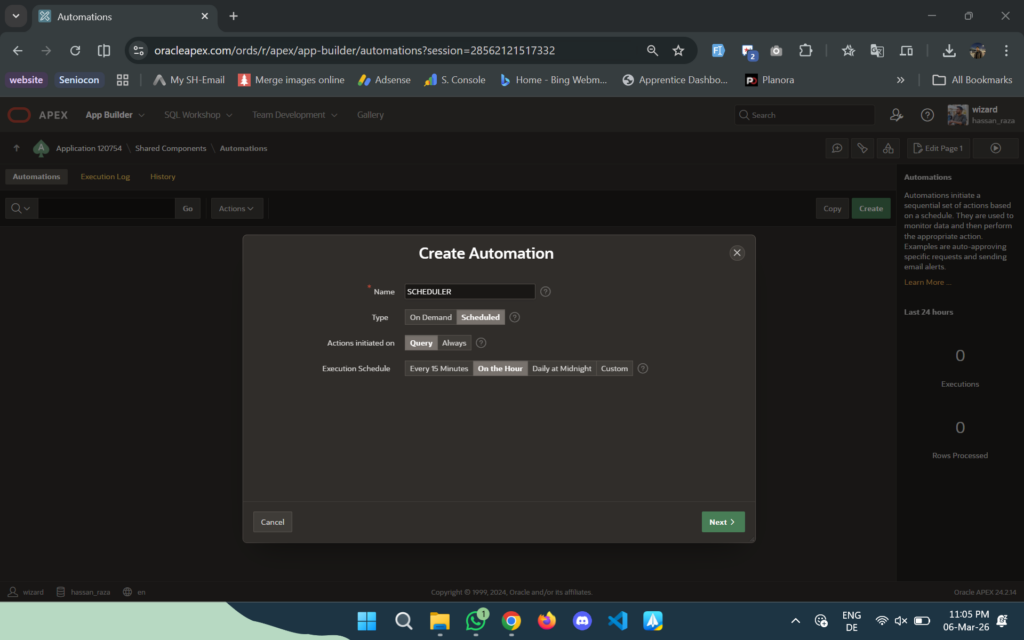
Oracle APEX 20.2 introduced APEX Automations, which are a developer-friendly low-code wrapper around DBMS_SCHEDULER Oracle. Here is how they compare:
| Feature | Oracle APEX Automations | Native DBMS_SCHEDULER Oracle |
|---|---|---|
| Interface | Low-code, declarative | PL/SQL code |
| Context | Full APEX session context | Standard database session |
| Execution | Every 2-minute coordinator | Precise per schedule |
| Best Use | APEX mail, app notifications | System maintenance, ETL |
| Portability | Exported with APEX app | Managed via SQL scripts |
Use APEX Automations when the task is tied to your application logic. Use native DBMS_SCHEDULER Oracle for anything database-level like purges, materialized view refreshes, ETL jobs, or health checks.
For getting your Oracle Cloud environment set up with APEX properly, I wrote a complete guide here: How to Set Up Oracle APEX on Oracle Cloud Free Tier
One important note for Autonomous Database users: you cannot run OS-level executables or shell scripts because there is no direct access to the underlying server. Oracle scheduled jobs are also governed by predefined job classes (LOW, MEDIUM, HIGH, TP) that control resource allocation priority.
DBMS_SCHEDULER Oracle Permissions and Security
Permissions for DBMS_SCHEDULER Oracle jobs are granted directly to users, not through roles. This surprises a lot of developers.
| Privilege | What It Does |
|---|---|
| CREATE JOB | Create Oracle scheduled jobs in your own schema |
| CREATE ANY JOB | Create jobs in any schema except SYS |
| EXECUTE ON DBMS_SCHEDULER | Basic right to use the Oracle job scheduler package |
| MANAGE SCHEDULER | Administrative right to change global attributes |
The most important security rule: CREATE ANY JOB must be restricted to DBAs only. A developer with this privilege can create a DBMS_SCHEDULER Oracle job that runs in the context of a more privileged schema, which is a serious enterprise security risk.
Also: when calling DBMS_SCHEDULER from definer’s rights PL/SQL, object privileges must be granted directly. Oracle ignores role-based privileges in this context and it causes production issues that are frustrating to debug if you do not know about it.
Oracle Job Scheduler Best Practices for Enterprise Systems
These habits separate junior Oracle automation scripts from senior production systems.
Namespace your DBMS_SCHEDULER Oracle jobs by domain using the schema as a prefix: APP_MAINT.PURGE_AUDIT_DAILY, FIN_ETL.SYNC_GL_DATA, APEX_APP.SEND_DAILY_DIGEST. When you manage 50 Oracle scheduled jobs, this convention is what keeps you sane.
Always separate the program and schedule objects from the job for anything reusable. Inline definitions work for quick tests but create unmanageable environments at scale.
Set logging levels intentionally. LOGGING_RUNS is the default and sufficient for most Oracle scheduled jobs. Use LOGGING_FULL for critical financial jobs. Reduce logging for high-frequency jobs to prevent the log tables growing too large.
Put all DBMS_SCHEDULER Oracle job logic in packages, not inline blocks. A job that calls PURGE_PKG.RUN is testable, versionable, and debuggable. A job with 100 lines of inline PL/SQL is none of those things.
Mastering DBMS_SCHEDULER Oracle: The Bigger Picture
If you have read this far, you now have a complete DBMS_SCHEDULER Oracle tutorial with everything you need to build reliable, observable, and enterprise-grade automation in your Oracle database.
The key mindset shift is treating your Oracle scheduled jobs as first-class production assets, not background scripts. They need proper naming, proper error handling with re-raise, proper monitoring using the scheduler dictionary views, and intentional logging levels. When a DBMS_SCHEDULER Oracle job fails at 2 AM on a Sunday, DBA_SCHEDULER_JOB_RUN_DETAILS should give you the complete picture without anyone needing to dig through application logs manually.
For writing clean PL/SQL procedures that your Oracle scheduled jobs call, I covered the most common mistakes that affect background jobs here: 5 PL/SQL Mistakes I Made as a Junior Oracle Developer
If you are thinking about where DBMS_SCHEDULER fits in your broader Oracle developer career roadmap, this guide covers it: How to Start Your Oracle Developer Career in 2026
What daily task are you planning to automate first with DBMS_SCHEDULER Oracle? Drop it in the comments below. I read every single one and I would love to hear what your team is automating right now.
Hassan Raza
Oracle ACE Apprentice | SH Software Solution, Pakistan