
ORA-01821: date format not recognized means Oracle found something in your format mask that it cannot read as a datetime element, or an element that the data type you passed cannot supply. The usual culprits are literal letters that are not wrapped in double quotes (the T in an ISO 8601 mask), digits in the mask, fractional seconds (FF) on a DATE, and time zone elements (TZH, TZM) on a DATE or a plain TIMESTAMP. The fix is almost always one of three things: quote the literal text, remove the element, or convert the value to a data type that has the field you are asking for.
This article reproduces each cause in a lab, shows the exact error and the corrected statement, and then covers the neighbours that are often confused with ORA-01821: ORA-01822 (era codes), ORA-01830 and ORA-01861 (TO_DATE input problems), and the HH:MM:SS typo that raises no error at all.
Tested on 31 October 2026: Oracle AI Database 26ai Free (23.26.3) with Oracle APEX 26.2.0 SQL Workshop, in a local lab with synthetic data. Session settings were the defaults for this container (NLS_CALENDAR = GREGORIAN, session time zone +00:00). This test does not cover client-side format masks in tools such as SQL Developer, JDBC or APEX item format masks, and other NLS settings can change some outputs.
Before you run a mask against real data, you can paste it into the free Oracle Date Format Tester to see how each element is read and what it will print. It is the quickest way to spot an unquoted letter or a typo such as MM for minutes.
The lab table
A single row with one DATE, one TIMESTAMP and one TIMESTAMP WITH TIME ZONE column is enough to show every case. All three hold the same moment, 31 October 2026 at 14:05:09.
create table a02_events (
  id        number generated always as identity primary key,
  label     varchar2(30),
  ev_date   date,
  ev_ts     timestamp(6),
  ev_tstz   timestamp(6) with time zone
);

insert into a02_events (label, ev_date, ev_ts, ev_tstz)
values ('Sample event',
        timestamp '2026-10-31 14:05:09',
        timestamp '2026-10-31 14:05:09.123456',
        timestamp '2026-10-31 14:05:09.123456 +05:00');
commit;
Cause 1: literal letters without double quotes
This is the most common ORA-01821. People write an ISO 8601 mask with a bare T between the date and the time:
select to_char(timestamp '2026-10-31 14:05:09', 'YYYY-MM-DDTHH24:MI:SS') as iso_text
from dual;

ORA-01821: date format not recognized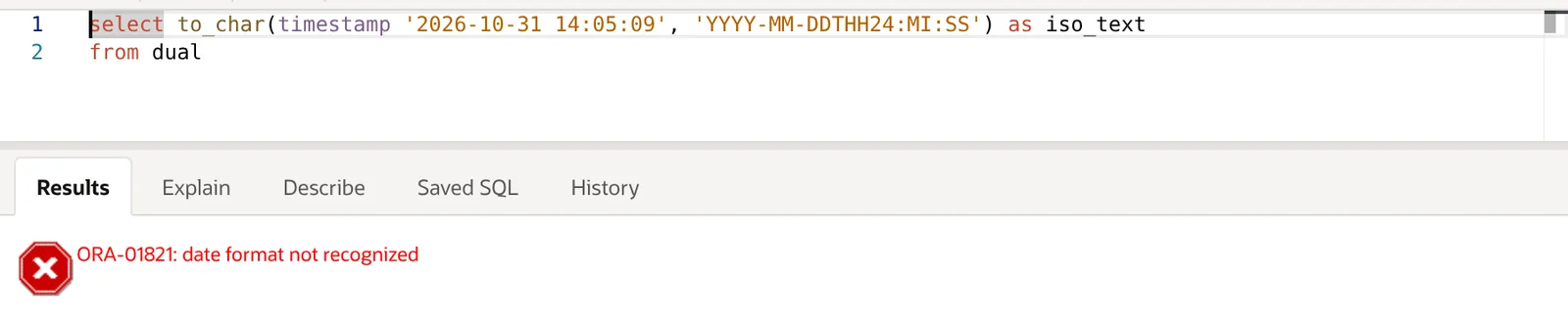
Any text that is not a format element must be enclosed in double quotes. Single quotes delimit the whole mask; double quotes delimit literal text inside it:
select to_char(timestamp '2026-10-31 14:05:09', 'YYYY-MM-DD"T"HH24:MI:SS') as iso_text
from dual;

ISO_TEXT
-------------------
2026-10-31T14:05:09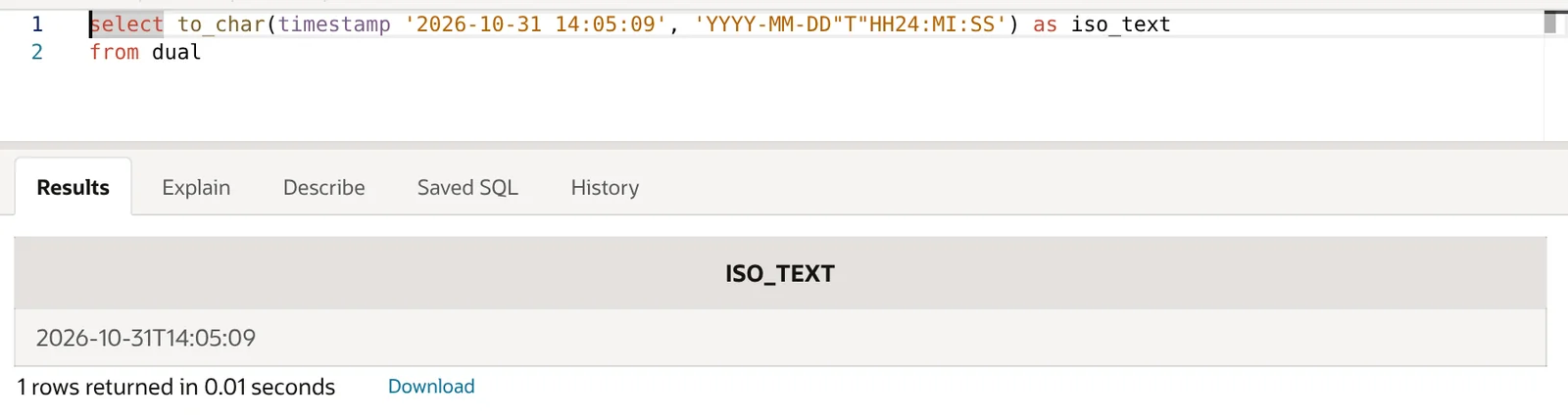
The same applies to words. 'YYYY-MM-DD at HH24' fails; 'YYYY-MM-DD "at" HH24' returns 2026-10-31 at 00.
A trap: DDTH is a valid element
TH is the ordinal suffix, so DDTH is legal and prints 31ST. In the lab, 'YYYY-MM-DDTH' returned 2026-10-31ST without any error. That is why 'YYYY-MM-DDTHH24:MI:SS' is a confusing failure: Oracle consumes DDTH and then trips on the remaining H24. If a mask with an unquoted T ever appears to work, check whether it is silently printing an ordinal suffix.
Cause 2: digits in the mask
Digits are not punctuation for a datetime format model. A mask such as 'YYYY1MM' raises ORA-01821. If you really need a digit in the output, quote it:
select to_char(date '2026-10-31', 'YYYY1MM')   as r from dual;  -- ORA-01821
select to_char(date '2026-10-31', 'YYYY"1"MM') as r from dual;  -- 2026110
Digits that belong to an element (HH24, FF3, YYYY) are fine, because they are part of the element name.
Cause 3: FF (fractional seconds) on a DATE
A DATE stores time to the second. It has no fractional seconds, so FF or FF1–FF9 on a DATE raises ORA-01821. This catches people with SYSDATE:
select to_char(sysdate, 'HH24:MI:SS.FF') as r from dual;
-- ORA-01821: date format not recognized

select to_char(ev_date, 'YYYY-MM-DD HH24:MI:SS.FF3') as with_fraction
from a02_events;
-- ORA-01821: date format not recognized
Two fixes, depending on what you need:
- If you want real sub-second precision, use a
TIMESTAMPsource:SYSTIMESTAMPinstead ofSYSDATE, or aTIMESTAMPcolumn. In the lab,to_char(systimestamp, 'HH24:MI:SS.FF3')returned a value like14:19:24.279. - If the source must stay a
DATEbut the output format is fixed (for example, an API expects.FF3), cast it. The fraction will always be zeros.
select to_char(ev_ts, 'YYYY-MM-DD HH24:MI:SS.FF3') as ts_fraction,
       to_char(cast(ev_date as timestamp), 'YYYY-MM-DD HH24:MI:SS.FF3') as date_cast
from a02_events;

TS_FRACTION              DATE_CAST
-----------------------  -----------------------
2026-10-31 14:05:09.123  2026-10-31 14:05:09.000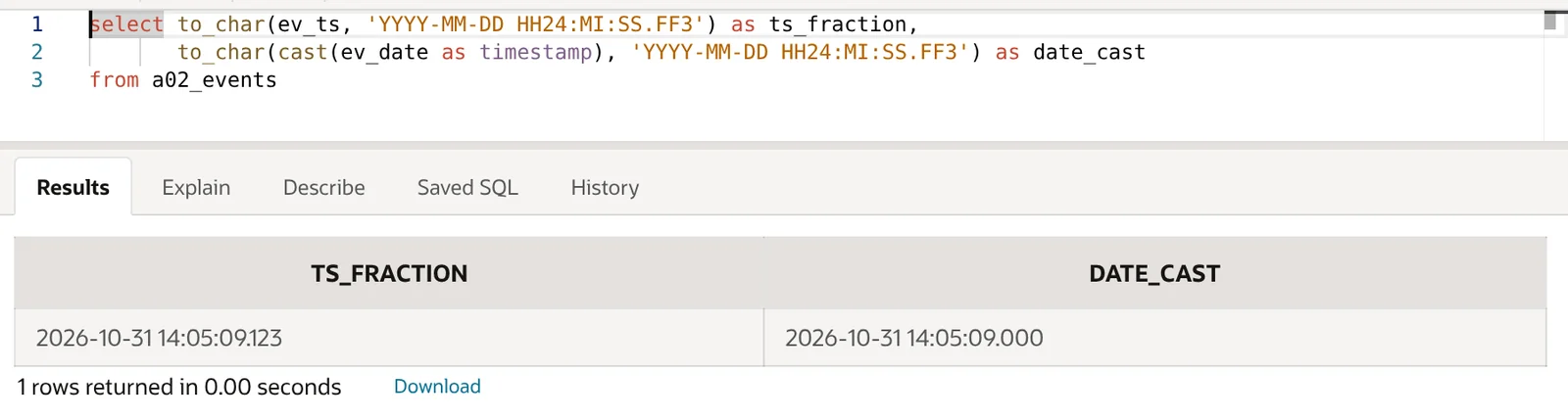
TO_DATE has the same rule on the input side. to_date('2026-10-31 14:05:09.123', 'YYYY-MM-DD HH24:MI:SS.FF3') raises ORA-01821; use TO_TIMESTAMP instead, which returned 31-OCT-26 02.05.09.123000000 PM with the default NLS timestamp format.
Cause 4: X on a DATE
X is the local radix character (the decimal separator before fractional seconds). It only makes sense with a TIMESTAMP, so on a DATE it fails the same way FF does:
select to_char(date '2026-10-31', 'HH24:MI:SSX') as r from dual;
-- ORA-01821: date format not recognized

select to_char(timestamp '2026-10-31 14:05:09.123456', 'HH24:MI:SSXFF') as r from dual;
-- 14:05:09.123456000
Cause 5: time zone elements on a DATE or plain TIMESTAMP
Neither DATE nor TIMESTAMP (without time zone) stores an offset. In the lab, TZH and TZM raised ORA-01821 on both:
select to_char(ev_date, 'YYYY-MM-DD HH24:MI TZH:TZM') as r from a02_events;
-- ORA-01821: date format not recognized

select to_char(ev_ts, 'YYYY-MM-DD HH24:MI TZH:TZM') as r from a02_events;
-- ORA-01821: date format not recognized

select to_char(ev_tstz, 'YYYY-MM-DD HH24:MI:SS.FF3 TZH:TZM') as r from a02_events;
-- 2026-10-31 14:05:09.123 +05:00
TZR and TZD behaved differently, and this matters because it can hide a bug. On a plain TIMESTAMP they did not raise an error in this lab: TZR printed +00:00 (even after ALTER SESSION SET TIME_ZONE = 'Asia/Karachi') and TZD printed nothing. Neither value describes the data, because there is no zone in the data. On a DATE, TZH fails outright.
The fix is to attach the zone the value actually belongs to, with FROM_TZ, or store it as TIMESTAMP WITH TIME ZONE in the first place:
select to_char(from_tz(ev_ts, 'Asia/Karachi'), 'YYYY-MM-DD HH24:MI TZH:TZM') as r
from a02_events;
-- 2026-10-31 14:05 +05:00
On the input side, TO_TIMESTAMP with TZH:TZM raised ORA-01821, while TO_TIMESTAMP_TZ parsed the same string. For ISO 8601 strings from an API, both forms below worked:
select to_timestamp_tz('2026-10-31T14:05:09.123Z',
         'YYYY-MM-DD"T"HH24:MI:SS.FF3"Z"') as r from dual;
-- 2026-10-31 14:05:09.123 +00:00   (session time zone was +00:00)

select to_timestamp_tz('2026-10-31T14:05:09.123+05:00',
         'YYYY-MM-DD"T"HH24:MI:SS.FFTZH:TZM') as r from dual;
-- 2026-10-31 14:05:09.123 +05:00
Note that quoting "Z" treats it as text, so the result takes the session time zone. That gave UTC above only because the session was +00:00. After ALTER SESSION SET TIME_ZONE = 'Asia/Karachi', the same call returned 2026-10-31 14:05:09.123 ASIA/KARACHI, which is wrong for a UTC string. Attaching the zone explicitly is safer:
select from_tz(to_timestamp('2026-10-31T14:05:09.123Z',
         'YYYY-MM-DD"T"HH24:MI:SS.FF3"Z"'), 'UTC') as r from dual;
-- 2026-10-31 14:05:09.123 UTC   (session time zone Asia/Karachi)
Cause 6: invalid elements in NLS_DATE_FORMAT
The same rules apply to session format parameters, and the error appears at ALTER SESSION time:
alter session set nls_date_format = 'YYYY-MM-DD HH24:MI:SS.FF';
-- ORA-01821: date format not recognized

alter session set nls_timestamp_format = 'YYYY-MM-DD HH24:MI:SS.FF3 TZH:TZM';
-- ORA-01821: date format not recognized

alter session set nls_timestamp_tz_format = 'YYYY-MM-DD HH24:MI:SS.FF3 TZH:TZM';
-- Session altered.
Put fractional seconds in NLS_TIMESTAMP_FORMAT and offsets in NLS_TIMESTAMP_TZ_FORMAT, not in NLS_DATE_FORMAT.
When the mask lives in a variable, a table or an APEX application setting, the error only surfaces at run time. A PL/SQL block with l_mask := 'YYYY-MM-DD HH24:MI:SS.FF' compiled cleanly and failed with ORA-01821 on to_char(sysdate, l_mask).
E and EE raise ORA-01822, not ORA-01821
E and EE are real format elements (abbreviated and full era name), so Oracle recognises them. They are only valid for calendars that have eras, such as Japanese Imperial, ROC Official and Thai Buddha. With the default Gregorian calendar you get a different error:
select to_char(date '2026-10-31', 'EE YYYY') as r from dual;
-- ORA-01822: era format code is not valid with this calendar

alter session set nls_calendar = 'Japanese Imperial';
select to_char(date '2026-10-31', 'EE YY') as r from dual;
-- 令和 08
The difference: ORA-01821 means “I do not know this element here”; ORA-01822 means “I know it, but not in this calendar”. For a Gregorian era, use AD/BC (or A.D.), which returned AD 2026.
The typo that does not raise ORA-01821: HH:MM:SS
MM is the month, MI is minutes, and HH is the 12-hour clock. 'YYYY-MM-DD HH:MM:SS' is a perfectly valid mask, so TO_CHAR runs without complaint and quietly prints the month where the minutes should be:
select to_char(ev_date, 'YYYY-MM-DD HH:MM:SS')   as wrong_mask,
       to_char(ev_date, 'YYYY-MM-DD HH24:MI:SS') as right_mask
from a02_events;

WRONG_MASK           RIGHT_MASK
-------------------  -------------------
2026-10-31 02:10:09  2026-10-31 14:05:09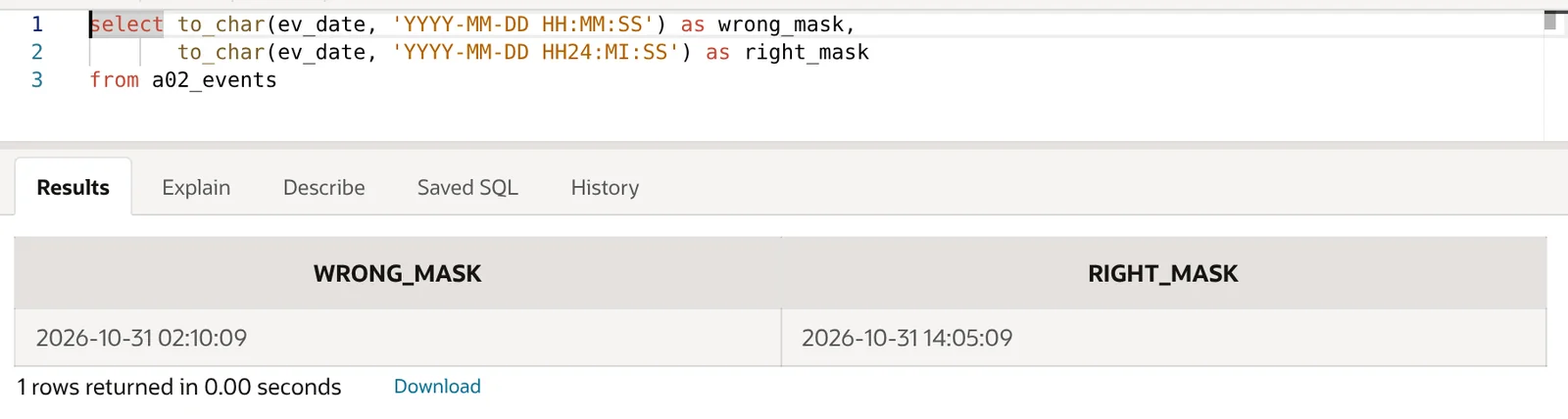
Two mistakes are visible in one value: 14:05 became 02 (no AM/PM indicator) and the minutes became 10, the month. In TO_DATE the same mask fails instead, with ORA-01810: format code appears twice, because MM would set the month twice.
TO_DATE input errors: ORA-01830 and ORA-01861
With TO_DATE and TO_TIMESTAMP, a valid mask can still fail because the input string does not match it. These are different errors from ORA-01821, and the fix is in the data or the mask shape, not in an unknown element.
ORA-01830: the mask ends before the string does
select to_date('2026-10-31 14:05:09', 'YYYY-MM-DD') as d from dual;
-- ORA-01830: Date format picture ends before converting entire input string.
The string has a time part that the mask does not cover. Extend the mask to 'YYYY-MM-DD HH24:MI:SS', or trim the input with SUBSTR if you really only want the date. The opposite case did not fail: to_date('2026-10-31', 'YYYY-MM-DD HH24:MI:SS') returned midnight, because Oracle allows the input to end early.
ORA-01861: literal does not match format string
select to_date('2026-10-31T14:05:09', 'YYYY-MM-DD HH24:MI:SS') as d from dual;
-- ORA-01861: literal does not match format string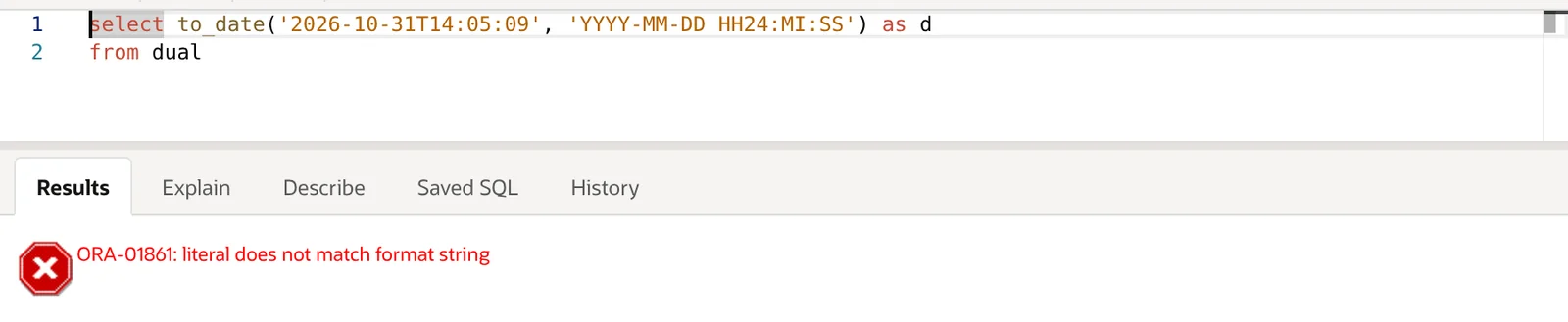
The mask is fine here; the string contains a T where the mask expects a space. Use 'YYYY-MM-DD"T"HH24:MI:SS', which converted the string to 2026-10-31 14:05:09. Note the contrast with Cause 1: an unquoted T in the mask raises ORA-01821, while a T in the input that the mask does not expect raises ORA-01861.
Other input errors you will see from the same family, all reproduced in this lab:
ORA-01858non-numeric character found:to_date('31-Oct-2026', 'YYYY-MM-DD').ORA-01849hour must be between 1 and 12:'14:05:09'withHHinstead ofHH24.ORA-01843invalid month:'2026-13-01'.ORA-01839date not valid for month:'2026-02-30'.
Lenient matching and FX
By default, TO_DATE is forgiving about punctuation: to_date('2026/10/31', 'YYYY-MM-DD') succeeded in the lab. If you need the input to match exactly, prefix the mask with FX. to_date('2026/10/31', 'FXYYYY-MM-DD') raised ORA-01861.
Bad data versus a bad mask
DEFAULT ... ON CONVERSION ERROR and VALIDATE_CONVERSION help with bad input, not with a bad mask:
select validate_conversion('2026-10-31 14:05:09' as date, 'YYYY-MM-DD HH24:MI:SS') ok1,
       validate_conversion('2026-10-31T14:05:09' as date, 'YYYY-MM-DD HH24:MI:SS') ok2
from dual;

       OK1        OK2
---------- ----------
         1          0

select to_date('2026-10-31' default null on conversion error,
               'YYYY-MM-DD HH24:MI:SS.FF') as r
from dual;
-- ORA-01821: date format not recognized
The second query still fails: an unrecognised mask is a coding error, not a data error, so the default does not swallow it.
What Oracle accepts that people expect to fail
Not every odd-looking mask is an error. Non-letter punctuation is copied to the output as-is, and quoting is more lenient than many developers assume:
select to_char(date '2026-10-31', '(YYYY) @ [MM] # DD!') as r from dual;
-- (2026) @ [10] # 31!

select to_char(date '2026-10-31', 'YYYY-MM-DD "at HH24:MI') as r from dual;
-- 2026-10-31 at HH24:MI

select to_char(date '2026-10-31', 'YYYY-MM-DD "o''clock"') as r from dual;
-- 2026-10-31 o'clock
Parentheses, @, brackets, # and ! pass straight through. An unclosed double quote does not raise an error either: it turns the rest of the mask into literal text, so HH24:MI is printed as letters rather than as the time. If a result contains element names instead of values, look for a stray ". A single quote inside the mask is written as two single quotes, as with any SQL string literal.
Quick reference: error, cause, fix
| Error / symptom | Typical cause | Fix |
|---|---|---|
| ORA-01821 | Unquoted literal letters, e.g. 'YYYY-MM-DDTHH24:MI:SS' or at |
Double-quote the text: 'YYYY-MM-DD"T"HH24:MI:SS' |
| ORA-01821 | Digit in the mask, e.g. 'YYYY1MM' |
Quote it: 'YYYY"1"MM' |
| ORA-01821 | FF or X on a DATE (incl. SYSDATE, TO_DATE) |
Use SYSTIMESTAMP/TO_TIMESTAMP, or CAST(d AS TIMESTAMP) |
| ORA-01821 | TZH/TZM on a DATE or plain TIMESTAMP, or in TO_TIMESTAMP |
FROM_TZ(ts, 'zone'), TO_TIMESTAMP_TZ, or a TIMESTAMP WITH TIME ZONE column |
ORA-01821 at ALTER SESSION |
FF in NLS_DATE_FORMAT, offsets in NLS_TIMESTAMP_FORMAT |
Move them to NLS_TIMESTAMP_FORMAT / NLS_TIMESTAMP_TZ_FORMAT |
| No error, wrong value | TZR/TZD on a plain TIMESTAMP (printed +00:00 / blank in the lab) |
Attach the real zone with FROM_TZ |
| ORA-01822 | E/EE with the Gregorian calendar |
Use AD/BC, or set an era calendar deliberately |
| No error, wrong value | HH:MM:SS in TO_CHAR (prints month as minutes) |
HH24:MI:SS |
| ORA-01810 | HH:MM:SS in TO_DATE |
HH24:MI:SS |
| ORA-01830 | Input string longer than the mask | Extend the mask or trim the input |
| ORA-01861 | Input text does not match mask literals (e.g. T vs space), or FX mismatch |
Match the mask to the input, e.g. "T" |
Troubleshooting checklist
- Check the data type first. Run
DESCon the table or wrap the expression inDUMP(). ADATEcannot give youFF,Xor a time zone. - Scan for letters that are not elements. Every word or single letter that should appear literally needs double quotes.
- Look at the caret. In SQL*Plus and SQLcl the
*under the statement points at the argument that failed, which helps when a query has severalTO_CHARcalls. - Test the mask in isolation against
DUALwith a fixed literal, or in the Oracle Date Format Tester, before running it against a large table. - Check masks stored outside the SQL (variables, config tables, NLS session settings) because those fail only at run time.
If the date values are right but your filters return the wrong rows, see Oracle SQL Date Filters: 6 Rules for Reliable Ranges.
Oracle references: Format Models, TO_CHAR (datetime), TO_DATE, VALIDATE_CONVERSION, and the error help pages for ORA-01821, ORA-01822, ORA-01830 and ORA-01861.
FAQ
Why do I get ORA-01821 with a TIMESTAMP format?
Usually because the value is a DATE, not a TIMESTAMP. SYSDATE, TO_DATE results and DATE columns cannot be formatted with FF or X. Use SYSTIMESTAMP, TO_TIMESTAMP, or CAST(... AS TIMESTAMP). If the mask has TZH/TZM, you also need a TIMESTAMP WITH TIME ZONE value.
How do I format a date as ISO 8601 with the T in Oracle?
Quote the T: to_char(d, 'YYYY-MM-DD"T"HH24:MI:SS'). For a zone-aware value, add TZH:TZM to a TIMESTAMP WITH TIME ZONE, for example 'YYYY-MM-DD"T"HH24:MI:SS.FF3TZH:TZM'.
What is the difference between ORA-01821 and ORA-01861?
ORA-01821 is about the mask itself: it contains something Oracle cannot use as a format element for that data type. ORA-01861 comes from TO_DATE/TO_TIMESTAMP when the mask is valid but the input string does not line up with it.
Why does my mask print the month in the minutes position?
You used MM (month) where you meant MI (minutes). TO_CHAR accepts it without an error, so check any mask containing HH:MM.
Quote literal text, match the element to the data type, and test the mask on a fixed value first; that covers nearly every ORA-01821 you will meet.