 By
By I built a long data-heavy form in Oracle APEX last month. The kind of form where users have to scroll down to find the input they need, make a change, and submit. Every time they submitted, the page reloaded and jumped them back to the top. Users had to scroll all the way down again.
“Hassan, why does the page keep jumping to the top?” one of our team members asked me after the tenth time scrolling the same form.
That was the moment I realized something simple but powerful: a smooth page reload experience is not a luxury. It is a core part of user experience, especially in enterprise apps where users are doing repetitive work on long forms.
So I built a small utility that saves the user’s scroll position before a page submits, then smoothly restores it after the page reloads. No server-side logic, no hidden items, no complexity. Just pure JavaScript using sessionStorage and window.scrollTo.
In this article, I show the approach and a revised, bounded implementation for full-page submits that return to the same page. The correction targets the documented APEX 24.2 client APIs. The JavaScript has local mocked behavior checks; it has not been run inside this application’s APEX workspace. Test the cases below before using it in your own form.
What Is Oracle APEX Smooth Scroll?
Scroll restoration is a browser-side convenience: save a window’s vertical offset before an allowed full-page submit, then attempt to restore it when the same page returns. It is not an APEX feature enabled by a particular release. Animation is optional and should respect reduced-motion preferences.
The code below adds no extra server request, but the underlying form submit still makes its normal request. It does not restore an Interactive Grid’s inner scrollbar, horizontal report position, a modal dialog’s own scroll container, browser back/forward history, or the identity of a row that moved after saving.
Why Does Scroll Position Matter in Oracle APEX?
When a user submits a form or button on a long page, the browser does a full page reload. By default, the page reloads at the top. Y position equals zero. For a user who was scrolled 3000 pixels down, this is frustrating. They lose context about where they were.
This is especially painful in Oracle APEX when you have:
- Long edit forms with many fields that require scrolling
- Data entry screens where users switch between different sections
- Long report pages where users scroll vertically in the browser window
- Interactive reports with inline edit buttons scattered down the page
A smooth scroll restore tells the user “your action was registered, and here is where you were working.” It is a small detail that signals polish.
How Oracle APEX Smooth Scroll Works Under the Hood
Let me break down the flow step by step so you understand exactly what is happening.
The 4-Step Flow
Step 1: An allowed APEX submit request reaches apexpagesubmit. This event follows APEX’s before-submit and client-validation checks; a cancelled button click does not save a new position.
Step 2: Save the page ID, vertical position and timestamp in sessionStorage under an application/session key. The form submits normally.
Step 3: On the next page load, consume that record once. Discard it if the page differs, the record is invalid, or it is more than five minutes old.
Step 4: For a valid same-page return, wait for window load and two animation frames. Skip restoration when visible validation errors need the user’s attention. This is an initial-layout approximation, not a guarantee that every asynchronous region or image has settled.
How to Implement Oracle APEX Smooth Scroll: Step-by-Step
Use a development page with a full-page Save submit that branches back to itself. This example uses page 10 and request values SAVE and APPLY_CHANGES; replace those values with your application’s actual page number and submit requests. They are request values, not button Static IDs.
Step 1: Load the JavaScript application-wide
Save the following as owh-scroll-restore.js in Shared Components → Static Application Files and reference #APP_FILES#owh-scroll-restore.js in the application’s JavaScript File URLs. Load it once on all application pages, including pages reached by branches, so navigation can discard a pending position. Do not also paste a second copy into Page Load code.
(function (apex, $) {
    "use strict";
    $(function () {
        var env = apex.env;
        if (!env.APP_ID || !env.APP_PAGE_ID || !env.APP_SESSION) {
            return;
        }

        // Replace 10 and the request values with your actual same-page saves.
        // Include this file on ALL app pages so a branch discards pending state.
        var allowedByPage = { "10": ["SAVE", "APPLY_CHANGES"] };
        var pageId = String(env.APP_PAGE_ID);
        var key = "owhScroll:" + env.APP_ID + ":" + env.APP_SESSION;
        var maxAgeMs = 5 * 60 * 1000;
        var pending = null;

        try {
            var raw = window.sessionStorage.getItem(key);
            window.sessionStorage.removeItem(key); // Consume once, even on a different page.
            pending = raw ? JSON.parse(raw) : null;
        } catch (ignore) {
            // Optional UI state must never prevent the page from working.
        }

        apex.gPageContext$.off("apexpagesubmit.owhScroll")
            .on("apexpagesubmit.owhScroll", function (event, request) {
                var allowed = allowedByPage[pageId] || [];
                try {
                    // A cancel/delete/other request must clear an earlier pending save.
                    window.sessionStorage.removeItem(key);
                    if (allowed.indexOf(String(request)) !== -1) {
                        window.sessionStorage.setItem(key, JSON.stringify({
                            pageId: pageId,
                            y: window.scrollY,
                            savedAt: Date.now()
                        }));
                    }
                } catch (ignore) {
                    // Storage can be blocked or full; submit normally.
                }
            });

        if (!pending || pending.pageId !== pageId ||
            !Number.isFinite(pending.y) || pending.y < 0 ||
            !Number.isFinite(pending.savedAt) ||
            Date.now() - pending.savedAt < 0 ||
            Date.now() - pending.savedAt > maxAgeMs) {
            return;
        }

        function restoreAfterLayout() {
            window.requestAnimationFrame(function () {
                window.requestAnimationFrame(function () {
                    // Universal Theme example: let validation/error focus win.
                    // Verify these selectors if your page uses another theme/template.
                    if (document.querySelector('[aria-invalid="true"]') ||
                        $(".t-Alert--danger:visible, .a-Notification--error:visible, .t-Form-error:visible").length) {
                        return;
                    }
                    var reducedMotion = window.matchMedia("(prefers-reduced-motion: reduce)").matches;
                    window.scrollTo({
                        top: pending.y,
                        behavior: reducedMotion ? "instant" : "smooth"
                    });
                });
            });
        }

        if (document.readyState === "complete") {
            restoreAfterLayout();
        } else {
            window.addEventListener("load", restoreAfterLayout, { once: true });
        }
    });
})(apex, apex.jQuery);
Step 2: Configure only same-page save requests
Edit allowedByPage in the file. Add only requests that perform a full-page submit and return to the same page. Leave cancel, delete, navigation, download and AJAX-only actions out. Check the submitted request in Page Designer or APEX debug; it need not equal the button’s Static ID.
Step 3: Verify the behavior in your page
Test a save near the bottom, two successive saves, keyboard submission, client-validation failure, server-validation failure, cancelling a confirmation, a branch to another page, two tabs, blocked sessionStorage and reduced-motion preferences. Error focus must take priority. Check the browser console and record the APEX/theme/browser versions used.
Real-World Example: A Long Data Entry Form
On an employee form, allow the request that saves Benefits and returns to that same form. Do not automatically allow a final Submit that navigates to a confirmation page. A stored pixel offset helps only while the page layout stays comparable; if saving reorders or hides sections, restore a meaningful element instead using an application-specific design.
Why the revised sample does not bind button clicks
The earlier Static ID and CSS-class variants saved state on click, before confirmation and validation had determined whether a submit would happen. Both also shared one unscoped storage key. The revised example uses the documented submit event and an explicit request allowlist instead of keeping several inconsistent copies of the same algorithm.
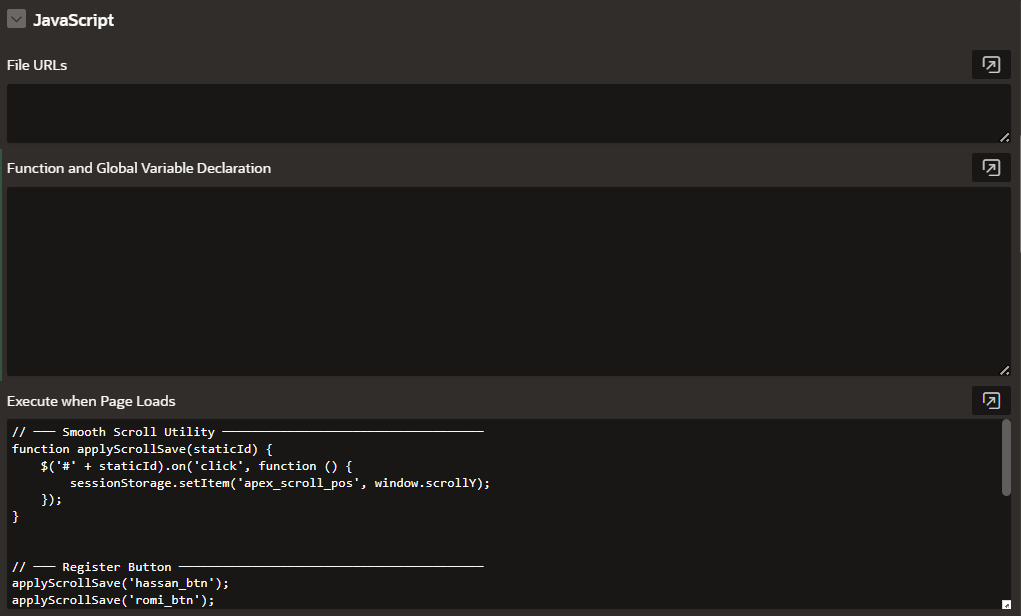
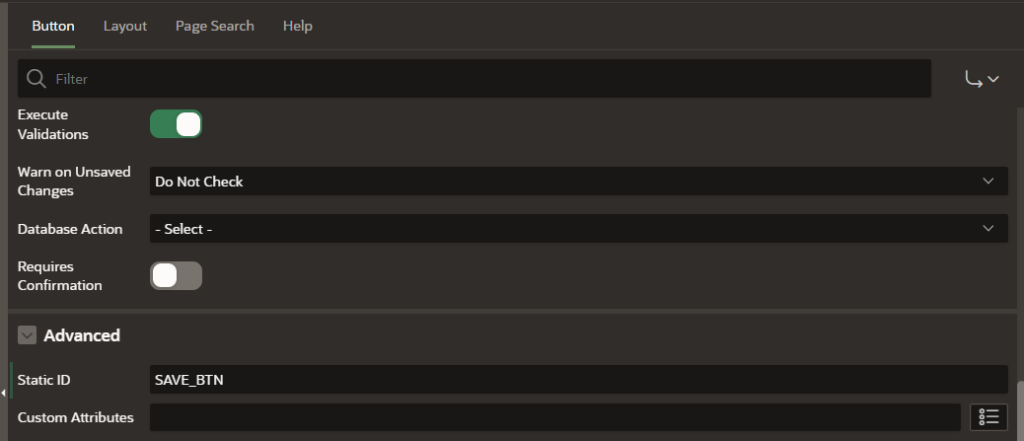
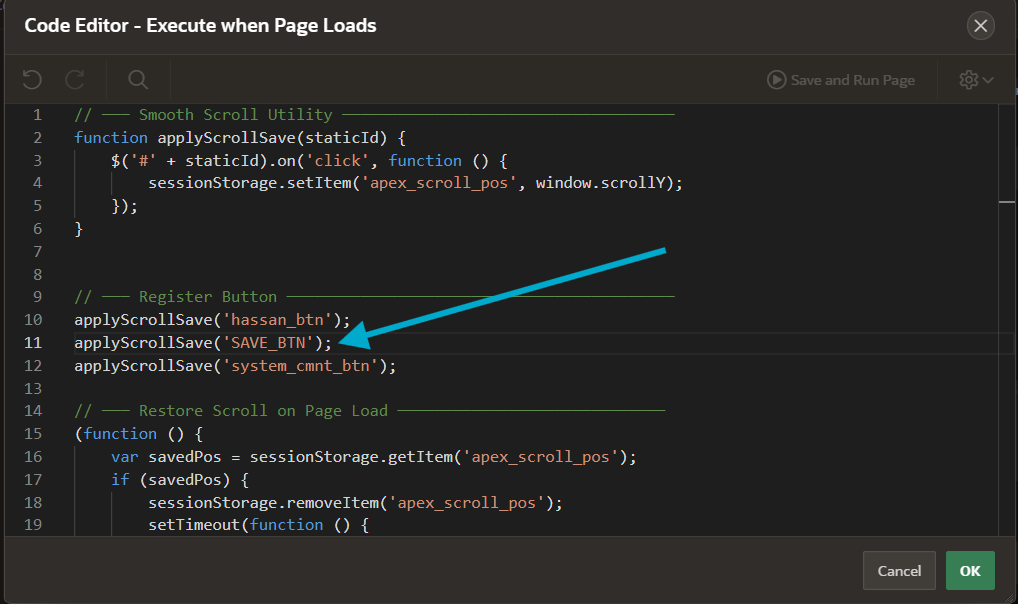
Original implementation screenshots
These screenshots document the earlier Page Load and button-click version. They are retained as historical context, not setup instructions for the revised application-wide file and request allowlist above.
Understanding sessionStorage vs localStorage
A common question I get: should I use sessionStorage or localStorage?
For this short-lived, per-tab convenience, sessionStorage is a useful fit. It can be unavailable because of browser policy, so every read and write is guarded.
sessionStorage is scoped to an origin and top-level browsing context and survives reloads. A newly opened tab can initially copy its opener’s storage, after which the two stores are separate. Closing the tab normally ends its page session. Namespacing and consume-once validation still matter; tab isolation alone does not distinguish applications or pages on the same origin.
LocalStorage, on the other hand, persists across browser sessions and tabs. For scroll position, that is overkill and can cause weird behavior. A user might close a tab, open it again a week later, and have the page scroll to an old position that no longer makes sense.
Choose persistence deliberately. Do not store credentials or business records in this convenience key. A failed network request can leave a pending entry, so the sample validates its age and consumes it on the next application page load; it cannot prove that a save committed.
Implementation references: Oracle APEX 24.2 environment values and submit events, MDN sessionStorage scope, MDN window.scrollTo.
Important Timing: Initial Layout Is Not Final Layout
A fixed 100ms or 150ms timer cannot guarantee that charts, images, fonts or refreshed regions have finished changing the page. The revised code waits for window load and two animation frames, which is a bounded initial-layout attempt. Late AJAX changes can still move the target afterward.
For a page that refreshes a known region after loading, coordinate restoration with that region’s documented apexafterrefresh event or an application-specific completion signal. Scope the handler to the actual region and restore at most once. A pixel offset does not preserve semantic position when content above it changes.
When You Do NOT Need Oracle APEX Smooth Scroll
This utility is for actual full-page reloads. Modal dialogs, region refreshes and AJAX-only actions have different lifecycle and scroll containers; do not apply the window-offset sample to them without a separate design. They often retain position naturally, but changes to layout or focus can still move the viewport.
Browser Support and Modern Standards
window.scrollTo with a behavior option is a browser API, independent of APEX 23.2. Check the browsers your application supports. The sample uses smooth behavior unless prefers-reduced-motion requests less animation, in which case it uses instant. There is no claimed compatibility test across every historical browser or APEX release.
Best Practices for Oracle APEX Smooth Scroll
Keep an explicit allowlist of same-page saves. Let validation messages and accessibility focus win. Test the actual scroll container, mobile layout and changed page heights. Do not equate a successful scroll with a successfully committed transaction. Use the ordinary APEX success/error feedback for that.
Common Issues and Troubleshooting
Scroll Not Restoring at All
Check that the file loads once, the APEX page/request values match allowedByPage, and the action is a full-page submit. Storage denial, expired data, a different return page or visible validation errors deliberately prevent restoration.
Scroll Restores but Position Is Wrong
Confirm that the browser window is the scrolling element. If content changed above the previous offset, a larger timer will not restore the same field reliably. Use a page-specific element anchor or wait for the region that actually changes layout.
Works on First Submit, Not on Second
Check for duplicate script copies or competing scroll/focus handlers. The sample replaces its own namespaced submit handler and consumes saved state on every load. Verify the actual request each time rather than assuming all buttons submit identically.
Performance Impact
This adds small synchronous storage operations and one optional scroll animation, with no extra network call. No timing benchmark is claimed. Measure it in your actual form, especially if the page already has expensive rendering or focus behavior.
Next Steps: Enhancing the User Experience Further
Smooth scroll position is one piece of a larger UX puzzle. Here are other enhancements that work well alongside it:
If you are building enterprise APEX applications with a lot of user interaction, you might also be interested in error handling and logging. I wrote a detailed guide on a centralized error logging framework that works beautifully with interactive forms: A Centralized Error Logging Framework for Oracle APEX
For more APEX UI and UX patterns like this one, check out my complete collection of APEX UI tips and tricks on the blog.
Quick Reference Table
| Item | Value / Location |
|---|---|
| Where to Load Code | Static Application File, application-wide JavaScript File URLs |
| Allowlist | Page ID and actual same-page submit request values |
| Storage | Application/session key with page ID and timestamp; consumed once |
| Timing | Window load plus two animation frames; late layout changes need separate coordination |
| Scope | Window vertical position after full-page same-page submit |
| Validation | Skip when error indicators are present; verify selectors for your theme |
| Accessibility | Reduced-motion preference disables smooth animation |
| Verification | Documentation and local mock checks; APEX runtime checks still required |
| Extra server calls | None; the form's ordinary submit remains |
Wrapping Up
Remembering position can make repetitive work less frustrating when the return page has a stable layout. The revised sample narrows that behavior to configured saves, avoids a shared cross-page storage key and gives validation feedback priority. Test it against your own form’s navigation and accessibility behavior before adopting it.
What kind of APEX page are you planning to add smooth scroll to? Drop it in the comments. I read every single one and I would love to hear about your use case.
Hassan Raza
Oracle ACE Apprentice | S&H Software Solution, Pakistan