
 By
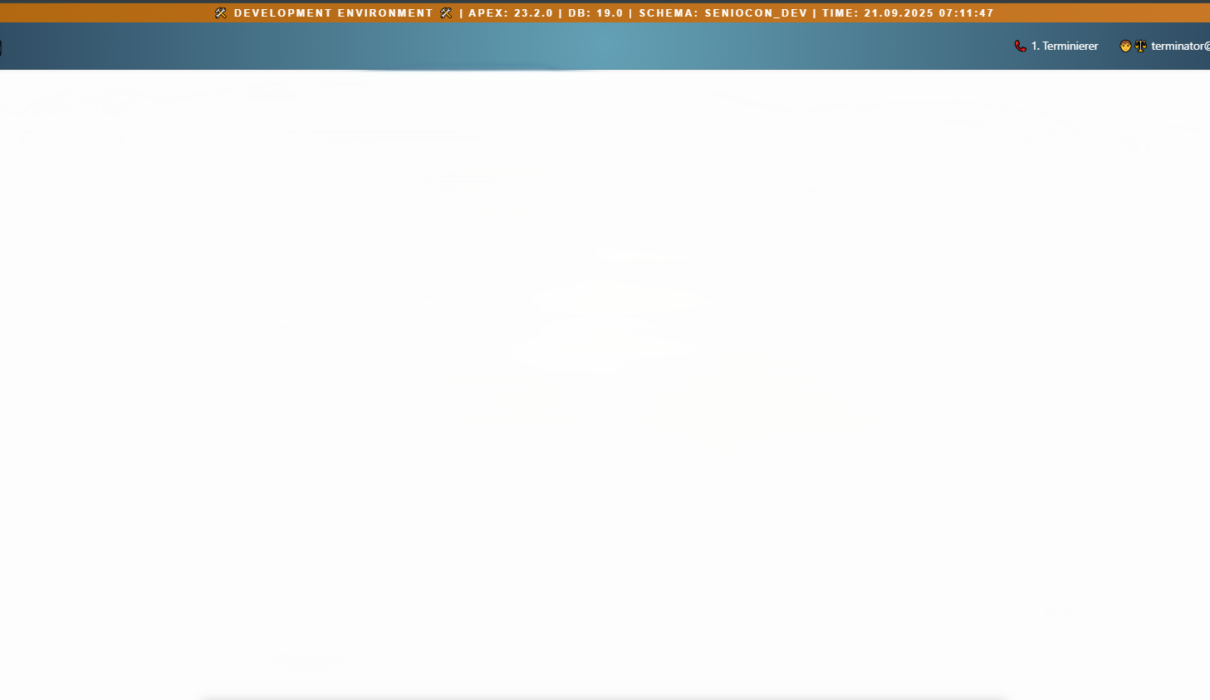
By Working in Oracle APEX across multiple environments DEV, TEST, and PROD is risky business if you don’t have clear visual indicators. All it takes is one slip-up to run tests in production or drop data where you shouldn’t. In this guide, I’ll walk you through building an advanced, styled, and environment-aware banner in Oracle APEX.
The concept is simple: you display a dynamic banner at the top of every page that tells you exactly where you are. But the execution? That’s where we take it to the next level.
1. Why Use an Oracle APEX Environment Banner?
For a team working across environments, a banner is a visual reminder. It does not prevent destructive SQL, enforce access control or prove which database a connection uses. Those protections still belong in privileges, deployment controls and review.
- Immediate Context: Know if you’re in DEV, TEST, or PROD at a glance.
- Prevent Costly Errors: Avoid running destructive processes in the wrong place.
- Show Live Data: Include real-time schema name, DB version, and APEX version.
This feature becomes especially important in high-pressure deployment or testing scenarios, where a small mistake can lead to huge setbacks.
2. Global Placement via Page 0
A Global Page (commonly page 0) contributes components to pages using the relevant user interface. Login pages are not categorically exempt. Rendering also depends on the page template, display points, component conditions and authorization. Start with one Global Page region and check whether it appears on both ordinary and login pages before adding another copy.
Steps:
- Navigate to Page 0 in your APEX app.
- Add a new Blank with Attributes region.
- Select an available display point in your actual page template; the position names are template-dependent.
- Change Region Type to Dynamic Content.
- Select PL/SQL Function returning CLOB.
3. Build the Banner Using PL/SQL
The revised example targets the Dynamic Content region source type PL/SQL Function Body returning CLOB in APEX 24.2. Paste the anonymous function body below, without a SQL*Plus slash. Set the environment explicitly for this deployment. The safe default shows UNCONFIGURED, and version/schema details are off. No database compilation or APEX render test was performed for this correction.
DECLARE
    -- Set explicitly for THIS deployment: DEV, TEST or PROD.
    -- An unconfigured deployment must never be silently labelled DEV.
    c_environment  CONSTANT VARCHAR2(20) := 'UNCONFIGURED';
    -- Keep FALSE on public/login pages. Enable only in a region protected
    -- by your application's developer/administrator authorization scheme.
    c_show_details CONSTANT BOOLEAN := FALSE;
    l_environment VARCHAR2(20) := UPPER(TRIM(c_environment));
    l_color       VARCHAR2(7);
    l_details     VARCHAR2(1000);
    l_apex_ver    VARCHAR2(100);
BEGIN
    CASE l_environment
        WHEN 'DEV'  THEN l_color := '#23613B';
        WHEN 'TEST' THEN l_color := '#765600';
        WHEN 'PROD' THEN l_color := '#A61B1B';
        ELSE
            l_environment := 'UNCONFIGURED';
            l_color := '#444444';
    END CASE;

    IF c_show_details AND apex_authentication.is_authenticated THEN
        SELECT version_no INTO l_apex_ver FROM apex_release;
        l_details := ' | APEX: ' || l_apex_ver
            || ' | DB major: ' || DBMS_DB_VERSION.VERSION
            || '.' || DBMS_DB_VERSION.RELEASE
            || ' | Current schema: ' || SYS_CONTEXT('USERENV', 'CURRENT_SCHEMA')
            || ' | Database time: ' || TO_CHAR(SYSDATE, 'YYYY-MM-DD HH24:MI:SS');
    END IF;

    RETURN TO_CLOB('<div class="env-banner" style="background-color:')
        || l_color
        || ';color:#fff;text-align:center;padding:6px;font-weight:600;">'
        || apex_escape.html(l_environment || ' ENVIRONMENT' || l_details)
        || '</div>';
END;
Set c_environment to DEV, TEST or PROD in a deployment-specific source step, or replace the constant with your existing trusted configuration lookup. Do not infer it from a schema substring. With details disabled, the result exposes only the chosen label. If you enable details for an internal page, protect the region with your application’s developer/administrator authorization scheme; being authenticated alone does not make a user an administrator. DBMS_DB_VERSION reports the major release, not the installed patch level, and SYSDATE is the database server time without a displayed time-zone offset. Every dynamic text value is HTML-escaped.
Implementation references: Oracle Global Page behavior, Oracle IS_AUTHENTICATED, Oracle SYS_CONTEXT attributes.
4. Apply the Banner to the Login Page
Inspect your actual login page number and template. If the Global Page region is already visible, do not duplicate it. If it is not, place a separate Dynamic Content region in an available login-template display point and reuse the label-only version with c_show_details = FALSE. Never expose schema/version diagnostics on a public login page.
5. Optional DEV/TEST Visibility
For a label-only banner, keeping an explicit PROD label visible can itself be useful. If your policy hides it in production, use a region server-side condition tied to a trusted deployment setting. The old CURRENT_SCHEMA LIKE ‘%dev%’ check was only a naming heuristic: it missed TEST and could mislabel or expose an unrelated schema.
For a small app that uses different parsing schemas, an exact allowlist can be a temporary region condition. Replace these example names with reviewed values, and use the same deployment mapping as the renderer; otherwise the label and visibility can disagree.
RETURN SYS_CONTEXT('USERENV', 'CURRENT_SCHEMA') IN ('APP_DEV', 'APP_TEST');This condition is presentation logic, not authorization for business operations. Recheck it after an application import. For one parsing schema reused across deployments, use explicit deployment configuration instead.
6. Customizing for Test and Prod
You can take it even further:
- Use color coding: Green for DEV, Yellow for TEST, Red for PROD.
- Store environment settings in a configuration table (ENV_TYPE, APEX_BUILD_ID, etc.)
- Fetch that info dynamically in your PL/SQL and switch banners based on conditions.
This makes your banner adaptive and fully centralized.
7. Key Benefits Recap
- Safety Reminder: Help developers notice the selected environment; permissions and deployment controls remain essential.
- Instant Debugging Context: Know exactly where and what you’re running.
- Team Confidence: Makes staging and QA more transparent.
- Modern UI Touch: Gives a polished, branded feel.
8. Final Tips
- Maintain one explicit deployment configuration. If you use schema mapping, match reviewed names exactly and account for schema reuse across environments.
- Keep your PL/SQL banner code in a shared package for reusability.
- Pair with build options or APEX global variables for cleaner control.
- Test visibility across multiple roles and logins.
Before deploying, verify DEV, TEST, PROD and UNCONFIGURED labels; anonymous login and authenticated pages; any role-gated diagnostics; template display points; and a fresh import into another environment. The example is documentation-reviewed, not a claim of a completed runtime test. See Oracle’s Global Page guide and IS_AUTHENTICATED API documentation for the relevant behavior.
Need a version with German/English switch? Want to include versioning info from Git or Jenkins? Let me know in the comments and I’ll extend it.
Stay sharp and keep your schemas separated.
Hassan Raza
Oracle ACE Apprentice, Pakistan

1 Comment
Comments are closed.