 By
By Calendar correction, 14 October 2026: The original visual design and APEX 23.2 context are preserved. This revision replaces unverified country dates, a fixed 30-day assumption, and the definitive day-27 label. The revised date logic passed local DOM-mock checks in UTC, Asia/Karachi, Europe/Berlin, and America/Los_Angeles. APEX Dynamic Action wiring and visual layout have not received an end-to-end APEX test. Dates must come from the calendar your community follows.
Every Ramadan I look at the apps and portals we build and think – why does everything feel so… corporate? Dark sidebar, data table, pagination, done. For a month that means so much to so many people, the least we can do is build something that actually feels like it.
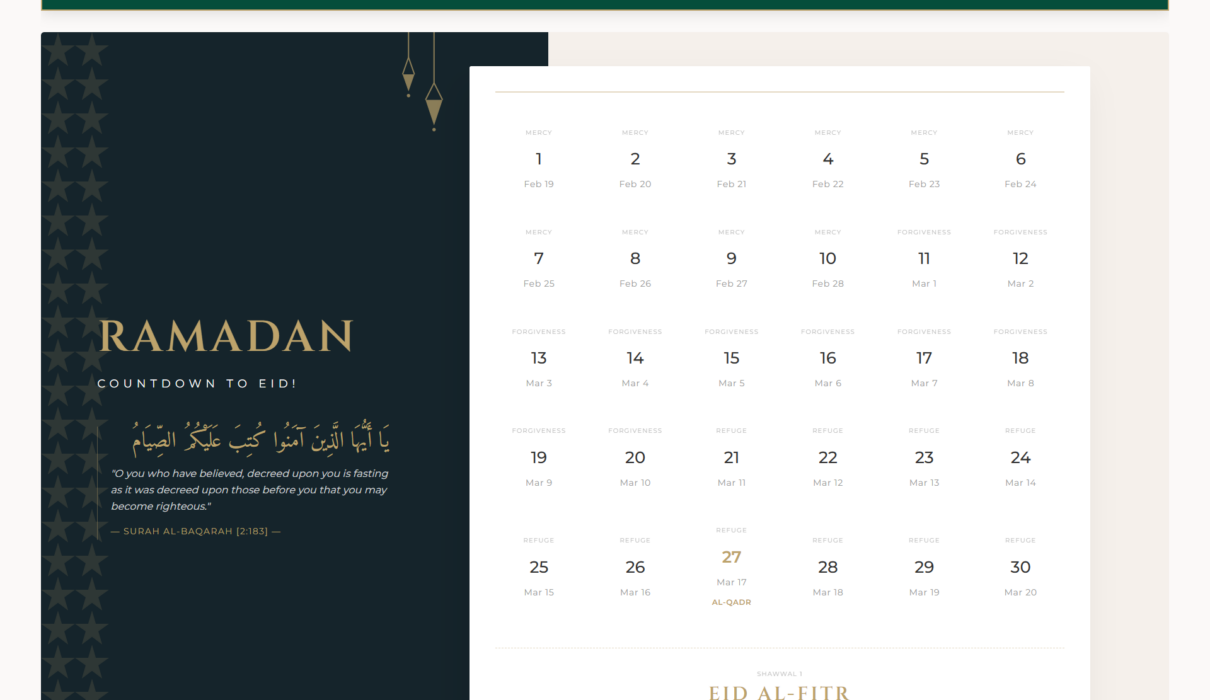
This year I decided to do something about it. I built a full interactive Ramadan Calendar directly inside Oracle APEX. No external plugins, no iframes, no third-party libraries. Just clean HTML, CSS Grid, JavaScript date logic, and a little bit of APEX dynamic actions.
It also supports different local calendars. Choose the first fasting date from the calendar your community follows, then choose its 29- or 30-day month length. The grid recalculates from those inputs. A country name alone does not determine the dates.
Let me show you how I built it.
What We’re Building
The calendar has two parts:
- A premium dark sidebar with the title, an Arabic Quranic verse, and the reference – gives the whole thing a meaningful, elegant feel
- An interactive calendar grid that generates 29 or 30 dated cells from your selected local calendar and shows a clearly labeled, calendar-based Eid entry
The calendar selectors sit in a collapsible region styled in emerald and gold. Choose a local calendar and its month length to update the grid without a page reload. Changing the local calendar clears the month-length choice so it can be checked again.
Built on Oracle APEX 23.2. Let’s get into it.
Step 1: The Setup
Set up two page items and a collapsible region before adding the CSS and JavaScript.
Page Item: P1_LOCATION
Create a single-value Select List page item called P1_LOCATION. Keep this item name so the existing page and JavaScript stay aligned. Label it Local calendar.
For each List of Values entry:
- Display value: the community or location, year, and calendar source.
- Return value: that source’s first fasting date, in YYYY-MM-DD format.
Use the Gregorian daytime date of the first fast. Do not use the preceding evening when Ramadan begins. Populate real values only after checking the calendar or authority followed by the relevant community. Do not carry an old year’s dates forward or relabel a demonstration date as an actual observance date.
Enable a null choice with the label Select a local calendar, a blank return value, and no automatic default. Keep the source link and applicable year in the item’s Help Text or adjacent region text. Update those details when the calendar is updated.
Page Item: P1_RAMADAN_DAYS
Add a second single-value Select List in the same region. Label it Days in selected calendar. Set these display/return pairs:
- 29 days → 29
- 30 days → 30
Enable a null choice labeled Select 29 or 30 days, with a blank return value and no default. Select a length only when the calendar or announcement your community follows establishes it. Otherwise leave it blank; the example deliberately waits rather than producing an unsupported Eid date. A country selection does not supply a month length.
This example displays Gregorian dates for fasting days. It does not calculate moon visibility, prayer times, or the start time of a religious night.
Collapsible Region
Create a region with:
- Template: Collapsible
- Static ID: ramadan_selector_reg
The Static ID is critical – our CSS targets it directly to override the default APEX theme styling.
Step 2: The Styling
This is where we break out of the standard APEX Universal Theme look. Paste this in the Page’s Inline CSS section.
The color palette is intentional – deep emerald (#064e3b) and muted gold (#bda36b). It reads “premium” without being flashy.
/* Premium Emerald & Gold Collapsible Bar */
#ramadan_selector_reg {
  background-color: #064e3b !important;
  border: 1.5px solid #bda36b !important;
  border-radius: 8px;
}

#ramadan_selector_reg .t-Region-header {
  background-color: #064e3b !important;
}

#ramadan_selector_reg .t-Region-headerTitle,
#ramadan_selector_reg .t-Icon {
  color: #bda36b !important;
  font-family: 'Montserrat', sans-serif;
}

/* The Overlapping Dashboard UI */
.rp-container {
  display: flex;
  background: #fff;
  min-height: 600px;
  border-radius: 4px;
  overflow: hidden;
}

.rp-sidebar {
  width: 40%;
  background: #15242b;
  color: #fff;
  padding: 60px 40px;
  position: relative;
}

.rp-main-title {
  font-family: 'Cinzel', serif;
  font-size: 3.5rem;
  color: #bda36b;
  letter-spacing: 10px;
}

.rp-ayat-section {
  border-left: 2px solid #bda36b;
  padding-left: 20px;
  margin-top: 30px;
}

.rp-arabic {
  font-family: 'Amiri', serif;
  font-size: 1.8rem;
  color: #bda36b;
}

.rp-calendar-main {
  width: 60%;
  padding: 40px;
  background: #fdfdfd;
}

.rp-grid {
  display: grid;
  grid-template-columns: repeat(6, 1fr);
  gap: 30px 15px;
  width: 100%;
}

.qadr-mark {
  color: #bda36b !important;
  font-weight: 700 !important;
}
Append this scoped CSS after the original block. It includes padding within the 40%/60% columns, lets long date labels wrap, and stacks the layout on narrow screens. These are CSS-level improvements; the revised layout still needs visual verification in your APEX theme.
/* Scoped sizing and narrow-screen additions; append after the original CSS. */
.rp-container,
.rp-container * {
  box-sizing: border-box;
}

.rp-container > .rp-sidebar,
.rp-container > .rp-calendar-main,
.rp-container .rp-day-cell {
  min-width: 0;
}

.rp-container .rp-grid {
  grid-template-columns: repeat(6, minmax(0, 1fr));
}

.rp-container .rp-day-label,
.rp-container .rp-date-label {
  display: block;
  overflow-wrap: anywhere;
}

.rp-container .rp-main-title {
  font-size: clamp(1.6rem, 3vw, 3.5rem);
  letter-spacing: clamp(2px, 0.5vw, 10px);
  overflow-wrap: anywhere;
}

@media (max-width: 900px) {
  .rp-container {
    flex-direction: column;
    min-height: 0;
  }

  .rp-container > .rp-sidebar,
  .rp-container > .rp-calendar-main {
    width: 100%;
    padding: 28px 24px;
  }

  .rp-container .rp-grid {
    grid-template-columns: repeat(3, minmax(0, 1fr));
    gap: 24px 12px;
  }
}

@media (max-width: 480px) {
  .rp-container > .rp-sidebar,
  .rp-container > .rp-calendar-main {
    padding: 24px 16px;
  }

  .rp-container .rp-grid {
    grid-template-columns: repeat(2, minmax(0, 1fr));
  }
}
A few things worth calling out here:
- The !important flags on the collapsible region are necessary – APEX’s Universal Theme is stubborn with its own styles. You have to override it explicitly.
- display: flex on .rp-container is what gives us that clean sidebar-plus-content layout. The sidebar gets 40%, the calendar gets 60%.
- The desktop grid keeps six equal columns. A 29-day selection plus its Eid entry uses 30 cells; a 30-day selection plus Eid uses 31 cells. The appended CSS uses three columns at viewport widths up to 900px and two at up to 480px, with minimum track widths that allow the content to wrap.
- Cinzel and Amiri fonts – Cinzel gives the title that engraved, historical look. Amiri is specifically designed for Arabic calligraphy. Both are available from Google Fonts – just add the import in your page’s CSS or load them in the app’s User Interface attributes.
Step 3: The HTML Structure
Create a Static Content region and drop this into its Source. This is the shell – the JavaScript will fill in the actual calendar days.
<div class="rp-container">
    <div class="rp-sidebar">
        <div class="rp-content">
            <h1 class="rp-main-title">RAMADAN</h1>
            <div class="rp-ayat-section">
                <p class="rp-arabic">
                    شَهْرُ رَمَضَانَ الَّذِي أُنزِلَ فِيهِ الْقُرْآنُ
                </p>
                <p class="rp-english">
                    "The month of Ramadan is that in which was revealed the Qur'an..."
                </p>
                <span class="rp-ref">Surah Al-Baqarah 2:185</span>
            </div>
        </div>
    </div>
    <div class="rp-calendar-main">
        <div id="calendar-grid" class="rp-grid"></div>
    </div>
</div>
Notice the calendar-grid div is empty at this point. JavaScript fills it using the selected first fasting date and month length. The sidebar verse and reference stay the same.
Step 4: The JavaScript Logic
Replace the existing calendar-rendering Dynamic Action with the following two actions. Keep the HTML from Step 3 and the CSS from Step 2.
Dynamic Action 1: Reset month length
- Event: Change
- Selection Type: Item(s)
- Item: P1_LOCATION
- Sequence: 10, before the rendering Dynamic Action
- True action: Execute JavaScript Code
- Fire on Initialization: No
apex.item("P1_RAMADAN_DAYS").setValue("", null, true);The final true suppresses another change event. The rendering Dynamic Action below handles the original P1_LOCATION change next.
Dynamic Action 2: Render calendar
- Event: Change
- Selection Type: Item(s)
- Items: P1_LOCATION, P1_RAMADAN_DAYS
- Sequence: 20, after Reset month length
- True action: Execute JavaScript Code
- Fire on Initialization: Yes, on this true action
Paste this complete block into the rendering true action:
(function () {
    "use strict";

    const grid = document.getElementById("calendar-grid");
    if (!grid) {
        return;
    }
    grid.textContent = "";

    function showNote(message) {
        const note = document.createElement("p");
        note.style.gridColumn = "1 / -1";
        note.setAttribute("role", "status");
        note.textContent = message;
        grid.appendChild(note);
    }

    // Interpret YYYY-MM-DD as a local calendar date, never as a UTC string.
    function parseLocalDate(value) {
        if (typeof value !== "string") {
            return null;
        }
        const match = /^(\d{4})-(\d{2})-(\d{2})$/.exec(value.trim());
        if (!match) {
            return null;
        }
        const year = Number(match[1]);
        const month = Number(match[2]);
        const day = Number(match[3]);
        if (year < 1000 || month < 1 || month > 12 || day < 1 || day > 31) {
            return null;
        }

        // Noon avoids common midnight daylight-saving transitions.
        const date = new Date(year, month - 1, day, 12, 0, 0, 0);
        // Date normalizes impossible dates; reject those rather than accepting them.
        if (Number.isNaN(date.getTime()) ||
            date.getFullYear() !== year ||
            date.getMonth() !== month - 1 ||
            date.getDate() !== day) {
            return null;
        }
        return date;
    }

    function addCalendarDays(date, amount) {
        const result = new Date(date.getTime());
        result.setDate(result.getDate() + amount);
        return result;
    }

    const startDate = parseLocalDate(apex.item("P1_LOCATION").getValue());
    const daysValue = apex.item("P1_RAMADAN_DAYS").getValue();
    if (!startDate) {
        showNote("Choose a calendar with a valid first fasting date in YYYY-MM-DD format.");
        return;
    }
    if (daysValue !== "29" && daysValue !== "30") {
        showNote("Choose 29 or 30 days from the calendar followed by your community. Leave this blank if the month length is not yet established.");
        return;
    }
    const daysInRamadan = Number(daysValue);
    const formatter = new Intl.DateTimeFormat("en-US", {
        year: "numeric",
        month: "short",
        day: "numeric"
    });

    function addCell(label, date, highlight) {
        const cell = document.createElement("div");
        cell.className = "rp-day-cell";
        const dayLabel = document.createElement("span");
        dayLabel.className = "rp-day-label" + (highlight ? " qadr-mark" : "");
        dayLabel.textContent = label;
        const dateLabel = document.createElement("span");
        dateLabel.className = "rp-date-label";
        dateLabel.textContent = formatter.format(date);
        cell.appendChild(dayLabel);
        cell.appendChild(dateLabel);
        grid.appendChild(cell);
    }

    for (let day = 1; day <= daysInRamadan; day += 1) {
        addCell(String(day), addCalendarDays(startDate, day - 1), false);
    }

    addCell("Eid (configured)", addCalendarDays(startDate, daysInRamadan), true);
    showNote("Dates follow the start date and month length you selected. The Eid entry is calculated from those inputs; check your community's calendar or announcement before relying on it.");
}());
How the revised code works
apex.item().getValue() reads each item’s current browser value. These are single-value Select Lists, so their configured return values are strings. Oracle documents this in the APEX 23.2 item API: Oracle APEX 23.2 item API
The parser splits YYYY-MM-DD into numeric year, month, and day components, constructs a local Date at noon, and checks that JavaScript did not normalize an impossible date such as February 30. This example accepts four-digit years from 1000 to 9999. MDN explains that new Date(“YYYY-MM-DD”) interprets a date-only string as UTC, while the numeric-component constructor uses local time. Using the string constructor and then local date methods can therefore move a displayed date backward in browsers west of UTC. References: MDN: date-time string formats and MDN: local date components. The normative parsing rule is in ECMAScript: ECMAScript Date.parse.
setDate() advances calendar days rather than adding fixed 24-hour durations. Noon avoids common midnight daylight-saving transitions. This is a Gregorian date-display technique, not a location-aware prayer-time or historical-calendar engine.
The loop uses the explicitly selected 29 or 30 days. Every numbered cell keeps its Gregorian date, including day 27. The gold qadr-mark CSS class is retained only to preserve the existing Eid accent; its class name does not determine a religious date.
The Eid entry is the day after the selected month length and is labeled Eid (configured). Its accuracy depends on the source data. If your community has not established the month length, leave that item blank. The U.S. Naval Observatory explains the difference between calculated calendars and observed crescent visibility: U.S. Naval Observatory calendar guidance.
All generated labels use textContent. The example does not insert page-item values as HTML.
Local verification, 14 October 2026: 180 checks passed in Node.js 24.19.0 using mock DOM elements and mock APEX item APIs across four time zones. The fixtures cover both month lengths, invalid inputs, leap-day and year boundaries, daylight-saving transitions, repeated rendering, and the reset snippet when called in the intended order. These checks do not verify actual APEX event scheduling, theme rendering, or religious observance dates.
Checks to run in your APEX page before using the revision
These are suggested checks, not a claim that the revised code has been tested in APEX:
- Open the page with both inputs blank. It should request a valid local calendar instead of showing dates.
- Use test-only start date 2026-01-01 and choose 29. Expect numbered cells 1–29 and a configured Eid entry for January 30, 2026. Choose 30 instead and expect numbered cells 1–30 plus January 31, 2026. These are arithmetic fixtures, not Ramadan observance dates.
- Change P1_LOCATION after selecting a month length. It should clear P1_RAMADAN_DAYS and wait for the new choice.
- Try an impossible date such as 2026-02-30 and a month length other than 29 or 30. Expect a validation message and no dated grid.
- Test a valid leap-day fixture such as 2028-02-29, a month boundary, and a year boundary.
- Repeat with browser time zones Asia/Karachi, Europe/Berlin, and America/Los_Angeles. The first numbered cell must keep the selected Gregorian date. Include a daylight-saving transition fixture in a zone that observes it.
- Confirm that day 27 still shows its Gregorian date and that no cell claims a definitive Laylat al-Qadr date.
- Check the 29/30 layouts and longer year-inclusive labels on desktop and mobile. The appended responsive CSS still needs visual review in the target APEX theme.
Why the Location Toggle Matters
The selector is useful when users follow different local calendars. Give each option a clear community, year, and source label, rather than treating the country name as a permanent calendar rule.
The application displays the dates supplied to it. Whoever maintains the calendar data should check the chosen source each year, record any updates, and confirm the month length before presenting the Eid entry as dependable. This also makes the example easier to reuse without carrying old dates into a new year.
Breaking Out of the Standard APEX Look
One of the most common things I hear from developers is “APEX apps all look the same.” And honestly? That’s a choice, not a limitation.
Universal Theme is a fantastic foundation but it’s just that – a foundation. The moment you start treating APEX regions as containers for your own HTML and CSS, the whole thing opens up. What we built here doesn’t look like a typical APEX report because it isn’t one. It’s a custom HTML layout that happens to live inside APEX.
The key techniques that made this possible:
- Static Content regions as raw HTML containers – drop any HTML you want, style it yourself
- Inline CSS for page-specific overrides – don’t be afraid of !important when fighting theme defaults
- Dynamic Actions with JavaScript – you have full access to the DOM. Use it
- Google Fonts in APEX – load Cinzel, Amiri, Montserrat via the app’s User Interface > CSS > File URLs. Typography transforms how a UI feels completely
Final Thoughts
This project took maybe 1 hour total. The result is something that actually looks and feels special – not like a database form wrapped in a theme.
Ramadan Mubarak to everyone observing. I hope this inspires you to build something meaningful this month – not just functional, but thoughtful.
If you want to extend this further, some ideas:
- Add Sehri and Iftar times per location (pull from a reference table or API)
- Let users mark personal goals for each day of Ramadan
- Add more local calendars, each labeled with its community, year, source, and verified first fasting date
- Style the Eid cell differently – bigger, gold border, celebration icon
As always, feel free to reach out if you get stuck or want to share what you built. I am always happy to talk about APEX.
Hassan Raza
Oracle ACE Apprentice, Pakistan